Disclosure: Shhots AI is our product.
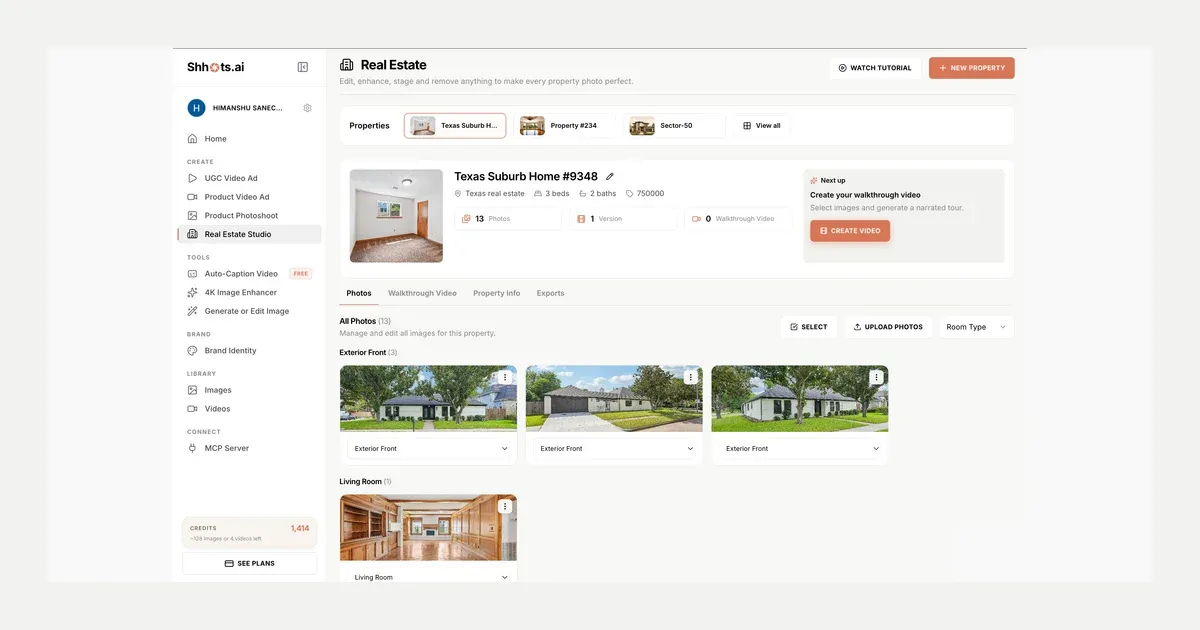
Real Estate Studio is live on Shhots AI. Upload a listing shoot, pick a preset, and get corrected, virtually staged, or decluttered photos back in minutes, then turn three or four of them into a narrated 15-second walkthrough video with an on-camera presenter. You never write a prompt at any step.
It is available today for every Pro and Scale subscriber at app.shhots.ai. If you are new to the workflow, start with the AI real estate photo editing page, or compare plans on pricing. The two biggest pieces now have pages of their own: AI virtual staging and the AI real estate video generator. Teams running this across many listings a month should look at bulk real estate photo editing, and the category overview lives at AI for real estate agents.
What launched
| What it is | A property media workspace: photo editing, virtual staging, object removal, and listing video |
| Who it is for | Real estate agents, brokerages, property brokers, interior designers, short-term rental hosts |
| How you drive it | Named presets, not prompts, plus an optional one-line comment per generation |
| Photo actions | Correction (9 presets), Staging (3 modes × 8 styles), Removal (4 presets) |
| Video output | 15-second narrated walkthrough, 16:9, on-camera presenter, from 3-4 photos |
| Plans | Pro ($49/mo, 6,000 credits) and Scale ($99/mo, 12,000 credits) |
| Cost per image | 55 credits, drawn from your normal monthly credit pool |
The problem it replaces
Listing photos decide whether a buyer clicks. Which is why the industry runs on outsourced post-production: ship raw shots to an editing service, wait 12 to 48 hours, pay per photo, send revision notes, wait again. Virtual staging is a separate vendor on a separate bill, published 2026 pricing guides put manual virtual staging somewhere between $16 and $75 per photo, usually with a 24 to 72 hour turnaround. A listing video needs a videographer, a script, and an edit on top of that.
Real Estate Studio compresses all three into one workspace. Same shoot, same afternoon, one subscription.
Why promptless matters for real estate
Generic AI image tools ask you to describe what you want. That works for ad creative. It fails for listing photos, where two things matter more than creative range.
Structural accuracy. Ask a general-purpose model to “stage this living room in Scandinavian style” and it will happily move a window, widen a doorway, or invent a fireplace. That photo is now a misrepresentation of the property. Every Real Estate Studio preset is engineered to keep the geometry locked: walls, windows, doors, floors, ceilings, built-ins, and sightlines stay exactly where they are. The AI corrects, furnishes, or empties the space without redrawing it, so the buyer who tours the home sees the room they saw in the listing.
Repeatability. An agent editing 30 photos across four listings a week cannot afford to experiment with prompt phrasing. Presets produce consistent output across a whole shoot, same white-balance logic, same staging style, same sky. The tenth photo matches the first.
For anything specific, there is an optional comments field on every generation. Type a short note like “keep the warm tone” or “leave the view outside the window untouched” and the model factors it in. It is a nudge, never a requirement.
How Real Estate Studio works
1. Create a property
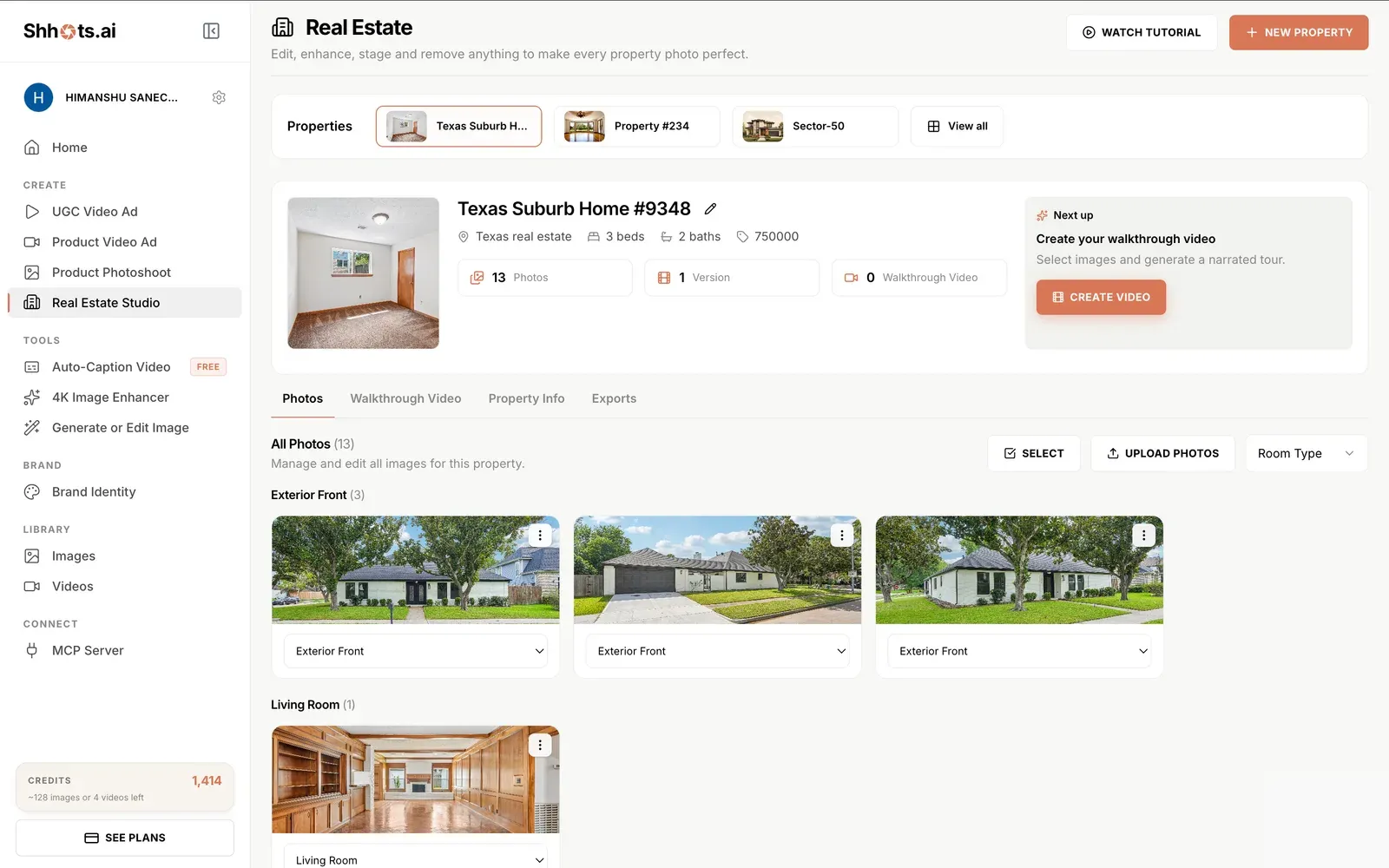
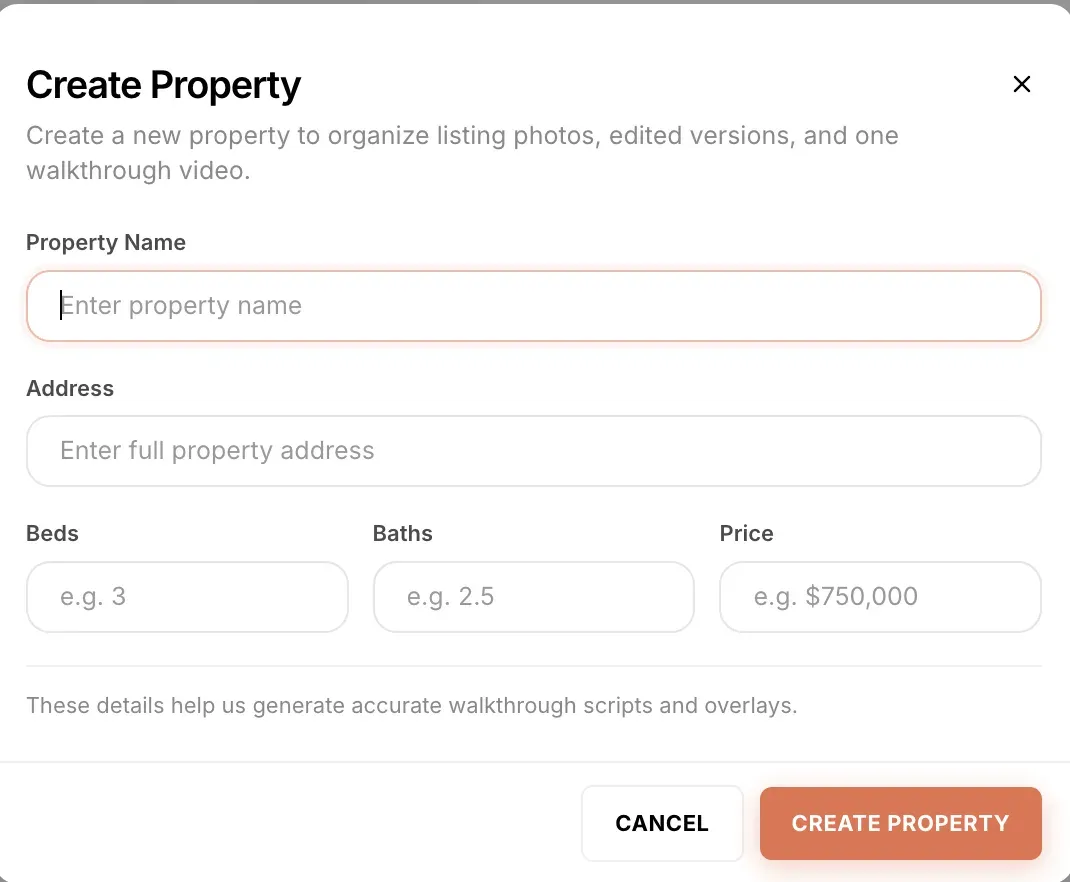
Each listing gets its own record: name, address, beds, baths, and price. Those details do double duty. They keep media organised per listing, and they feed the walkthrough video script, so the narration quotes the real specs without you typing them twice.
2. Upload the shoot and let it sort itself
Upload the full shoot at once. Shhots AI classifies every photo by room type, exterior front, living room, kitchen, dining, bedroom, bathroom, office and more. So a 40-photo shoot arranges itself into a grouped, browsable gallery. Any photo’s room type can be reassigned from a single dropdown.
3. Pick a photo, an action, and a preset
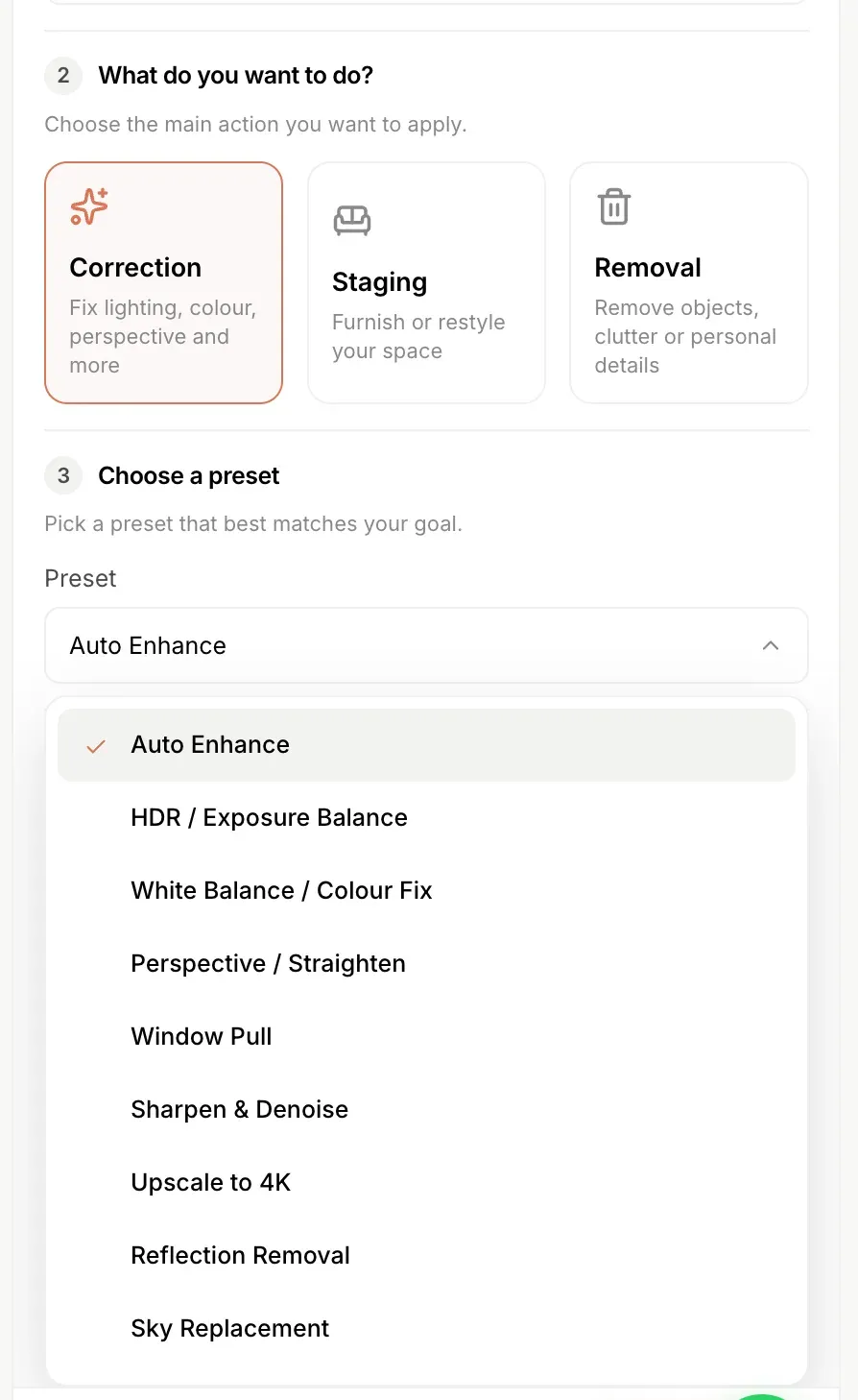
Select an image and choose Correction, Staging, or Removal. Each action opens a short preset list. Choose how many variations you want, add a comment if there is something specific to preserve, and generate. Every version is saved against the property, so originals and edits live side by side.
Correction: nine fixes you used to pay an editor for
- Auto Enhance, a balanced overall correction in one click. The default, and enough for most photos.
- HDR / Exposure Balance, recovers blown-out windows and dark corners in the same frame, from a single exposure.
- White Balance / Colour Fix, removes the colour cast that mixed indoor lighting always leaves behind.
- Perspective / Straighten, corrects converging verticals and tilted horizons from wide-angle interiors.
- Window Pull, replaces washed-out window glare with the actual outdoor view.
- Sharpen & Denoise, cleans up soft or grainy shots, including phone photos.
- Upscale to 4K, lifts low-resolution images to print and MLS quality. The same engine as the 4K image upscaler.
- Reflection Removal, clears mirror and glass reflections, photographer included.
- Sky Replacement, swaps a grey overcast sky for a clear one.
A batch of dull phone photos becomes a consistent, professional-looking set in minutes.
That comparison is the clearest way to see what “structure-preserving” means in practice. It is also why the Versions strip under the canvas matters: every edit is saved as a new version and never overwrites the original, so the untouched file stays one click away.
Staging: eight styles, three starting points
Full detail on modes, styles, room types, and disclosure is on the AI virtual staging page, and the ground-level explanation is in what is virtual staging.
Staging adapts to whatever state the room is actually in:
- Stage empty room, furnishes a vacant space from scratch.
- Restyle room, keeps the layout, replaces the furniture and decor with a new aesthetic.
- Occupied to Vacant, strips a furnished room, then stages it fresh.
Each preset offers eight styles: Modern, Scandinavian, Luxury, Coastal, Farmhouse, Minimalist, Boho, and Mid-century. Match the style to the buyer profile. A downtown condo gets Modern, a lakeside property gets Coastal, a family suburb gets Farmhouse. Because generation takes under a minute, you can run the same room in three styles and pick the one that sells the space best, instead of committing to one and waiting two days to find out.
Removal: clean listings without a cleanup crew
- Remove furniture (occupied to vacant), empties a lived-in room so buyers see the space, not the sofa.
- Object removal, takes out one specific thing: the bin, the pet bed, the cables.
- Declutter, clears countertops, shelves, and floors in a single pass.
- Privacy Blur, obscures family photos, documents, and personal details before the listing goes public.
Privacy Blur solves a real compliance and safety problem. Sellers’ family photos and personal paperwork routinely end up on public listing portals because nobody caught them in frame. One preset handles it across the whole shoot.
Walkthrough videos: a narrated tour from three or four photos
The full breakdown lives on the AI real estate video generator page, with the step by step in how to make a real estate video.
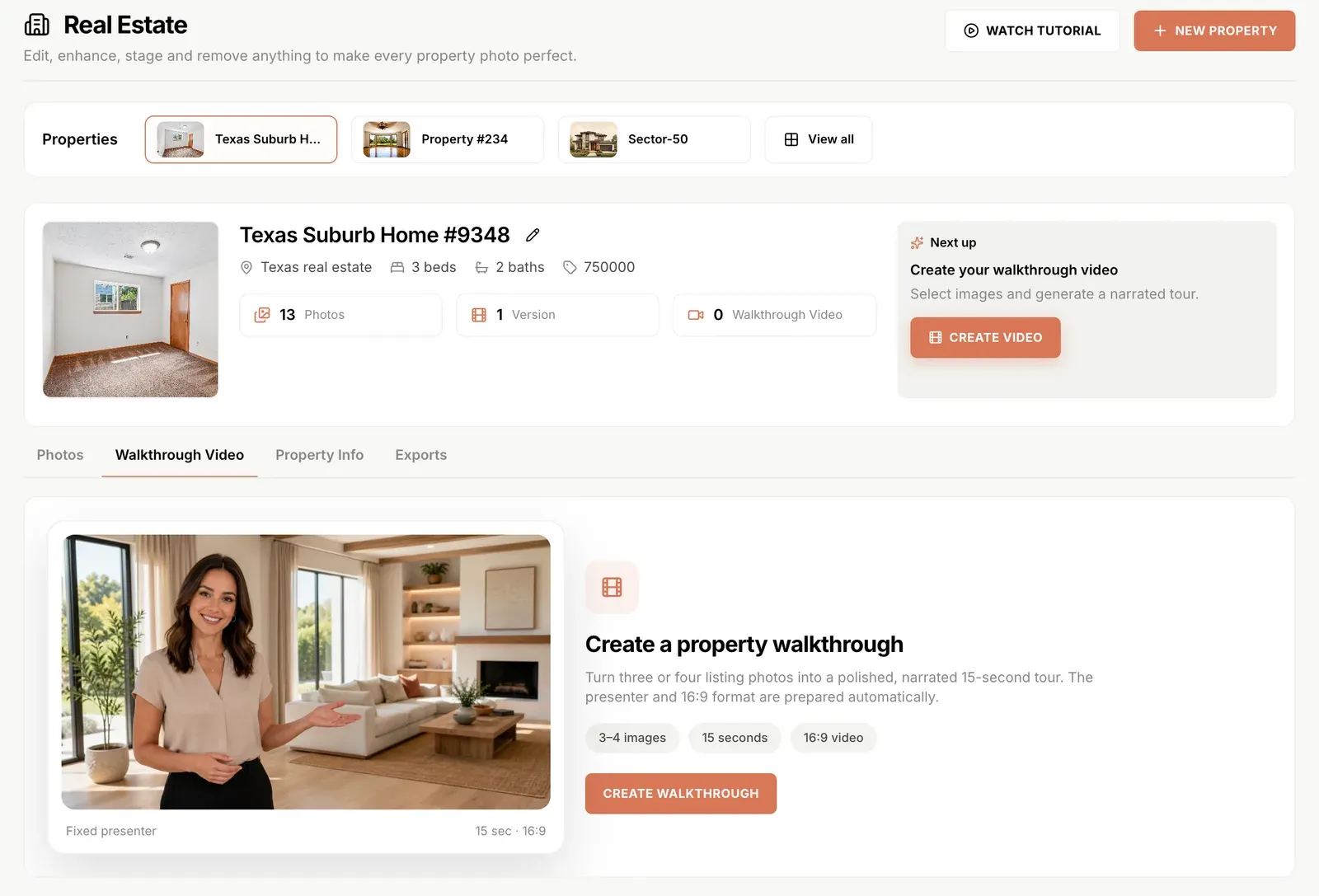
Once the photos are ready, the Walkthrough Video tab turns them into a 15-second narrated tour with an on-camera presenter, in 16:9.
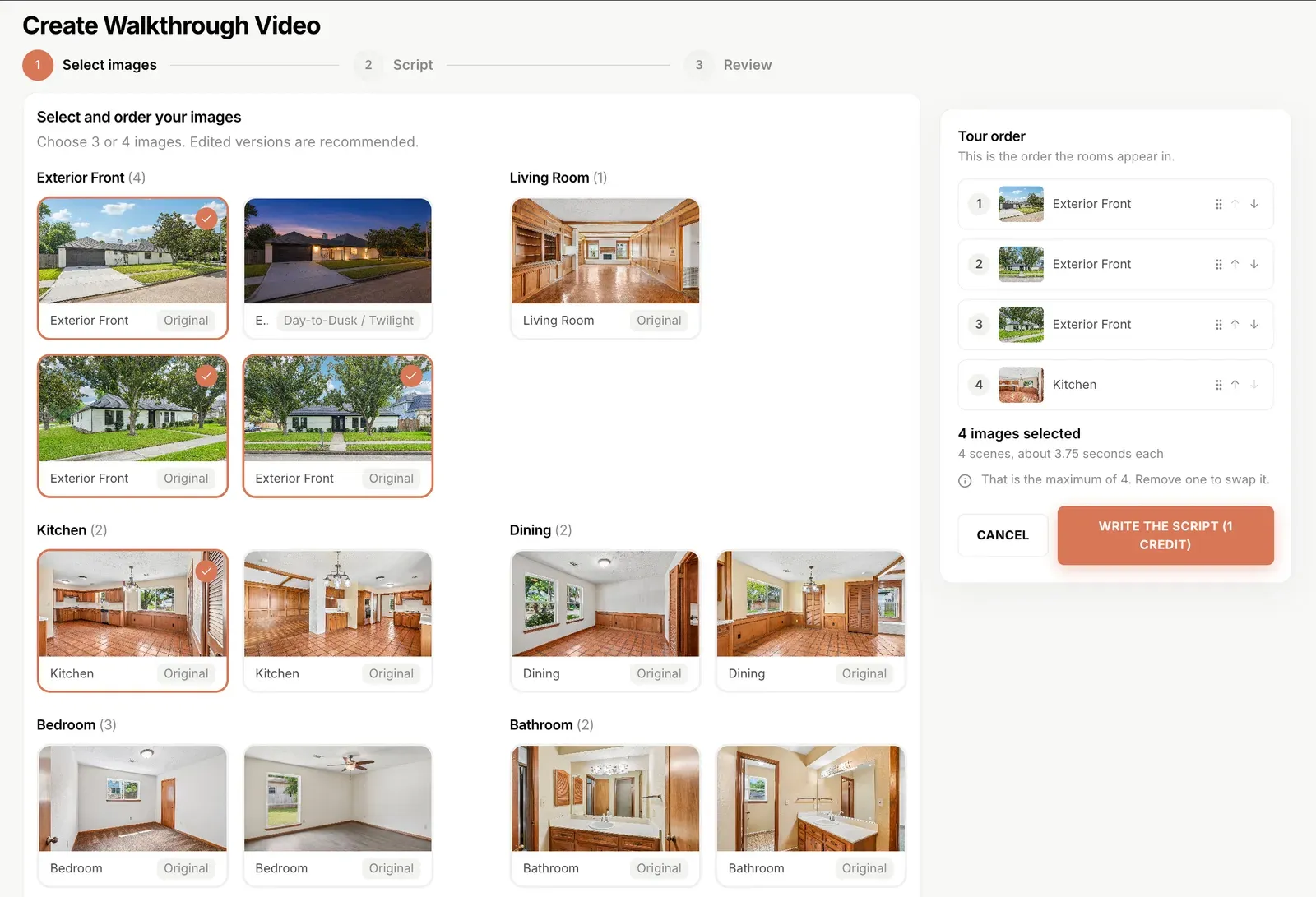
Step 1, select and order the images. Pick three or four photos from the property gallery; edited versions are recommended. The tour order panel is drag-and-drop, so you control which room opens the video and which one closes it.
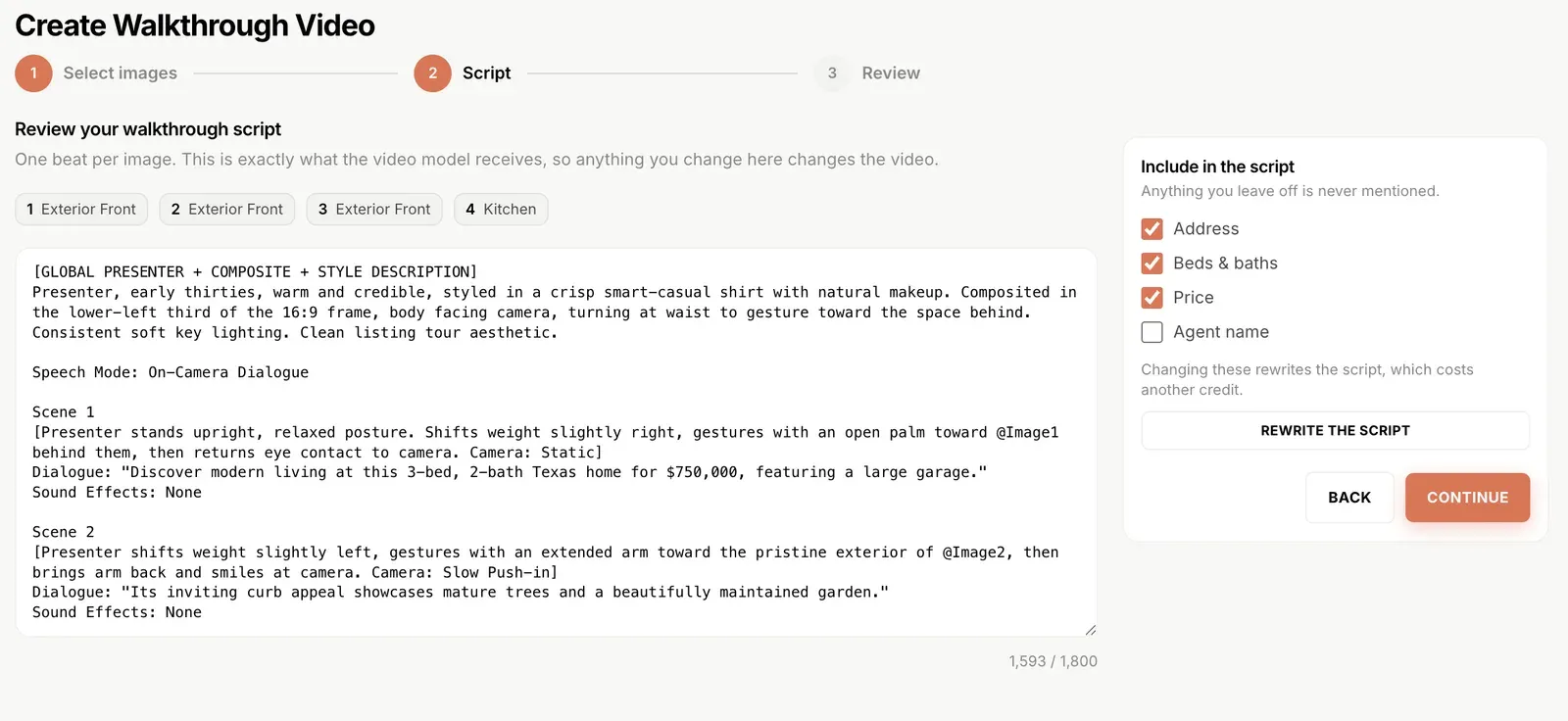
Step 2, review the script. The script writes itself from the property record for 1 credit. Address, beds and baths, price, and agent name are individual toggles, anything you switch off is never mentioned. The full script is editable up to 1,800 characters, including presenter direction, camera moves, and dialogue per scene. What you see in the editor is exactly what the video model receives.
Step 3, review and generate. Presenter, framing, and format are handled for you.
Fifteen seconds is a deliberate constraint. These are teasers. The format that performs on Instagram Reels, listing portal previews, WhatsApp shares to buyers, and email campaigns. A room-by-room deep tour buries the hook; a 15-second narrated overview with the address, specs, and price gets watched to the end. Generate as many as you like per property: one leading with the exterior, one leading with the kitchen, one price-forward cut for the brokerage page.
If you want the same listing in other formats, the rest of the studio is right there: image to video for a single-photo motion clip, the AI video generator for longer listing films, the image ad generator for open-house promos, and the free video caption generator for burned-in subtitles.
Who it is for
Real estate agents. The whole listing media pipeline in one place, correct the shoot, stage the empty rooms, remove the seller’s clutter, and produce the teaser video, all before lunch on listing day.
Brokerages and property teams. Every listing gets the same visual standard regardless of which agent or photographer shot it, and every version stays organised per property. No more digging through a shared drive for final_v3_edited.
Property brokers with high-volume inventory. Sector and society listings, builder floors, and resale flats usually arrive as raw phone photos. Auto Enhance plus Declutter turns an unusable shoot into a publishable one at a per-image cost far below any editing service.
Interior designers. Restyle a client’s actual room in eight aesthetics using photos of their real space. Because the structure never changes, the client sees a genuine preview of their own room, not an inspiration board.
Short-term rental hosts. Airbnb and booking-platform photos drive occupancy directly. Correct the lighting, declutter the counters, and blur anything personal before the listing goes live.
Homeowners reimagining a space. Photograph your own rooms and see them staged in styles you are considering before buying a single piece of furniture. Occupied to Vacant shows you the empty canvas; Restyle shows you eight possible futures.
Honest staging, by design
The complete rules picture, covering NAR Article 12, MLS photo policies, and state statutes, is in is virtual staging legal.
Virtually staged photos are marketing, and buyers are entitled to know what is real. This is not just etiquette. It is increasingly the rule.
NAR’s Code of Ethics requires REALTORS® to “present a true picture” in their advertising, and Standard of Practice 12-10 explicitly prohibits misleading images online. In California, AB 723 went into effect on 1 January 2026: any digitally altered image used to market a property needs a conspicuous disclosure on or near the image, plus a link, URL, or QR code to the original, unaltered version. Standard corrections like exposure and white balance are treated differently from alterations that change what is physically in the frame, adding grass, removing wires, staging furniture.
Real Estate Studio is built to sit on the right side of that line in two ways. Structure preservation means the room in the photo is the room in the tour: same dimensions, same windows, same finishes, so staged furniture is presentation rather than misrepresentation. And because every generation is saved against the property alongside the untouched original, the unaltered image an agent now has to be able to produce is one click away instead of lost in a download folder.
Label staged images as virtually staged in your listings, keep the corrected originals alongside them, and check your own MLS’s disclosure wording. The Properties system holds up its end automatically.
Pricing and availability
Real Estate Studio is included in the Pro plan at $49/month (6,000 credits) and the Scale plan at $99/month (12,000 credits). Each image generation costs 55 credits.
| Plan | Price | Credits | Image generations if you spent it all here | Effective cost per image |
|---|---|---|---|---|
| Pro | $49/mo | 6,000 | ~109 | ~$0.45 |
| Scale | $99/mo | 12,000 | ~218 | ~$0.45 |
Two honest caveats on that table. Credits are one shared pool across every Shhots AI feature, so a month spent generating UGC ads is a month not spent staging bedrooms. The per-image figure is a ceiling, not a forecast. And walkthrough video scripts cost 1 credit each, with the finished video render drawing from the same pool.
Even at the ceiling, ~$0.45 per image sits well under the $16-$75 per photo the manual virtual staging market charges, and it lands in minutes rather than in two days.
Get started
Open app.shhots.ai, pick Real Estate Studio in the sidebar, and create your first property. A tutorial video is built into the studio. There is more detail on the presets and the underlying engine on the AI real estate photo editing page, and the rest of the workspace, video, ads, product photography, upscaling, is on one subscription in the Marketing Studio.
Not on Pro or Scale yet? Compare the plans. Every plan ships watermark-free with a full commercial license, so the output goes straight to the MLS, Zillow, Redfin, your brokerage site, or paid social.
FAQ
Does Real Estate Studio change the structure of the room?
No. Walls, windows, doors, floors, ceilings, and built-in features stay exactly where they are in the original photo. Every preset corrects, stages, or empties the space while keeping the geometry intact, so the room in the listing is the room a buyer walks into.
Do I need to write prompts to use it?
No. Every edit runs through a named preset, Correction, Staging, or Removal, with a short list of options under each. An optional comments field lets you add one specific instruction, like preserving a warm tone or leaving the view outside a window untouched, but it is never required.
What room types does the automatic sorting recognise?
Exterior, living room, kitchen, dining, bedroom, bathroom, office, and the other common residential room types. Upload a full shoot and it arranges itself into grouped galleries; any photo’s room type can be changed manually from a dropdown.
How many virtual staging styles are available?
Eight: Modern, Scandinavian, Luxury, Coastal, Farmhouse, Minimalist, Boho, and Mid-century. All eight are available across the three staging modes, staging an empty room, restyling a furnished one, and occupied-to-vacant conversion.
How long are the walkthrough videos?
15 seconds, in 16:9, built from three or four photos with an AI presenter and narration. They are designed as listing teasers for Instagram Reels, portal previews, WhatsApp shares, and email campaigns. You can generate as many as you want per property.
Can the walkthrough script mention my name and the asking price?
Yes. Address, beds and baths, price, and agent name are individual toggles, and anything you switch off is never mentioned in the video. The script is generated for 1 credit and is fully editable up to 1,800 characters before you render.
Which Shhots AI plans include Real Estate Studio?
The Pro plan at $49/month (6,000 credits) and the Scale plan at $99/month (12,000 credits). One image generation costs 55 credits, drawn from the same shared credit pool as every other Shhots AI feature.
Can I generate multiple versions of the same edit?
Yes. Choose how many variations to generate per edit, and every version is saved to the property alongside the untouched original. Which also means the unaltered image stays available for disclosure requirements like California’s AB 723.
Is this different from the AI real estate photo editing tool?
Real Estate Studio is the workspace that tool now lives inside. Instead of editing loose images, you work per property: photos are sorted by room, every edited version is filed against the listing, and the same gallery feeds the walkthrough video. See the AI real estate photo editing page for the full breakdown of what each preset does.