Real Estate Studio
AI real estate video generator. Every listing gets a video.
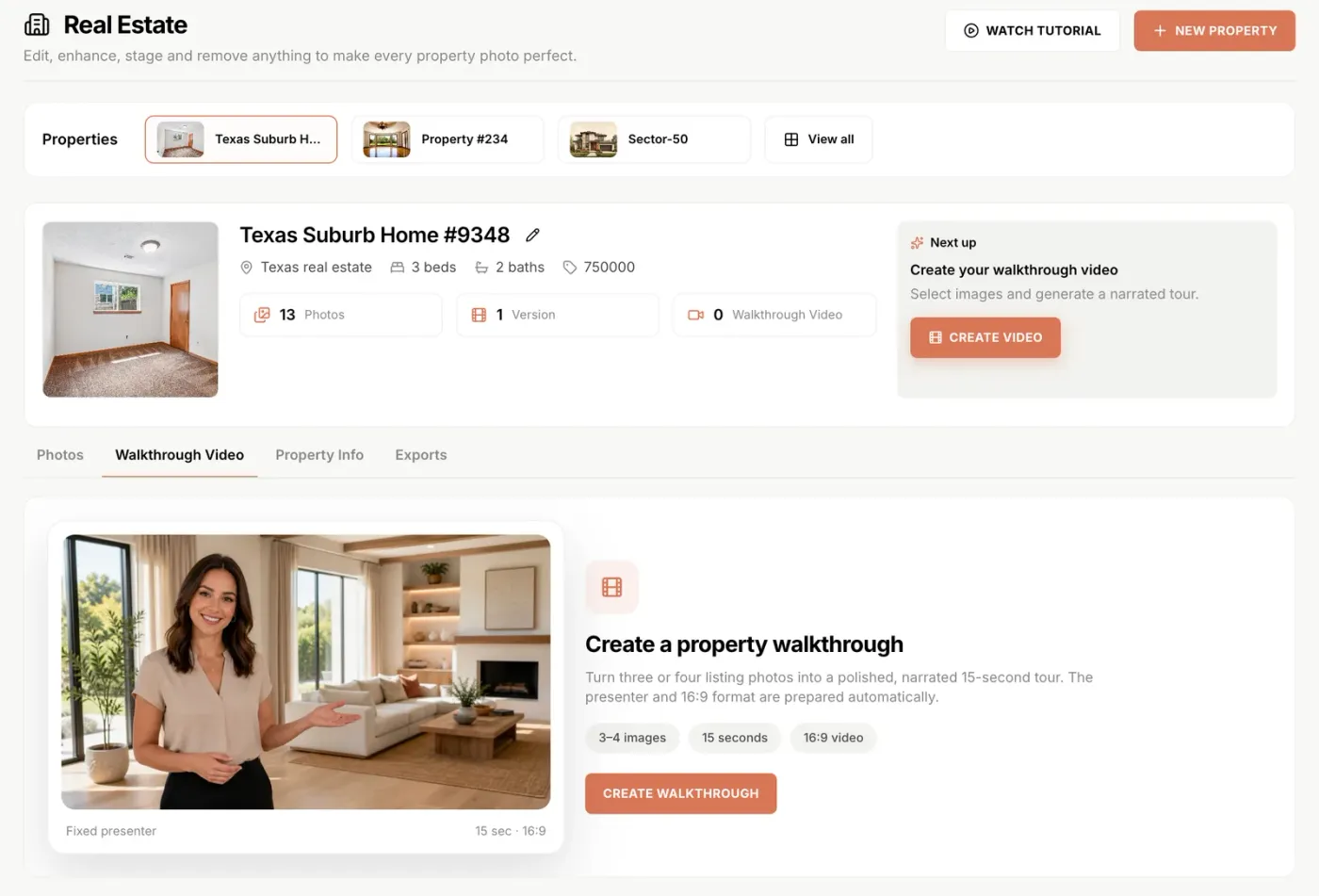
Pick three or four listing photos and get back a 15-second narrated walkthrough with an on-camera presenter. The script writes itself from the property record, you edit it, and the whole thing renders in minutes. No shoot, no timeline, no prompts.
New Walkthrough video ships inside Real Estate Studio on the Pro and Scale plans. Read the launch announcement, or the 10 real estate reel formats for what to post once the video is rendered.
15s
narrated walkthrough
3–4
photos needed
16:9
portal-ready output
1
credit for the script
10,000+
Listings edited monthly
Minutes
From gallery to finished video
1 credit
Per walkthrough script
4.9/5
1,240 in-app user ratings
Trusted by realtors, real estate photographers, and brokerages across the US, Canada, UK, and Australia. 4.9/5 average from 1,240 in-app user ratings collected in the Shhots AI web app after completed generations.
The short answer
Can AI make a real estate video from photos?
Yes. Select three or four photos from a property gallery and Shhots AI generates a 15-second narrated walkthrough in 16:9 with an on-camera presenter. The narration is written from the property record you already filled in, so the address, the beds and baths, the price, and your name arrive in the script without being typed twice. You edit the words, set the tour order, and render.
What you bring
Three or four listing photos and the property details. Nothing else. No camera, no gimbal, no site visit, no scheduling around the seller.
What comes back
A 15-second 16:9 walkthrough with an on-camera presenter narrating your script over the photos, watermark-free and commercially licensed.
What it costs
One credit for the script plus the render, out of the same monthly pool as photo editing and staging. Pro is $49 a month for 6,000 credits.
How it works
How the AI real estate video generator works, in three steps.
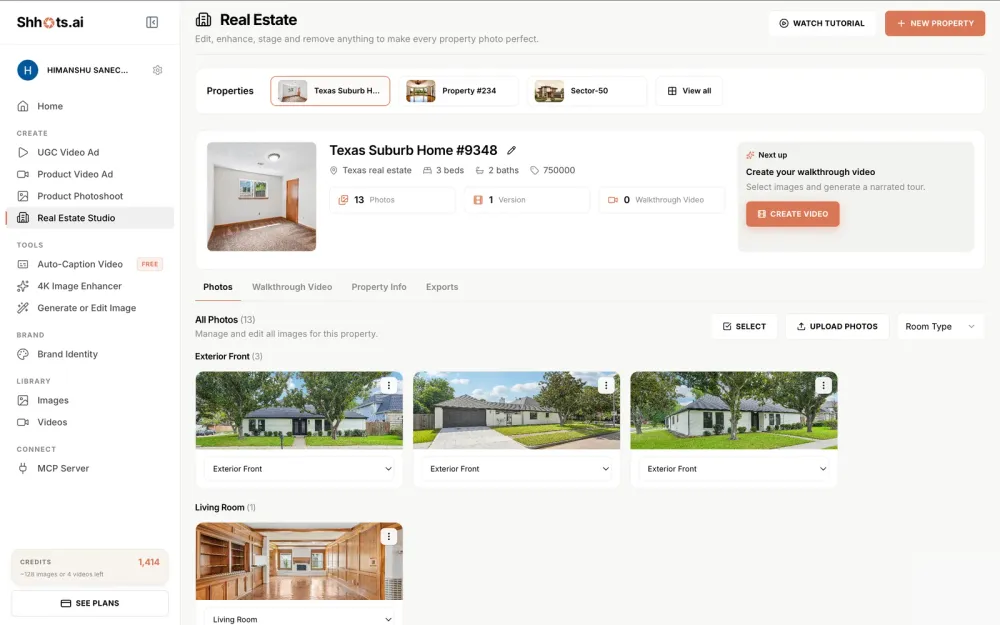
The whole flow runs inside the property you already created for the photo edit, so the video is never a separate project with its own file folder.
Upload the shoot
Create the property, upload the photos, and every image is classified by room type into a grouped gallery. Correct or stage anything that needs it first, because the video is only as good as the stills behind it.
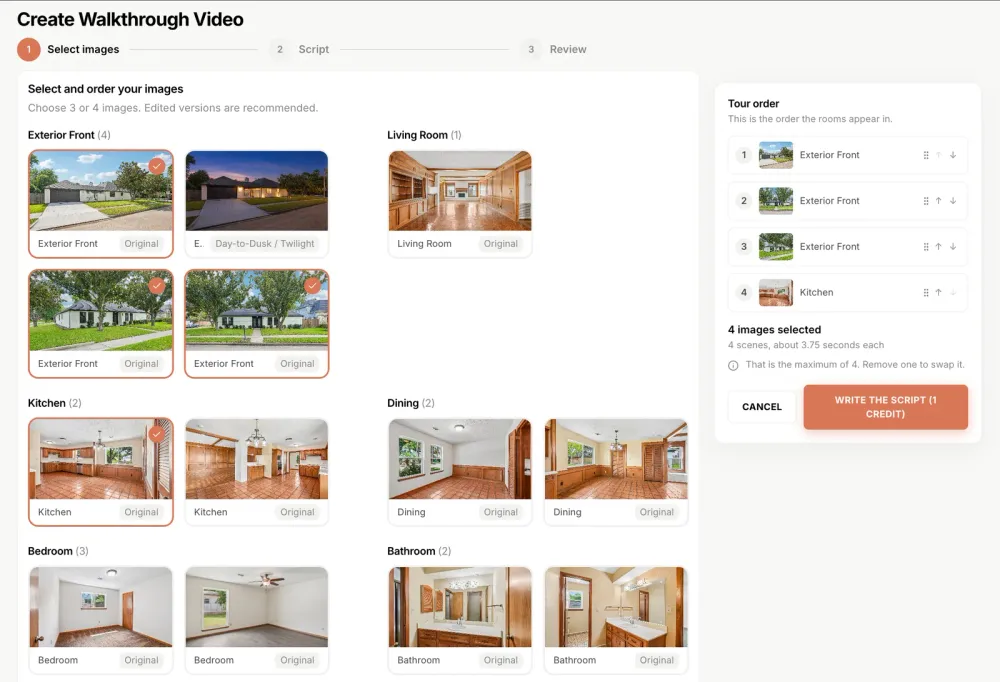
Select and order the photos
Pick three or four images from the gallery. The tour order panel is drag-and-drop, so you decide which room opens the video and which one closes it. Lead with the exterior for a portal cut, lead with the kitchen for social.
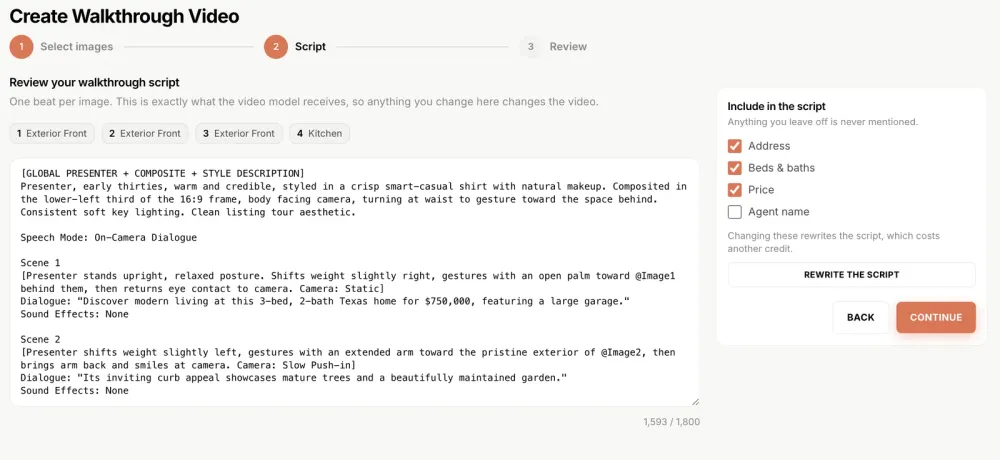
Review the script, then render
The script is written from your property record for 1 credit. Address, beds and baths, price, and agent name are individual toggles, and anything you switch off is never mentioned. Edit any line up to 1,800 characters before you render.

The full flow on video: photos in, script reviewed, walkthrough out.
Watch it run
From photo picks to finished walkthrough, in real time.
The full flow, uncut: pick and order the images, review the per-room script beats, and play the finished 15-second walkthrough with the presenter standing in the actual rooms.
The format
Why fifteen seconds, and why a presenter.
Two deliberate constraints, both chosen because of how listing video actually gets watched rather than how it gets produced.
Fifteen seconds is a teaser, not a tour
A room-by-room deep tour buries the hook and loses the viewer before the kitchen. A short narrated overview with the address, the specs, and the price gets watched to the end, and the buyer who wants more clicks through to the gallery. The video is the trailer. The listing is the film.
A presenter beats a photo pan
Slideshow videos with a music bed read as filler on a social feed, because there is nothing in frame asking to be looked at. An on-camera presenter gives the clip a subject and a voice, which is the difference between a listing video people finish and one they scroll past.
You control every fact in the script
Address, beds and baths, price, and agent name are four separate toggles. Switch price off on a listing where you are not advertising the number and the narration will never say it. Everything else stays editable line by line before you render.
Make several cuts, not one
Because there is no per-video invoice, generating three cuts of the same listing is normal. Exterior-led for the portal, kitchen-led for Instagram, price-led for the brokerage page. Same gallery, different order.
Where it runs
Six places a listing video earns its keep.
Real estate video marketing stopped being a luxury for the top listings once the cost of making one dropped to minutes of work.
Instagram Reels and TikTok
A face and a voice beat a photo carousel on every social feed. Fifteen seconds is long enough to establish the property and short enough to finish, which is what the algorithm actually rewards.
Listing portal previews
Portals surface listings with video above listings without. A 16:9 walkthrough satisfies the video slot on your listing without booking a shoot.
WhatsApp and email to buyers
A single file you can send to a buyer list the hour the listing goes live. Far more likely to be opened than a link to a gallery.
Open house promotion
Run the walkthrough as a paid Facebook or Instagram ad geotargeted around the property for the week before an open house.
Vendor pitch and listing presentations
Show a prospective seller the video you would make for their property, built from photos of a comparable listing. It wins instructions.
Brokerage and team pages
A consistent video format across every agent on the team, because every walkthrough comes out of the same generator rather than a different freelancer each time.
Compare
AI listing video vs. a real estate videographer.
A videographer still wins on a flagship listing. For the other ninety percent of your pipeline, the maths has changed.
| Feature | Videographer | Shhots AI |
|---|---|---|
| Cost per listing video | Several hundred dollars | Credits from your plan |
| Turnaround | 3–7 days | Minutes |
| On-site shoot required | Yes | No, built from photos |
| Narration | Booked separately | Written and voiced automatically |
| On-camera presenter | You, or a hired actor | AI presenter, included |
| Script control | Email revisions | Editable, with per-field toggles |
| Alternate cuts | Billed as revisions | No per-cut fee, just credits |
| Scheduling | Coordinate with the seller | None |
| Commercial license | Check your contract | Included free |
| Watermarks | On draft versions | Never |
Walkthrough scripts cost 1 credit and the render is billed on top, from the same shared credit pool as photo editing and staging. Pro is $49/month for 6,000 credits; Scale is $99/month for 12,000. Videographer figures reflect typical published 2026 listing-video packages and vary by market.
FAQ
AI real estate video, answered.
What agents ask before they replace a listing-video booking with a generated walkthrough.
Can AI make a real estate video from photos?
Yes. Select three or four photos from a property gallery on Shhots AI and Real Estate Studio generates a 15-second narrated walkthrough video in 16:9 with an on-camera presenter. The script is written from the property record you already filled in, so the address, beds and baths, price, and agent name come across without you typing them again.
How long are the walkthrough videos?
Fifteen seconds, in 16:9. That length is deliberate. These are teasers built for Instagram Reels, listing-portal previews, WhatsApp shares to buyers, and email campaigns, where a short narrated overview gets watched to the end and a room-by-room deep tour gets abandoned in the first five seconds.
Is there an AI avatar or presenter in the video?
Yes. The walkthrough renders with an on-camera AI presenter who delivers the script over your listing photos. That is what separates a walkthrough video from a slideshow with music on it, and it is the format that performs on social because a face holds attention that a photo pan does not.
Who writes the script?
Shhots AI writes it from your property record for 1 credit, and then you edit it. Address, beds and baths, price, and agent name are individual toggles, so anything you switch off is never mentioned in the narration. Every line stays editable up to 1,800 characters, and what you see in the editor is exactly what the video model receives.
How much does an AI real estate video cost?
A 15-second walkthrough render costs 825 credits, about $6.74 on the Pro plan, plus 1 credit for the script. Both come out of the same monthly credit pool as photo editing and virtual staging, on the Pro plan at $49 a month for 6,000 credits or the Scale plan at $99 a month for 12,000 credits. Compare that to a listing videographer, who typically quotes several hundred dollars per property plus a turnaround of several days.
How many videos can I make per listing?
As many as your credit pool covers, with no per-video fee. Generating several is the point: one cut leading with the exterior for the portal, one leading with the kitchen for Instagram, and one price-forward cut for the brokerage page. Each one pulls from the same property gallery, so you are reordering photos rather than reshooting anything.
Do I need video editing skills?
No. There is no timeline, no keyframes, and no prompt writing. You pick the photos, drag them into the order you want the tour to run, review the script, and render. If you can arrange four photos you can make the video.
What aspect ratio are the walkthrough videos?
Walkthrough videos render in 16:9, which is what listing portals, YouTube, brokerage sites, and email embeds expect. For vertical 9:16 cuts aimed at Reels and TikTok, run your edited listing photos through the AI video generator or the image to video tool, both included on the same subscription.
Can I use the videos in paid ads?
Yes. Every Shhots AI plan ships watermark-free output with a full commercial license, so the same file works as an organic Reel, a portal listing video, a YouTube pre-roll, and a paid Facebook or Instagram ad without any extra licensing.
Does it work with phone photos?
Yes, and it works better if you correct them first. Run the shoot through the correction presets, which fix exposure, white balance, and perspective on phone photos, then build the walkthrough from the corrected versions. A video is only as good as the stills it is assembled from.
Can the video mention the price and my name?
Only if you want it to. Address, beds and baths, price, and agent name are four separate toggles on the script editor. Switch price off for a listing where you are not advertising the number, and the narration never mentions it.
How is this different from hiring a real estate videographer?
Speed and cost, mostly. A videographer shoots on site, edits for a few days, and bills per property, which is why most agents only commission video for their higher-value listings. A walkthrough generated from photos you already have costs credits and takes minutes, which makes video viable on every listing rather than the top ten percent.
Can I make real estate reels from listing photos?
Yes. The walkthrough renders in 16:9 for portals, and the same property gallery generates the vertical cuts that Reels, TikTok and Shorts need. Because there is no per-video fee, the normal pattern is one horizontal cut for the listing page and one vertical cut for social, built from the same photos and the same script rather than reshot.
What should a real estate reel actually show?
Lead with the single most striking room rather than the front door, because the first second decides whether anyone watches the rest. Keep it to one idea: the kitchen, the view, the price, or the neighbourhood. Reels that walk the whole house in fifteen seconds show everything and land nothing.
Is this a real estate video maker or a video editor?
A maker. There is no timeline, no clips to trim and no transitions to choose. You pick three or four finished photos from the property, set the tour order, edit the script if you want to, and the video is rendered for you. If you want frame-level control over an existing video, this is the wrong tool and a conventional editor is the right one.
How long does it take to generate a real estate walkthrough video?
Minutes, end to end. The script is written from your property record for 1 credit and stays editable before you render, choosing the three or four photos and their tour order takes about as long as deciding which rooms lead, and the render itself finishes while you write the listing description. A videographer quotes days for the same deliverable.
Can I use virtually staged photos in the walkthrough video?
Yes. The video pulls from the same property gallery as every other action in Real Estate Studio, so a staged living room can lead the tour. The disclosure obligation follows the imagery: if staged photos appear in the video, label the listing media as virtually staged the same way you would for the stills.
What if I want to change the video after seeing it?
Edit and re-render rather than requesting a revision. The script stays editable up to 1,800 characters with toggles for address, beds and baths, price, and agent name, and you can reorder or swap the photos and generate another cut, because there is no per-video fee. Making an exterior-led cut for the portal and a kitchen-led cut for Instagram is the intended workflow.
Real Estate Studio
One property workspace, five ways in.
AI real estate photo editing
Sky replacement, HDR from one exposure, window pull, and clutter removal, 16 promptless presets at ~$0.45 an image.
AI virtual staging
Furnish empty rooms in 8 named styles across 3 modes, structure preserved, under a minute per image.
AI day to dusk editing
Daytime exteriors converted to twilight in under a minute, about $0.45 a photo, house unchanged.
You are here
AI real estate video generator
15-second narrated walkthrough videos with an on-camera presenter, built from 3–4 finished listing photos.
Bulk real estate photo editing
Whole-shoot and multi-property workflows for brokerages, portals, and real estate photography companies.
AI for real estate agents
The overview: the listing jobs AI genuinely does, per-listing economics, and where to start.

Put a video on every listing not just the expensive ones.
Create a property on Shhots AI, upload the shoot, and build a 15-second narrated walkthrough from three or four photos. Then make a second cut that leads with a different room and see which one your buyers actually finish.
6,000 credits · No per-video fee · Watermark-free · Commercial license included
The studio
The video is the last step of one listing workflow.
Correct the shoot, stage the empty rooms, remove the clutter, then build the walkthrough from the finished gallery. Same workspace, same credit pool, same property record.
AI Real Estate Photo Editing
Correct the shoot before you film it. Sky replacement, HDR from a single exposure, window pull, perspective straightening, and clutter removal.
AI Virtual Staging
Stage the empty rooms first so the walkthrough shows a furnished home. Eight styles across three modes, about $0.45 per image.
Image to Video
Turn a single listing photo into a short cinematic clip with camera motion. The vertical companion to the 16:9 walkthrough.
AI Video Generator
Longer listing films and multi-clip edits, with voiceover and captions, on the same subscription.
Video Caption Generator
Burn accurate captions onto your walkthrough before it goes to Reels, where most viewers watch with the sound off.
AI for Real Estate Agents
How photos, staging, and video fit together into one listing workflow, and which parts are worth paying for.
Bulk Real Estate Photo Editing
Whole-shoot and whole-portfolio workflows for brokerages and portals that want a walkthrough on every listing, not just the flagship ones.
Pricing
Listing video is included on Pro at $49 a month for 6,000 credits and Scale at $99 a month for 12,000 credits. One credit pool across every feature.
Related guides
Go deeper on real estate video
How to build a listing video, what it costs against a videographer, and where each cut goes.

How to Make a Real Estate Video in 5 Steps (No Camera)
How to make a real estate video from listing photos in about five minutes. The full workflow, what to shoot, script structure, and where to post each cut.

Real Estate Video Marketing: The Complete 2026 Playbook
A practical real estate video marketing guide for 2026. What to make, where to post it, how often, and how to measure whether any of it is working.

Real Estate Videographer Cost vs AI: Honest 2026 Math
What a real estate videographer costs versus AI video tools in 2026. Per-listing pricing, turnaround, quality trade-offs, and when each one is the right call.
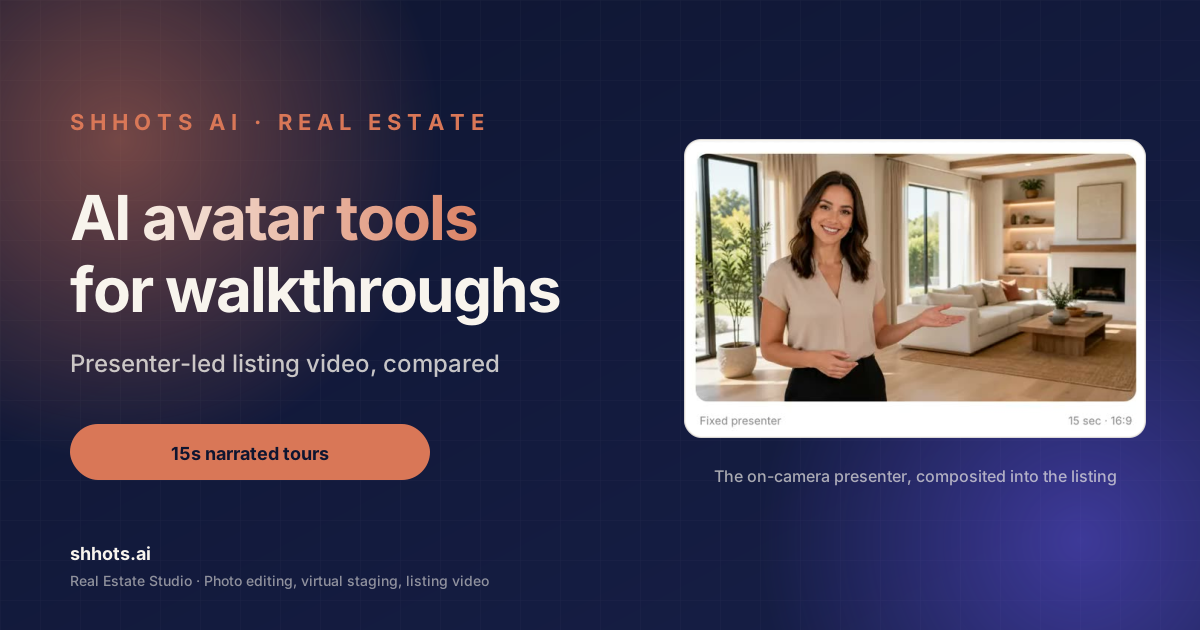
AI Avatar Tools for Real Estate Video Walkthroughs: Top 7
The top AI avatar tools for real estate video walkthroughs, compared. Seven options rated on presenter quality, setup time, and real cost per listing.

AI UGC Video for Real Estate: 6 Formats That Convert
AI UGC video for real estate: which creator-style formats work for listings, what to avoid, and how agents produce them without hiring creators.
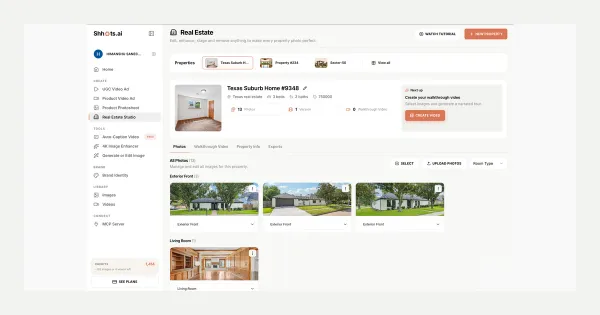
Real Estate Studio: AI Virtual Staging & Listing Videos
Real Estate Studio is live on Shhots AI, promptless photo correction, virtual staging in 8 styles, clutter removal, and 15-second narrated walkthrough videos. On Pro and Scale.
Deep dive
The complete guide to AI real estate video.
Six short reads on what AI listing video does well, what it does badly, and how it fits next to the videographer you already use.
01 · Why now
Why every listing needs video now
Video used to be the thing you commissioned for the listing that justified it, which in most markets meant the top ten percent by price. Everything else got a photo gallery. That split existed because a videographer costs money and takes days, not because buyers only wanted video on expensive homes. Once a walkthrough takes minutes and comes out of a subscription you already pay for, the split stops making sense and video becomes a default part of the listing package.
02 · Photos first
Your video is only as good as your stills
A generated walkthrough is assembled from the photos you feed it, so a blown-out window or a cluttered counter in the source shows up in the video too. The sequence that works is correct first, stage second, film third. Run the shoot through photo correction, stage the empty rooms with virtual staging, then pick your three or four hero images from the finished versions rather than the originals.
03 · Avatars
AI avatars and presenters for property walkthroughs
Most agents do not want to be on camera for every listing, and the ones who do rarely have time to shoot a fresh piece to camera per property. An AI presenter solves the throughput problem: the same delivery, the same pacing, and a fresh script per listing. It will never replace an agent's own face on a personal brand video. What it replaces is the music-bed slideshow that most listings currently ship instead.
04 · Cost
Videographer cost vs AI video tools
A listing videographer bills per property and typically returns the edit in three to seven days, which is why the booking usually happens before the photos are even ready. A generated walkthrough costs credits from a plan you already hold and renders in minutes from photos you already have. A well-shot gimbal walkthrough of a large home is still a better film, so the honest comparison is coverage: one great video on ten listings, or a decent video on all of them.
05 · Formats
16:9, 9:16, and where each one goes
Walkthroughs render in 16:9, which is the shape listing portals, YouTube, brokerage sites, and email embeds expect. Vertical is a different job: for Reels and TikTok cuts, run individual listing photos through image to video for motion, or the AI video generator for a multi-clip vertical edit. Add burned-in captions with the caption generator before posting, because most social viewing happens with the sound off.
06 · Honesty
Keeping a generated video honest
The same disclosure logic that applies to a staged photo applies to a video built from staged photos. If the living room in the walkthrough was virtually staged, the video is showing furniture that is not there, and it needs the same label your MLS requires on the still. Keep the script factual, leave the price toggle off if the number is not public yet, and never let the narration claim a feature the photos do not show.
Where to start
Build a walkthrough for a listing you already have.
Take a property that went live last week with photos only. Upload four of the shots, run the script generator, switch the price toggle off, and render. Post it as a Reel and compare the reach against the photo carousel you posted the first time.