Real Estate Studio
AI virtual staging software that furnishes a room in under a minute.
Shhots AI stages a listing photo in about two minutes for roughly $0.45 a photo on the Pro plan. Furnish an empty room, restyle a dated one, or clear out a seller’s furniture and stage it fresh. Pick a named style instead of writing a prompt, and on a preset pass the walls, windows, and floors stay exactly where the camera found them.
New Virtual staging ships inside Real Estate Studio on the Pro and Scale plans. Read the launch announcement.
8
staging styles
3
staging modes
<60s
per generation
~$0.45
per staged image
The real staging flow, uncut: property, upload, Restyle Room in Luxury, and the before-and-after slider.
10,000+
Listings edited monthly
97%
Cheaper than manual virtual staging
8
Named styles, zero prompts
4.9/5
1,240 in-app user ratings
Trusted by realtors, real estate photographers, and brokerages across the US, Canada, UK, and Australia. 4.9/5 average from 1,240 in-app user ratings collected in the Shhots AI web app after completed generations.
The short answer
What is AI virtual staging?
AI virtual staging adds furniture, lighting, and decor to a photograph of a room so buyers see a furnished space instead of bare walls. The room is never rebuilt. Only the contents change. On Shhots AI a staged image comes back in under a minute for 55 credits, which is roughly $0.45 on the Pro plan, against $16 to $75 per image at a dedicated staging service and $1,500 to $4,000 to physically stage a whole listing.
What it changes
Furniture, rugs, art, plants, soft furnishings, and the styling on surfaces. Everything a physical stager would carry through the front door.
What it never changes
Walls, windows, doors, floors, ceilings, built-ins, and sightlines. If a buyer measures the room off your photo, the measurement holds.
What you have to disclose
Label the image as virtually staged. NAR Article 12 and most MLS rules require it, and the untouched original stays saved beside every version.
Three modes
Empty, furnished, or occupied. All three stage.
Most virtual staging tools only handle the easy case, which is a room that is already empty. Real listings are rarely that tidy. These three modes cover the room as you actually photographed it.
Stage empty room
Vacant listing, furnished photo
Furnishes a bare room from scratch. The AI matches the furniture lighting and shadows to the photograph, so the sofa sits in the same light as the floor it stands on. This is the mode for new builds, vacant resales, and any listing where the seller has already moved out.
Restyle room
Same layout, different taste
Keeps the existing furniture layout and swaps the pieces and decor for a new aesthetic. Useful when the room reads as dated rather than empty, and for interior designers showing a client what their actual living room looks like in a different direction.
Occupied to vacant
Clear it, then stage it
Strips a lived-in room back to an empty shell, then stages it fresh in whichever style you pick. This is the one to reach for when the seller still lives in the house and their furniture is working against the listing.
Eight styles
Eight virtual staging styles, matched to the buyer.
Every mode offers the same eight styles. Because a generation takes under a minute, you can run one room in three styles and list the one that sells the space best, instead of committing blind and waiting two days to see it.
Modern
Downtown condos and new builds
Scandinavian
Light woods, calm, broad appeal
Luxury
High-end listings and penthouses
Coastal
Lakeside and beach properties
Farmhouse
Family suburbs and rural homes
Minimalist
Small spaces that need to breathe
Boho
Character rentals and creative lets
Mid-century
Period homes and design-led buyers
Style names are presets, not prompts. That is what keeps a thirty-photo shoot consistent: the Coastal bedroom and the Coastal living room came out of the same instruction, so they look like they belong in the same house.
How it works
How to virtually stage a home in three steps.
No prompt writing at any point. Create the property, upload the shoot, pick the mode and the style.
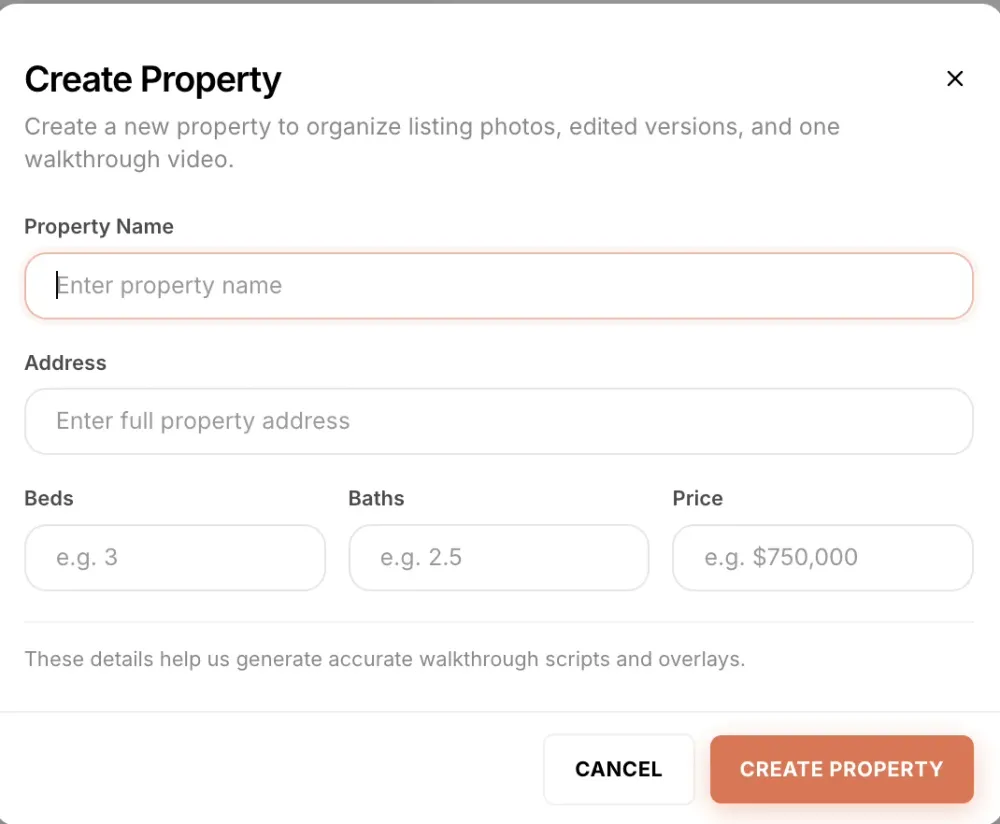
Create the property
Every listing gets its own record with name, address, beds, baths, and price. Staged versions file themselves against that listing, so a brokerage with forty active properties never digs through a shared drive for the right bedroom photo again.
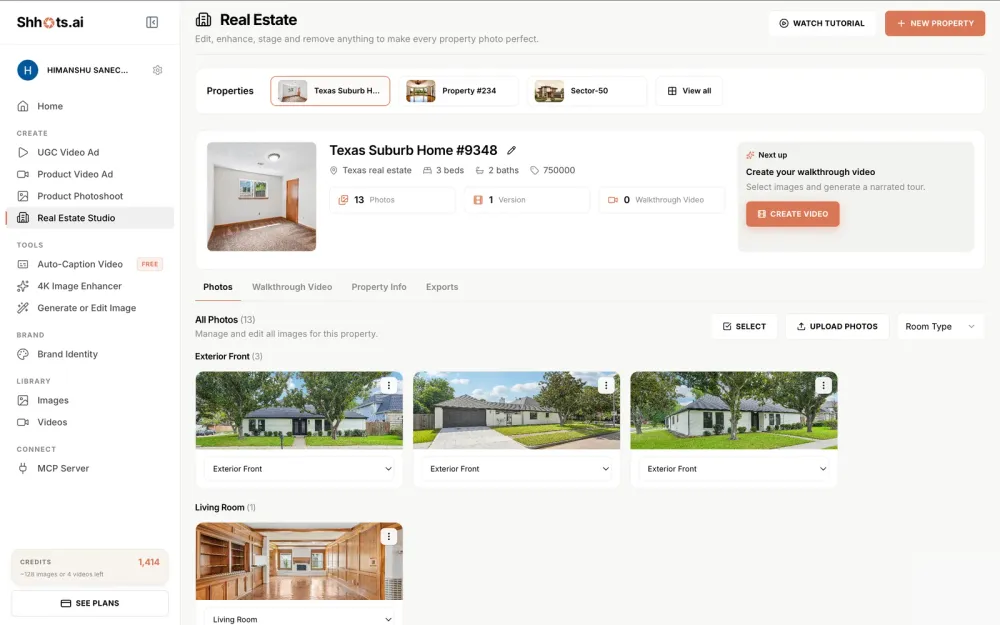
Upload the shoot, get room sorting
Upload the whole shoot at once and every photo is classified by room type, so the bedrooms sit together and the living room shots sit together. Pick the room you want to stage straight out of the grouped gallery.
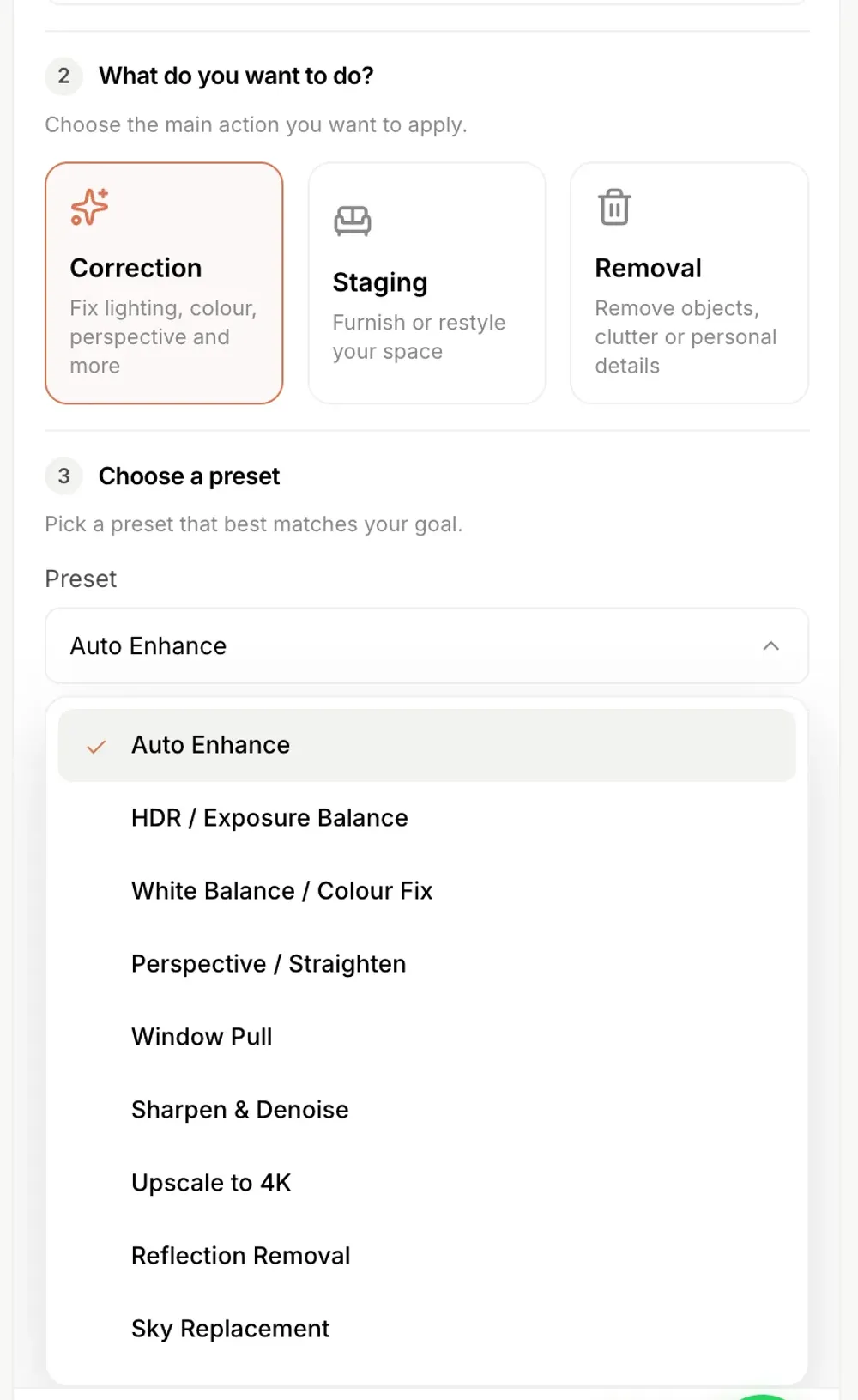
Pick an action, then generate
The edit panel offers three actions: Correction, Staging, and Removal. Choose Staging, then a mode and a style. Set how many variations you want, add a one-line comment if something specific has to survive, and generate for 55 credits per image.

The same three steps on video: upload, pick a mode and style, generate.
The specs
What this virtual staging software actually does.
The numbers people compare when they are choosing AI staging for real estate, in one table.
| Cost per staged photo | 55 credits, about $0.45 on the Pro plan |
| Turnaround | Under a minute per generation |
| Furniture styles | 8 named styles, no prompt writing |
| Staging modes | 3: stage empty room, restyle room, occupied to vacant |
| Revisions | Unlimited. Regenerate for 55 credits, no revision request |
| Original photo | Kept beside every generated version, never overwritten |
| Disclosure support | Untouched original always retrievable for MLS and AB 723 rules |
| Output | Full resolution, watermark-free, up to 4K with the upscale preset |
| Commercial license | Included on every plan |
| Free tier | None. Staging ships on Pro ($49/mo) and Scale ($99/mo) |
| Beyond staging | Photo correction, object removal and listing video on the same credits |
Staging runs inside Real Estate Studio, so the same credits also cover correction, object removal and a narrated listing video. There is no separate staging subscription to buy.
Software, app, or service
Three ways to buy virtual staging. Only one of them scales.
A staging service
A human designer stages each photo. Expect $16 to $75 per image and 24 to 72 hours. Good judgement, slow, and the price scales linearly with your listing count.
A staging app
Upload a photo, get furniture back in seconds. Fast and cheap per photo, but staging is the whole product, so correction, removal and video need a second and third subscription.
A staging platform
Staging is one action in a per-property workspace that also corrects the shoot, removes clutter and builds the listing video. This is the real estate staging software model, and it is what Shhots AI is, at $49 a month.
Comparing named tools rather than categories? The virtual staging AI alternatives guide puts seven of them side by side with verified prices, and the virtual staging cost guide covers what each pricing model works out to across a month of listings.
By room
Virtual staging, room by room.
Every room in a listing asks a different question of the buyer, so the staging brief changes with it. Here is what to reach for in each one.
Bedroom virtual staging
An empty bedroom is the hardest room for a buyer to read, because without a bed in frame there is nothing to judge the scale against. Staging one settles the question of whether a king fits. Scandinavian and Minimalist keep a small bedroom feeling open, and Luxury suits a primary suite with its own sightline to an ensuite.
Living room virtual staging
The living room is usually the hero shot in the gallery and the thumbnail on the portal, so it earns the most staging attention. Run it in two or three styles and pick the one that matches the buyer profile for the neighbourhood rather than your own taste.
Dining room virtual staging
Dining rooms photograph badly when empty, because the space reads as a corridor with nothing in it. A table and chairs establish that the room seats six, which is the actual question a family buyer is asking.
Kitchen staging and styling
Kitchens rarely need furniture. What they need is the clutter gone and the counters styled, which is Removal plus a light staging pass. Clear the countertop appliances, then add the small styling touches that make the worktop look usable rather than bare.
Apartment and condo staging
Apartments live or die on perceived square footage. Minimalist and Modern keep the floor visible, which is what makes a compact unit photograph larger. Avoid heavy Farmhouse pieces in a studio, because a big table eats the room in a wide-angle shot.
Commercial virtual staging
Office suites, retail units, and mixed-use floors stage the same way a residential room does. The structure preservation rule matters more here, because a commercial tenant is measuring the space from your photograph before they ever book a viewing.
Honest staging
The room in the photo is the room they walk into.
Plenty of image models will happily widen a room, add a window, or move a wall to make a composition work. That is a liability in a property listing, not a feature. Staging on Shhots AI is constrained so it cannot do any of that.
Structure is locked
On a plain staging pass, walls, windows, doors, floors, ceilings, built-ins, and sightlines stay exactly as photographed. The AI furnishes or empties the space without redrawing it. Ask for a change in the comment field and it will render one, which makes that output a renovation preview rather than a listing photo.
The original is always kept
Every generated version is saved against the property alongside the untouched original, so producing the before file for a disclosure request takes one click.
Disclosure is your job, and it is easy
Label staged images as virtually staged. NAR Article 12 requires a true picture in advertising, several states have their own statutes, and most MLS rules require a label on materially altered photos.
Defects stay visible
Staging adds furniture. It is not a repair tool, and it should never be used to hide damage a buyer would reasonably want to see before making an offer.
For the correction side of the workflow, sky replacement and HDR and clutter removal, see AI real estate photo editing. The same disclosure logic applies there.
Before & after
Staged room, untouched structure.
A real listing photo, run through the studio. The furniture is generated, the room is not. Six more examples, graded against a checklist, are in the before and after guide.
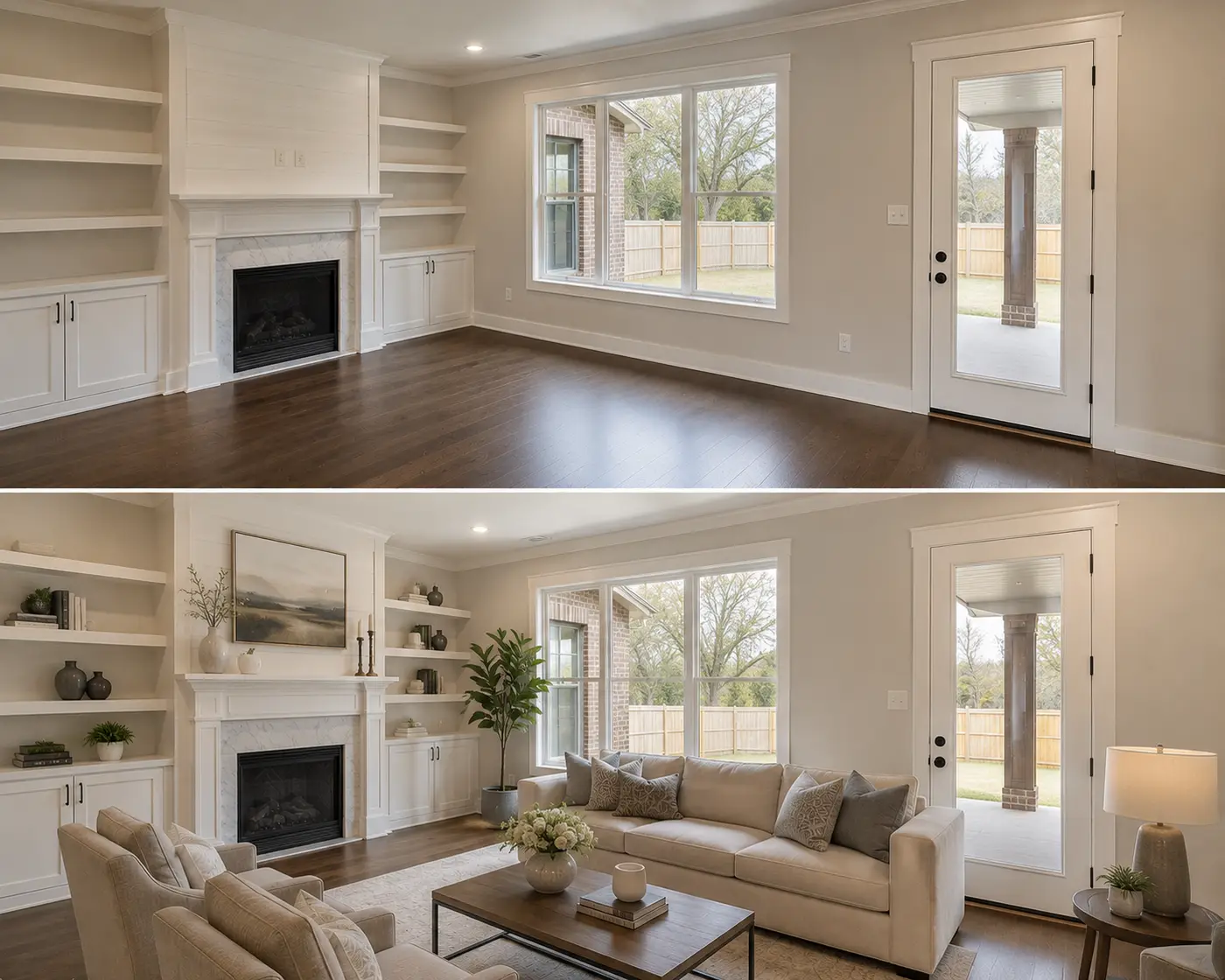
Compare
AI virtual staging vs. a virtual staging service.
Same output, two very different cost and speed profiles.
| Feature | Virtual staging service | Shhots AI |
|---|---|---|
| Cost per staged image | $16–$75 | ~$0.45 |
| Turnaround | 24–72 hours | Under a minute |
| Revisions | Billed, or capped per job | Generate again for 55 credits |
| Styles | Quoted per job | 8, named |
| Occupied to vacant | Premium add-on | A mode, same price |
| Prompt writing | Written brief per room | None, named presets |
| Original kept on file | Your own backups | Every version, per property |
| Photo correction included | Separate service | 9 correction presets |
| Listing video included | Separate vendor | 15s narrated, built in |
| Commercial license | Per-image fees | Included free |
| Watermarks | On free tiers | Never |
| Pricing model | Per image | Flat plan from $49/mo |
Shhots AI figures are based on 55 credits per image generation on the Pro plan ($49/month, 6,000 credits, refreshed each billing cycle). Credits are one shared pool across every Shhots AI feature, so ~$0.45 is a ceiling rather than a forecast. Service ranges reflect published 2026 industry pricing guides.
Who it is for
Built for anyone who has to sell a room.
Listing agents
Stage the empty rooms in a vacant listing on the same afternoon the photos land, without a staging invoice or a two-day wait. Three styles of the main living space costs 165 credits, which is under a dollar and a half.
Real estate photographers
Add staging to your package without subcontracting it. Shoot the empty property, stage the rooms that need it, and hand the client a gallery that already includes the staged versions and the untouched originals.
Brokerages and teams
One staging standard across every agent. Named styles mean the Coastal bedroom your Miami team ships looks like the Coastal bedroom your Tampa team ships, because both came from the same preset.
Interior designers
Restyle a client’s actual room in eight aesthetics from a photo of their real space. Because the structure never changes, they see a genuine preview of their own room rather than a mood board of somebody else’s.
Short-term rental hosts
Airbnb and Vrbo ranking is driven by the photos. Restyle a tired lounge, declutter the kitchen, and blur anything personal before the listing goes live, all on the same subscription.
Property developers
Sell off-plan and pre-completion units from a single finished show-home photo, staged in the styles that match each buyer segment you are targeting.
The two jobs it does most
Virtual staging for realtors, and for the photographers who shoot for them.
Same tool, two different invoices.
For realtors and listing agents
A vacant listing usually needs three to five staged rooms. On Pro that is 165 to 275 credits, between $1.35 and $2.25, and the whole listing, 25 corrected photos, four staged rooms, two removals and a walkthrough script, comes to about $14. At a staging service the same four rooms are $64 to $300 before any correction work.
Stage every empty room rather than picking one, run the hero room in two styles, and list on the day the photos land. The disclosure label is the only extra step, and the studio keeps the untouched original beside every version for it.
See the full per-listing cost for agentsFor real estate photographers
Agents pay $30 to $50 for a few staged rooms and a twilight exterior on top of the shoot fee. Bought from a staging service at $16 to $30 a room, that line is close to zero margin. Generated at about $0.45 a room, it is the highest-margin line on the invoice.
Deliver the staged versions beside the untouched originals so the agent’s disclosure starts with the file you handed over. Photography companies running several shoots a day should use the bulk workflow, where the whole gallery sorts itself by room and one preset runs across it.
Bulk real estate photo editing for photography companiesFAQ
AI virtual staging, answered.
What agents, photographers, and brokerages ask before they move staging in house.
What is AI virtual staging?
AI virtual staging uses artificial intelligence to add furniture, lighting, and decor to a photograph of an empty room, so buyers see a furnished space instead of bare walls. The room itself is never rebuilt. Walls, windows, doors, floors, and ceilings stay exactly where the camera found them, and only the contents of the room change. On Shhots AI a staged image comes back in under a minute and costs 55 credits, which works out to roughly $0.45 on the Pro plan.
How much does AI virtual staging cost?
On Shhots AI, virtual staging costs 55 credits per generated image. The Pro plan is $49 a month for 6,000 credits, which covers about 109 staged images, and the Scale plan is $99 a month for 12,000 credits, or about 218 images. That is roughly $0.45 per image. Dedicated virtual staging services generally charge $16 to $75 per image, and physical staging runs $1,500 to $4,000 for a whole listing.
Is there a free AI virtual staging tool?
Free virtual staging tools exist, and they all share the same three limits: a watermark burned into the output, capped resolution, and a hard cap on daily generations. None of those produce a file you can put on the MLS. Shhots AI has no free tier. Virtual staging is included on the Pro plan at $49 a month and the Scale plan at $99 a month, at full resolution, watermark-free, with a commercial license.
What virtual staging styles are available?
Eight, and each one is a named style rather than a prompt: Modern, Scandinavian, Luxury, Coastal, Farmhouse, Minimalist, Boho, and Mid-century. Every style works with all three staging modes, so you can stage an empty bedroom in Coastal and the living room next door in Modern from the same gallery.
Can AI add furniture to a photo of an empty room?
Yes, that is the core staging job. Upload the photo, pick Stage Empty Room, choose one of the eight styles, and the AI adds furniture to the photo with shadows and lighting matched to the room, in under a minute for 55 credits. The walls, windows, and floors stay exactly as photographed, so the furnished image is still an honest picture of the space.
Can AI stage a room that already has furniture in it?
Yes, two ways. Restyle Room keeps the existing layout and swaps the furniture and decor for a new aesthetic. Occupied to Vacant strips the room back to empty first, then stages it fresh in whichever of the eight styles you pick. The second one is what you want when the seller still lives in the house.
Will virtual staging change the layout of my room?
No. On a plain staging pass, walls, windows, doors, floors, ceilings, built-ins, and sightlines stay exactly as photographed. The AI furnishes or empties the space without redrawing it, so the room a buyer sees in the listing is the room they walk into at the showing. The one exception is deliberate: the optional comment field accepts a plain-text request, so if you specifically ask for a different floor or a repainted wall, the model will render it. That output is a virtual renovation preview rather than a staged listing photo, and it should be labelled as a rendering.
Do I need to write prompts to stage a room?
No. Every staging job runs through a named mode and a named style. That is what makes the results repeatable across a 30-photo shoot instead of varying image by image. There is an optional comments field for one specific instruction per generation, such as keeping a particular rug, but it is never required.
Is virtual staging legal, and do I have to disclose it?
Virtual staging is legal and widely used, and in almost every jurisdiction you have to label the image as virtually staged. NAR Article 12 requires a true picture in advertising, several states have their own disclosure statutes, and most MLS rules require a label on any materially altered photo. Shhots AI keeps the untouched original saved beside every generated version for exactly this reason, so the before file is always one click away.
How long does AI virtual staging take?
Under a minute per generated image. Traditional virtual staging services quote 24 to 72 hours. Because a generation is that fast, the practical workflow changes: you run the same room in three styles, compare them side by side, and list the one that sells the space best, instead of picking blind and waiting two days to see the result.
Can I use virtually staged photos on the MLS and Zillow?
Yes, with the disclosure label your MLS requires. Every Shhots AI plan ships watermark-free output at full resolution with a full commercial license, so the same file works on the MLS, Zillow, Realtor.com, Redfin, your brokerage site, printed brochures, and paid Facebook or Google ads.
What room types can the AI stage?
Any room in a residential or small commercial listing. Uploaded photos sort themselves by room type automatically across exterior, living room, kitchen, dining, bedroom, bathroom, and office, and staging works on all of them. Bedrooms, living rooms, and dining rooms are the three that move a listing most, because those are the spaces buyers struggle to picture empty.
How is this different from a dedicated virtual staging company?
Two differences that matter. Price model: staging companies bill per image on top of any subscription, while Shhots AI bundles staging into a flat monthly plan alongside photo correction, object removal, listing video, and 4K upscaling. Speed: a company quotes 24 to 72 hours because a human designer is doing the work, and Shhots AI returns a generation in under a minute, which lets you iterate rather than commit.
Can ChatGPT do virtual staging?
It can furnish a room in a picture, and for a mood board that is fine. It is not built for a listing photo. A general image model redraws the frame it is given, so walls move, window proportions drift, and the room in the output is not quite the room you photographed. That is the exact failure that turns a staged photo into a misrepresentation problem. Staging tools constrain the model so the structure holds and keep the untouched original beside the result for disclosure, which a chat window does not do.
Is Shhots AI a virtual staging app or a virtual staging service?
It is software you run yourself, not a service that queues your photo behind a designer. You upload a listing photo in the browser, pick a mode and a named style, and the staged version comes back in under a minute for 55 credits. Nobody reviews it, which is why it costs about $0.45 instead of $16 to $75, and why you can regenerate as many times as you like instead of filing a revision request.
What is the best virtual staging software for realtors?
For an agent listing regularly, the answer is whichever platform covers the whole shoot rather than staging alone, because a listing needs correction and often a video too. Shhots AI stages at about $0.45 a photo on the $49 Pro plan and runs photo correction, object removal and a narrated listing video from the same credit pool. Staging-only apps are cheaper per photo at low volume, and human services still win on a single hero image where you want a designer's judgement.
Does virtual staging software work on a phone or tablet?
Yes. Real Estate Studio runs entirely in the browser, so it works on a Mac, a Windows laptop, an iPad or a Chromebook with no install and no plugin. There is no desktop app to download and no GPU requirement on your machine, which matters when you want to stage a room from the car between showings.
How does AI staging compare to a virtual staging platform with a designer in the loop?
Different failure modes. A designer catches taste errors a model will not, so a managed platform is defensible for one flagship image at $16 to $75 and a day or two of turnaround. AI staging is wrong differently: it is instant and cheap enough to run a room in three styles and pick, so you fix taste by regenerating rather than by briefing. At a full listing or several listings a month, the economics stop being close.
Can buyers tell if a home is virtually staged?
Good virtual staging is convincing in a portal photo, which is exactly why disclosure rules exist: the label, not the image quality, is what tells the buyer. Because a plain staging pass never moves walls, windows, or floors, the staged photo and the empty room agree on everything except the furniture, so a buyer who walks in is never surprised by the space itself. Label the image as virtually staged and keep the original available, which the studio does automatically.
How many photos should you virtually stage in a listing?
Three to five rooms carry most listings: the living room, the primary bedroom, and the dining room are the spaces buyers struggle to read empty, plus the kitchen if it needs styling. At $16 to $75 per image at a service, that judgement call is a budget decision. At roughly $0.45 per image, the honest answer becomes: stage every empty room, and run the hero room in more than one style.
What happens if I do not like the staging result?
Generate again. There is no revision request or waiting on a designer: change the style, add a one-line comment such as "keep the rug", or ask for more variations, and the next result is back in under a minute for 55 credits. Generating two or three variations up front and picking the best one is the normal workflow rather than a workaround.
Is virtual staging worth it for a realtor with a few listings a year?
Usually, if any of those listings is vacant. Three to five staged rooms on Pro cost 165 to 275 credits, between $1.35 and $2.25, and the whole listing with 25 corrected photos, four staged rooms, two removals and a walkthrough script is about $14. The same four rooms at a staging service are $64 to $300 before any correction work. At two or three listings a year the honest comparison is the $49 month you switch on when a listing lands and switch off after, against one staging invoice.
Can a real estate photographer resell AI virtual staging to clients?
Yes. Every plan is watermark-free with a full commercial license, so staged images can go to a client under the photographer's own name. Agents commonly pay $30 to $50 for a few staged rooms and a twilight exterior on top of the shoot fee, which is close to zero margin when bought from a staging service at $16 to $30 a room and the highest-margin line on the invoice at about $0.45 a room generated. Deliver the staged versions beside the untouched originals so the agent's MLS disclosure starts with the file you handed over.
Does virtual staging actually help sell a listing?
Staging exists because buyers struggle to judge scale and purpose in an empty room, and NAR’s home-staging research consistently reports that agents say staging helps buyers visualize a property as their home. Virtual staging delivers that visualization at photo level, where nearly every buyer first meets the listing, at a fraction of physical staging’s $1,500 to $4,000 cost. It improves the photos; the price, the location, and the agent still sell the house.
Real Estate Studio
One property workspace, five ways in.
AI real estate photo editing
Sky replacement, HDR from one exposure, window pull, and clutter removal, 16 promptless presets at ~$0.45 an image.
You are here
AI virtual staging
Furnish empty rooms in 8 named styles across 3 modes, structure preserved, under a minute per image.
AI day to dusk editing
Daytime exteriors converted to twilight in under a minute, about $0.45 a photo, house unchanged.
AI real estate video generator
15-second narrated walkthrough videos with an on-camera presenter, built from 3–4 finished listing photos.
Bulk real estate photo editing
Whole-shoot and multi-property workflows for brokerages, portals, and real estate photography companies.
AI for real estate agents
The overview: the listing jobs AI genuinely does, per-listing economics, and where to start.

Stage your next empty listing before the sign goes up.
Create a property on Shhots AI, upload one photo of a bare room, and run it in three styles. It costs 165 credits and takes about three minutes, which is less time than writing the brief for a staging service.
6,000 credits · 8 staging styles · Watermark-free · Commercial license included · Cancel anytime
The studio
Staging is one action inside the property workspace.
The same workspace that stages an empty bedroom also corrects the exterior shot, removes the seller’s clutter from the kitchen, and builds a narrated walkthrough video from the finished gallery. One subscription, one credit pool.
AI Real Estate Photo Editing
The correction half of the same workspace. Sky replacement, HDR from a single exposure, window pull, perspective straightening, and clutter removal across a full listing shoot.
AI Real Estate Video Generator
Turn three or four staged photos into a 15-second narrated walkthrough video with an on-camera presenter, written from the property record.
Bulk Real Estate Photo Editing
Whole-shoot and whole-portfolio workflows for brokerages, listing portals, and photography companies working across hundreds of properties.
AI for Real Estate Agents
The overview of what AI actually does for listing marketing today, which parts are worth paying for, and how the pieces fit together.
4K Image Upscaler
Lift a low-resolution or older listing photo to print-ready 4K before you stage it, so the staged output holds up on a brochure and a yard sign.
Pricing
Virtual staging is included on Pro at $49 a month for 6,000 credits and Scale at $99 a month for 12,000 credits. One credit pool across every feature.
Related guides
Go deeper on virtual staging
What it is, what it costs, what the rules are, and what good output looks like.
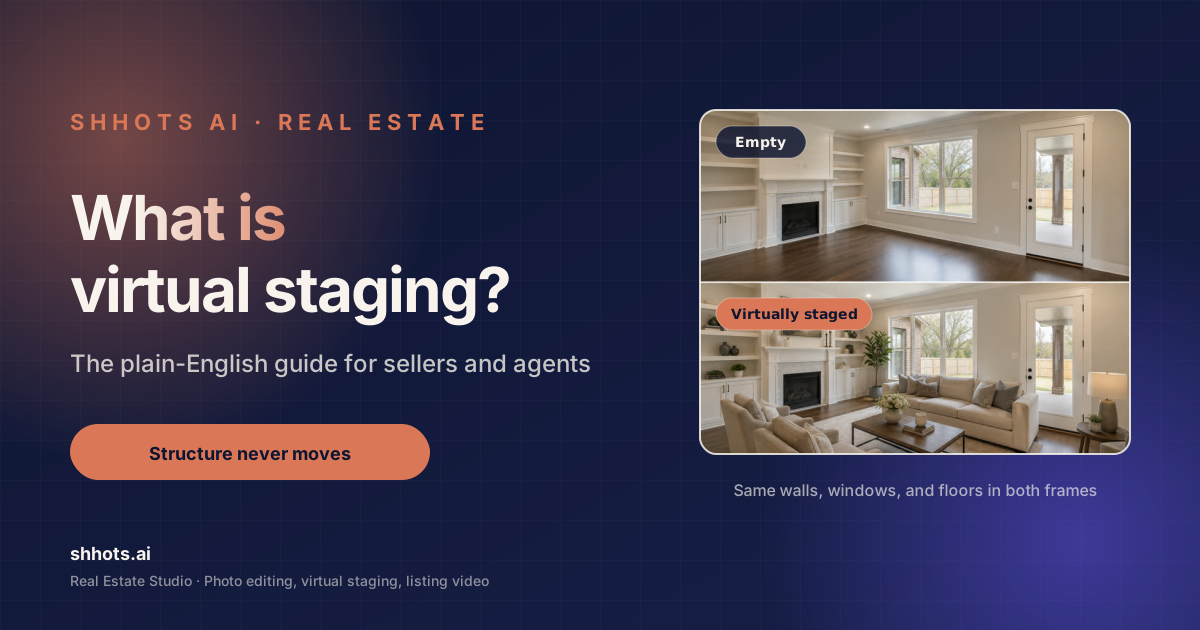
What Is Virtual Staging? The Complete 2026 Guide
What is virtual staging, what it costs, whether it is legal, and when to skip it. A plain guide for sellers, agents, and photographers, with real 2026 numbers.
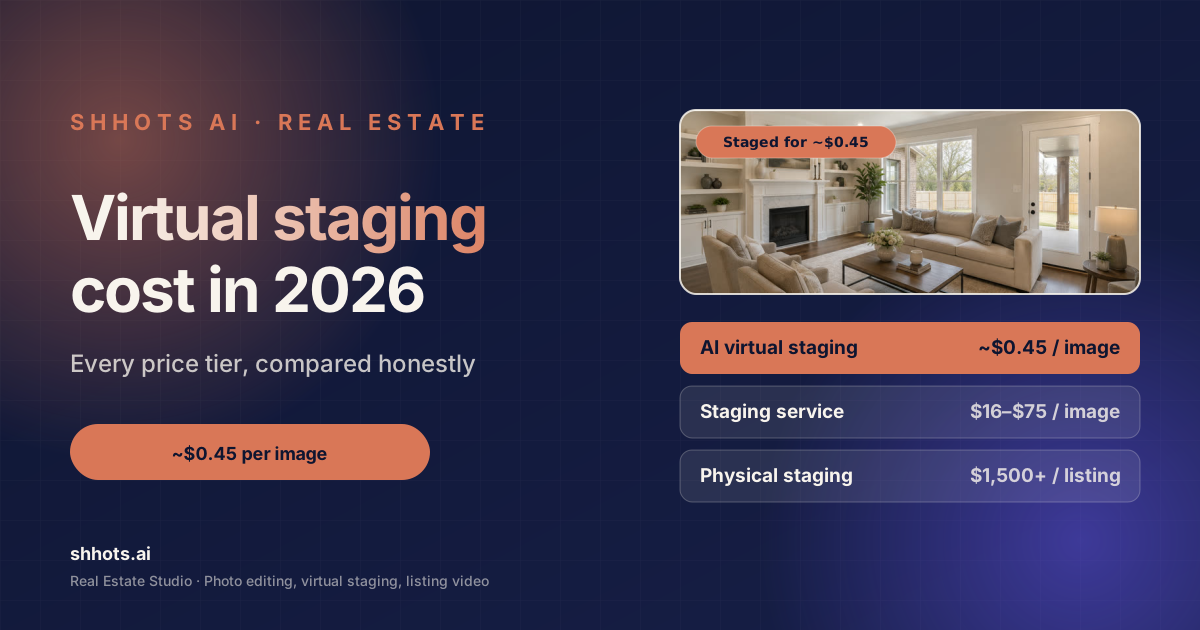
Home Staging Cost in 2026: Virtual Staging vs Real Staging
What home staging costs in 2026. Real staging runs $832 to $2,917 a listing, virtual staging $0.45 to $75 an image. Sourced numbers and hidden fees.

Best Virtual Staging AI Alternatives 2026: 7 Tools Compared
7 Virtual Staging AI alternatives compared for 2026 with verified prices, photo caps, and turnaround. Shhots AI stages for ~$0.45/image from $49/mo.

Virtual Staging Before and After: 6 Real Listing Examples
Six real virtual staging before and after examples, from empty living rooms to twilight exteriors. What changed, what stayed, and how to judge a good result.
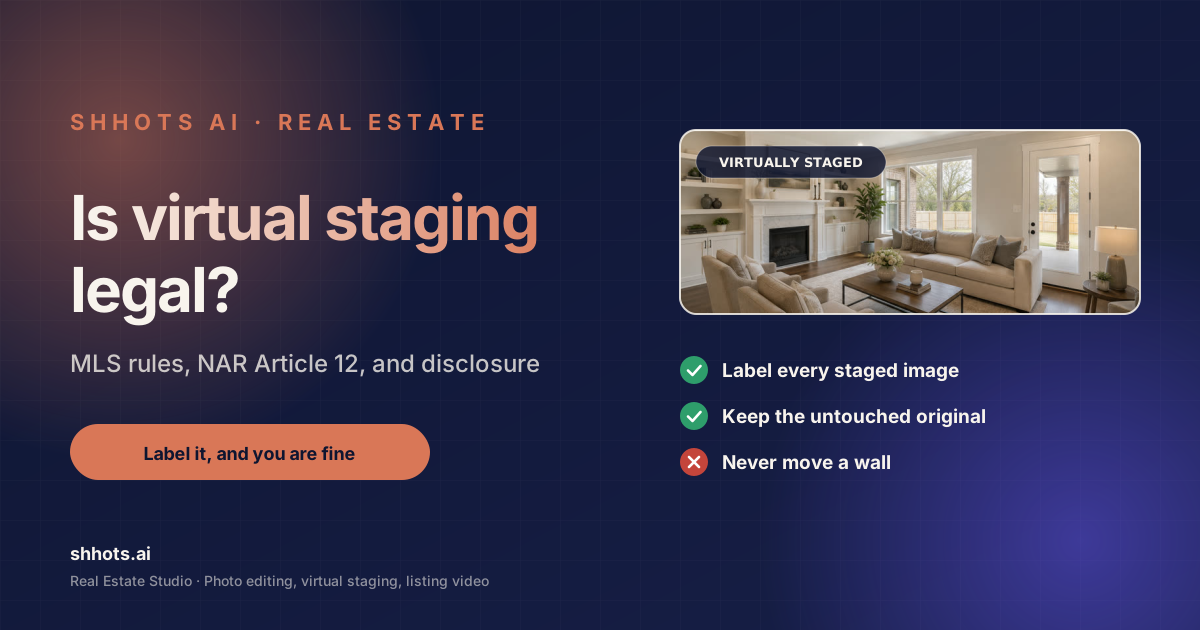
Is Virtual Staging Legal? State + MLS Rules, Verified 2026
Is virtual staging legal? Yes, with disclosure almost everywhere. AB 723, NAR Article 12, and per-MLS labeling rules verified against primary sources.
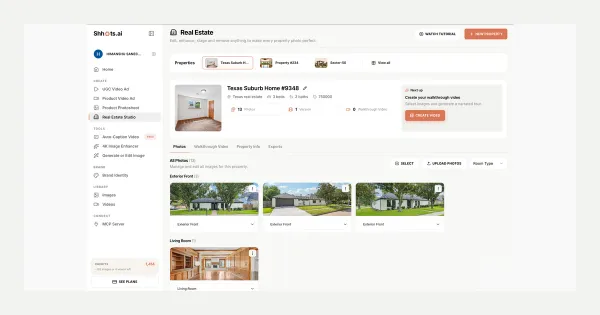
Real Estate Studio: AI Virtual Staging & Listing Videos
Real Estate Studio is live on Shhots AI, promptless photo correction, virtual staging in 8 styles, clutter removal, and 15-second narrated walkthrough videos. On Pro and Scale.
Deep dive
The complete guide to AI virtual staging.
Six short reads covering what virtual staging is, what it costs, whether it is honest, how the software compares, and when to skip it.
01 · Why it works
Why empty rooms cost you offers
Buyers cannot judge scale in an empty room. Without a bed or a sofa in frame there is no reference object, so a generous bedroom photographs as a box and a narrow one photographs as a corridor. Staging supplies the reference. That is the entire mechanism, and it is why a staged photo holds attention on a portal thumbnail while a bare one gets scrolled past. Staging makes the room legible, which matters more than making it pretty.
02 · What it costs
Virtual staging cost, honestly
There are three price tiers in this market. Physical staging runs $1,500 to $4,000 for a listing and takes a week to book. Virtual staging services charge $16 to $75 per image and quote 24 to 72 hours. AI staging inside a subscription costs roughly $0.45 per image on Shhots AI and returns in under a minute. The gap is large enough that the real change is behavioural: at $60 an image you stage three rooms, and at $0.45 you stage every room and try three styles on the ones that matter.
03 · Free tools
Is there free virtual staging software?
Free virtual staging apps exist and they are genuinely useful for one thing, which is finding out whether you like the idea. For an actual listing they fall down in the same three places every time: a watermark across the output, resolution capped well below MLS requirements, and a daily generation limit that makes a full shoot impossible. Shhots AI has no free tier. Staging is included on Pro at $49 a month with 6,000 credits, which covers about 109 staged images.
04 · Disclosure
Virtual staging rules and disclosure
The rule almost everywhere is simple: stage freely, and say that you staged. Most MLS systems require a label such as "virtually staged" on the affected photos themselves, NAR Article 12 requires a true picture in advertising, and several states have added their own statutes. Trouble comes from structural edits and hidden defects, never from labelled staging. Shhots AI cannot move a wall, and it keeps the untouched original beside every staged version so the before file is always available.
05 · The landscape
Best virtual staging software in 2026
The market splits three ways. Managed services put a human designer behind an upload form, which produces good work slowly and bills per image. Single-purpose AI apps stage a room and stop there, so you still need a separate tool for correction and video. Full studios handle the whole listing. Shhots AI sits in the third group, which matters mainly because a listing shoot is never only a staging job: the exterior needs a sky, the kitchen needs decluttering, and the portal wants a video.
06 · When to skip it
When not to virtually stage
Skip staging when the room is already well furnished and photographs well, because restyling it adds a disclosure obligation for no gain. Skip it on a teardown or a renovation project, where the buyer is pricing the structure and furniture is noise. And skip it anywhere the buyer will read the staged photo as a promise about what conveys with the sale. Staging sells the space. It should never imply the sofa comes with it.
Where to start
Stage one empty room in three styles.
Sign up for Pro, create your property, and upload the emptiest room in the listing. Run it in Modern, Scandinavian, and Luxury, then put all three side by side. Whichever one you would walk into is the one that goes on the portal.