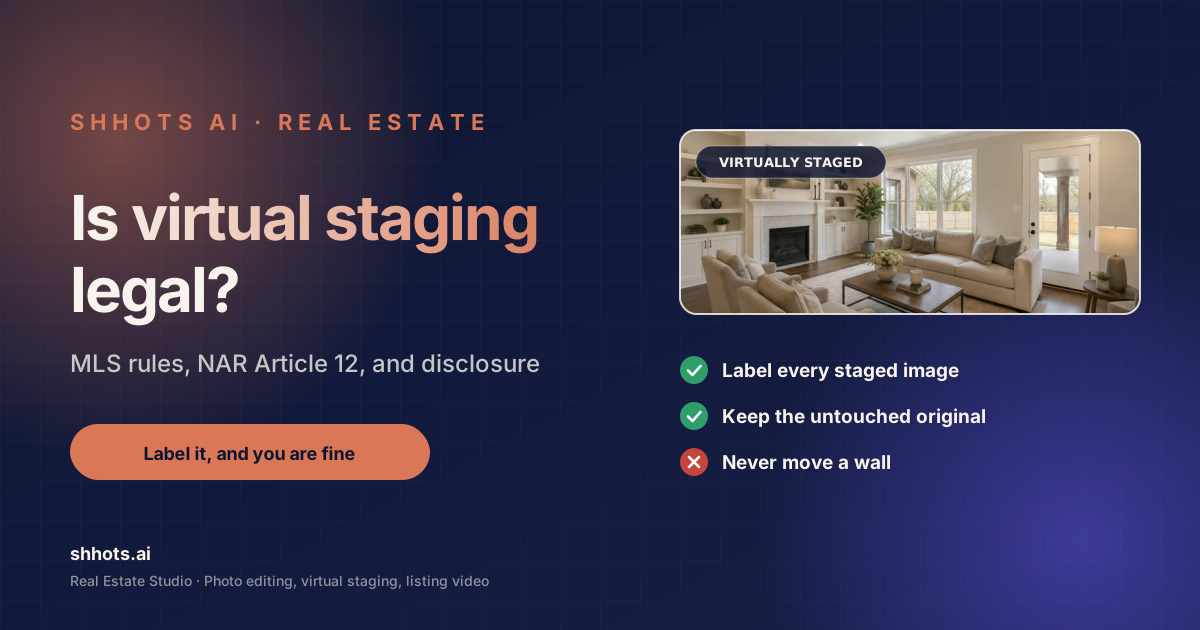
Disclosure: Shhots AI is our product.
Is virtual staging legal? Yes. Virtual staging is legal in every US state and in most markets worldwide. It is a normal, widely used part of real estate marketing. The obligation attached to it is disclosure: in almost every jurisdiction you have to label a virtually staged image as virtually staged, somewhere the buyer will actually see it.
That is the short answer. The rest of this guide covers where the disclosure obligation comes from, what specific state statutes and MLS rulebooks actually say, with each rule checked against the primary source, not a vendor blog. Which edits cross from presentation into misrepresentation, and how to keep a defensible record without adding work to your listing day.
This is a maintained guide. Every statute, MLS rule, and portal policy below was verified against its primary source (bill text, rulebook PDF, or official policy page) on August 24, 2026. Rules in this area are moving fast, two state statutes were enacted in the last year and more are pending. So treat the verification date as part of the information.
This is general guidance rather than legal advice. Real estate advertising rules are set at the state and MLS level and they change, so check your own board’s current photo policy.
Is virtual staging legal everywhere, and why is disclosure required?
Virtual staging is legal because adding furniture to a photograph does not, in itself, misrepresent the property. Everyone understands that a listing photo is a marketing image. The furniture is not being sold and no reasonable buyer thinks it is.
Disclosure is required because a photograph is also evidence. A buyer scrolling a portal is forming a factual impression of what the property is like, and they are entitled to know which parts of that impression are real.
The line runs between the contents of a room and the room itself:
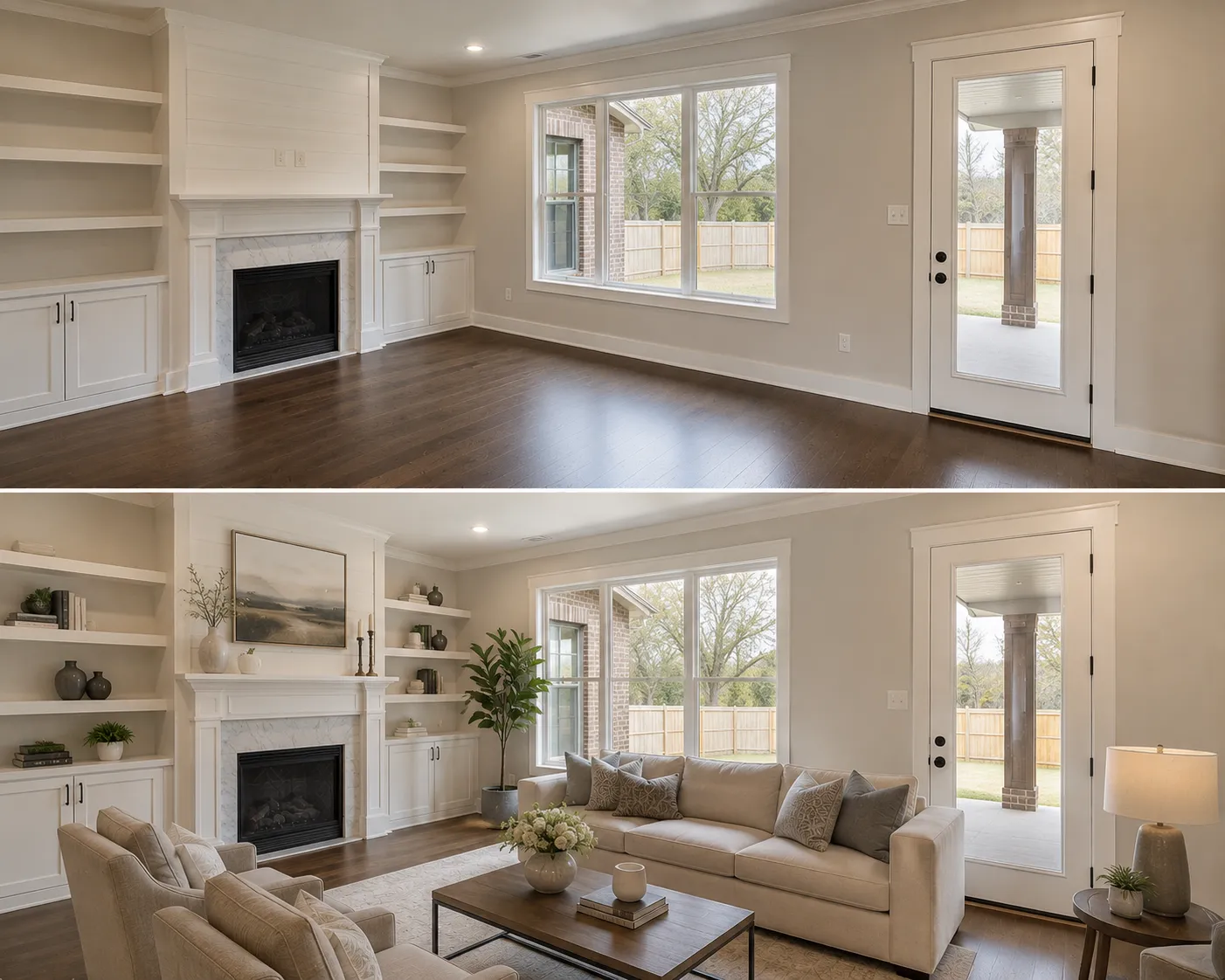
- Adding contents is staging. A sofa, a bed, a rug, art on a wall. Disclose it and you are fine. The before and after examples show where that line sits in practice.
- Changing the room is misrepresentation. Widening a space, adding a window, removing a support column, changing the ceiling height. There is no disclosure that makes this acceptable, because the buyer’s factual impression of the structure is now wrong.
Every rule below is an expression of that distinction.
NAR Article 12 and the Code of Ethics
For REALTOR members in the US, the governing text is Article 12 of the REALTOR Code of Ethics, which requires members to present a true picture in their advertising and marketing.
Two things follow from that in practice.
A staged photo without a label can fail the true picture test. The image shows a furnished room. The room is empty. Without a label, the advertising is not presenting a true picture of the property, and an ethics complaint has somewhere to land.
A structurally altered photo fails it regardless of labelling. You cannot disclose your way out of showing a room that is bigger than the room. Standard of Practice 12-10 specifically prohibits manipulating listing content “in any way that produces a deceptive or misleading result” and bars misleading images, and a wall that moved is misleading whatever the caption says. Article 2, which prohibits exaggerating or concealing pertinent facts about the property, is the other article NAR’s own guidance points to for AI-enhanced photos.
One correction worth making because it circulates widely: staging-vendor blogs often cite “Standard of Practice 12-7” as requiring accurate photographs. It doesn’t, 12-7 is about “sold” claims. The image provisions live in Article 12 itself, SOP 12-10, and Article 2.
Article 12 applies to REALTOR members specifically. If you are not a member, state law and your MLS rules still apply to you.
What MLS rules typically require
MLS photo policies are set board by board, so there is no single national rule. That said, the requirements cluster into a recognisable pattern.
A label on materially altered images. Most MLS systems require some marking on any photo that has been materially changed. Common wording includes “virtually staged”, “digitally staged”, or “photo digitally altered”.
Placement that a buyer will see. A label buried in the agent-only remarks does not satisfy a rule intended to inform buyers. Boards vary on whether the label must be burned into the image, placed in the public remarks, or both. Burning it into the image corner is the most conservative option and it survives being scraped onto a third-party portal, which a remarks-field disclosure does not.
Label every affected image. If you staged five photos, five photos need labelling. A single note on the listing is usually not enough.
Some boards extend this to sky replacement and twilight conversion. This surprises people. A number of MLS systems treat a changed sky or a day-to-dusk conversion as a material alteration, on the reasoning that it changes the buyer’s impression of the property’s condition and setting. Check your own board specifically, because practice here varies more than it does on furniture.
Prohibitions on removing permanent features. Nearly every policy bars edits that remove or conceal fixtures, structural elements, or defects.
Since portals such as Zillow, Realtor.com, and Redfin syndicate from the MLS, satisfying the MLS rule generally satisfies them too. Each portal also maintains its own content policy, and those are worth reading once.
What specific MLSs require, verified August 2026
The pattern above is real, but the details differ enough to matter, where the label goes, whether the original photo must be published, and what a violation costs. Here is what the major rulebooks actually say, each checked against the MLS’s own published policy on August 24, 2026.
| MLS | Label required | Where the label goes | Original photo | Notes |
|---|---|---|---|---|
| CRMLS (California) | “digitally enhanced,” “digitally altered,” or “virtually staged” | Image description field | Must appear immediately before or after the altered image | Rule 11.5.2, effective Jan 1, 2026; warning first, then a $250 fine |
| San Diego MLS | Clear disclosure as digitally altered | Per its labeling workflow | Must be paired with the altered image, including through IDX and syndication | AB 723 implementation, effective Jan 1, 2026 |
| Bright MLS (Mid-Atlantic) | Virtually staged photos and renderings “must be disclosed in the MLS” | Not specified in the policy | Not required by the policy | Images policy §4.E, Feb 2024 |
| Stellar MLS (Florida) | “Virtually staged” | Photo description field, the virtually-staged field, AND public remarks must begin “One or more photo(s) was virtually staged.” | Not required | Staging banned on pre/under-construction listings; no exterior staging except unattached furniture |
| MRED (Chicagoland) | Disclosure required | Designated MLS field | Not required | Prohibits adding or removing elements outside the owner’s control |
| NorthstarMLS (Minnesota) | Clear identification of virtually staged, AI-generated, or AI-enhanced | Photo caption, filename, or on the photo itself | Required, at least one unaltered image per enhanced room | Guidelines dated July 2026 |
| ARMLS (Arizona) | “Disclosure of Digitally Altered Images” for any altered media | Within Flexmls | Not specified | In force from May 2026 |
| Canopy MLS (Carolinas) | “AI-Enhanced” or “virtually-staged” | Directly ON the image or in the virtual tour, captions and remarks alone are insufficient | Original unstaged images must accompany | The strictest placement rule in this table |
Three things jump out of that table. First, the label’s required location genuinely varies: Canopy requires it burned onto the image, Stellar requires it in three places at once, CRMLS wants it in the image description field. Second, three of the eight (CRMLS, San Diego, NorthstarMLS) now require the unaltered original to be published or paired, not just kept. Third, the newest rules (CRMLS, ARMLS, NorthstarMLS, all 2026) name AI alteration explicitly. This is where every rulebook is heading.
One honest gap: NWMLS (Washington) keeps its rulebook member-gated, and the disclosure rule widely attributed to it circulates only through third-party sites, so it is not included above. If you operate there, confirm against the member rulebook directly.
What Zillow and the other portals say
Zillow’s published position (July 2026) is that listing photos must accurately represent the home, that responsibility for MLS-fed content sits with agents and brokers, and that it supports clear disclosure when AI materially alters a listing image. Its own Showcase virtual staging tool labels staged images and always pairs them with the original photo side by side. Realtor.com and Redfin publish no dedicated virtual-staging policy we could verify; they display MLS-fed content, so your MLS’s rule is the operative one. Claims that all three portals “require labeling” overstate what is actually published.
State disclosure laws, verified August 2026
State statutes are the fastest-moving part of this picture: two are now enacted, more are pending, and most of what circulates about them in vendor blogs is wrong in the details. Status of every state rule we could verify from primary sources, as of August 24, 2026:
| State | Rule | What it requires | Status |
|---|---|---|---|
| California | AB 723: Business & Professions Code §10140.8 | Conspicuous altered-image statement on or adjacent to the image, plus a link, URL, or QR code to the original unaltered image | In force since Jan 1, 2026 |
| Wisconsin | 2025 Act 69: Wis. Stat. §452.136 | Licensees must disclose in all advertising if it was altered or modified using technology, including AI, in a way that creates a false or misleading impression | Enacted Dec 2025, effective Jan 1, 2027 |
| New York | S9584 / A11635 / A11403 | Clear and conspicuous disclosure of materially altered images; AB 723-style original-image access in A11635 | Pending, not law as of Aug 2026 |
| New Jersey | A4728 | Bars fundamentally altered photos; virtual furniture allowed with disclosure and originals available on request; photos must be under 5 years old | Passed both chambers June 2026; signature unconfirmed |
| Texas | 22 TAC §535.155 | General ban on misleading advertising only. No virtual-staging-specific provision we could verify | Claims of a 2025 “altered image” TREC amendment could not be verified |
California AB 723, in plain language
Because AB 723 is the template other states are copying, it is worth getting exactly right, including the parts the summaries get wrong.
Who it covers: real estate brokers and salespersons, and anyone acting on their behalf, who include a digitally altered image in advertising or promotional material for the sale of real property.
What it requires: two things, both from the statute’s own text. A statement disclosing that the image has been altered, placed reasonably conspicuously on or adjacent to the image. And a link, publicly accessible URL, or QR code that includes and clearly identifies the original, unaltered image. No specific disclosure wording is mandated: “reasonably conspicuous” placement plus original-image access is the whole test.
What counts as altered: images changed by photo-editing software or AI to add, remove, or change elements. The statute’s own list includes fixtures, furniture, appliances, flooring, walls, paint color, hardscape, landscape, facade, floor plans, and even elements visible from the property such as views through windows and neighboring properties. Virtual staging is squarely inside this definition.
What is exempt: the statute explicitly excludes images where only lighting, sharpening, white balance, color correction, angle, straightening, cropping, exposure, or other common photo-editing adjustments were made that do not change the representation of the property. Routine exposure correction does not trigger AB 723.
About that “$250 fine”: the number circulating in staging-vendor blogs is not in AB 723 at all. It is CRMLS’s citation fine for violating its own Rule 11.5.2. The statute itself carries no specific dollar penalty; it sits inside California’s Real Estate Law, where willful violations are handled through the existing enforcement framework.
The operational consequence of AB 723 is simple: if your editing workflow overwrites the original photo, you cannot comply. The original must exist and be linkable for as long as the advertisement runs. (Full bill text: AB 723 on leginfo.legislature.ca.gov.)
Two practical implications regardless of where you operate:
- Keep every original. If your workflow overwrites the source file when you edit it, you cannot comply with a link-to-original requirement, and you will not be able to answer a complaint either.
- Assume the rules tighten. Wisconsin’s statute takes effect January 2027 and New York and New Jersey have bills in flight. Building the habit of labelling and archiving now costs nothing and means you are not retrofitting a process later.
Which edits are safe, and which are not
A rough taxonomy that maps onto how boards and courts actually think about this.
Generally safe, with a label
- Adding furniture, rugs, art, and decor to an empty room
- Restyling furniture in an occupied room
- Removing the seller’s furniture and personal belongings
- Decluttering countertops, floors, and shelves
- Blurring family photos, documents, and personal details for privacy
- Correcting exposure, white balance, and converging verticals
- Recovering a blown-out window to show the actual view
Depends on your board, and lean toward labelling
- Sky replacement
- Twilight and dusk conversion
- Lawn greening and seasonal landscaping cleanup
- Pool water clarification
- Removing a car from a driveway or a bin from a kerb
Not safe, with or without a label
- Widening a room or changing its proportions
- Adding, removing, moving, or resizing windows and doors
- Removing or concealing structural elements
- Painting out cracks, damp, stains, or visible damage
- Removing or hiding an unattractive permanent neighbouring feature
- Adding a feature the property does not have, such as a fireplace or built-in cabinetry
- Removing a fixed appliance or fixture that does not convey
The pattern in that third list is consistent: each one changes a fact a buyer would price differently if they knew. That is what separates it from a sofa.
The special case of hiding defects
This deserves its own line because it is where the real liability lives. Editing out damage goes past advertising rules into potential fraud, and disclosure obligations about property condition are separate from and stronger than advertising rules.
If an edit removes something a buyer would want to know about before making an offer, do not make that edit. There is no version of the caption that fixes it.
How to disclose virtual staging properly
A workable standard that satisfies most boards. Confirm the specifics with yours.
Label the image itself. Add “Virtually Staged” in a corner of the photo, legible at thumbnail size. This is the only method that survives syndication to third-party sites and social sharing.
Add a line to public remarks. Something plain, such as: “Photos of the living room, primary bedroom, and dining room are virtually staged. The property is currently vacant.”
Be specific about which rooms. Naming them is more useful to the buyer and more defensible than a blanket note.
Keep the originals accessible. Where state law requires a link to the unaltered version, have a plan for producing it. Where it does not, you still want it for the complaint you hope never arrives.
Mention it before the viewing. A buyer who learns the house is empty when they open the front door feels misled even if you labelled everything correctly. A sentence in the confirmation email removes the problem entirely.
Keeping a defensible record
Compliance is mostly a filing problem. The rule is easy and the evidence is what people lose.
Two habits make it manageable:
Never overwrite the original. Editing should produce a new version, not replace the source. On Shhots AI every generated version is saved against the property alongside the untouched original, so the before file is always one click away rather than dependent on someone having backed up a memory card.
Keep media filed by property. A shared drive full of files named final_v3_edited.jpg is not a record. Per-property organisation means that when a question arrives about a listing you closed eight months ago, answering it takes a minute. The Real Estate Studio workflow is built around a property record for this reason.
What structure preservation means in a tool
Some image models will happily redraw a room to make a composition work, because making a pleasing picture is what they were built for. In a property listing that behaviour is a liability rather than a feature.
When you evaluate a staging tool, run this test: stage the same empty room three times and flip between each result and the original at full size. Watch the corners of the room, the window frames, and the ceiling line. If any of them shift between generations, the tool is redrawing the space and you should not use it on a listing.
Staging on Shhots AI runs through named presets, and a preset pass leaves walls, windows, doors, floors, ceilings, built-ins, and sightlines exactly as photographed. Only the contents change, which is what makes that output defensible on a listing.
The caveat is the optional comment field. It accepts a plain-text request, so asking for a different floor or a repainted wall will produce one. That result is a renovation preview, not a staged listing photo, and the disclosure rules above apply to it with full force. The test is simple: if the edit changes a fact a buyer would price differently, it needs to be labelled as a rendering or left out of the listing.
Virtual staging and listing video
The same logic carries into video. A walkthrough assembled from virtually staged photos is showing furniture that is not in the property, so it needs the same disclosure the stills need.
Practical points for generated listing video:
- Label the video, in the description and ideally on screen.
- Keep the narration factual. If the script mentions a feature, the photos need to show it.
- Leave the price toggle off if the number is not public yet.
More on how the script and toggles work on the AI real estate video generator page.
A virtual staging disclaimer template you can reuse
Agents usually call this a disclaimer and rulebooks call it a disclosure. It is the same text. Adapt the wording to your board, then use the same text every time so it becomes automatic rather than a decision per listing.
On the image. A small label in a lower corner reading “Virtually Staged”, legible at thumbnail size, on every affected photo.
In the public remarks. One sentence naming the rooms: “The living room, primary bedroom, and dining room photos are virtually staged. The property is currently vacant.”
In the viewing confirmation. One line so nobody arrives surprised: “Please note the property is unfurnished. Some listing photos are virtually staged.”
In your files. The untouched originals, kept per property, retrievable without a hunt.
Four places, the same standard every time. The version of this that fails is the one where disclosure is a judgement call made separately on each listing, because eventually one gets missed on a busy week.
Is virtual staging legal for rentals and commercial listings?
Almost everything above is written for residential sales, which is where the rules are most developed. Two adjacent cases come up often enough to address.
Rentals. Is virtual staging legal on a rental listing? Yes, and the disclosure logic is the same. What changes is the practical risk: a rental prospect often views fewer properties and decides faster, so the gap between a staged photo and an unfurnished flat is felt more sharply. Letting agents in several markets also fall under consumer-protection advertising rules that sit outside real estate law entirely, so check both.
Commercial. Is virtual staging legal for office, retail, and mixed-use listings? Yes, and structure preservation matters more here than anywhere else, because a commercial tenant is measuring usable area from your photograph before they book a viewing. A widened room in a residential listing is a bad look. In a commercial listing it can be the basis of a dispute over a lease that has already been signed.
In both cases the four habits hold: stage freely, label clearly, never touch the structure, keep the original.
Virtual staging legality FAQ
Is virtual staging legal in the US?
Yes, in every state. Virtual staging is a standard part of real estate marketing. What is regulated is disclosure: most MLS systems require a label on materially altered photos, NAR Article 12 requires members to present a true picture in advertising, and several states have their own statutes covering digitally altered listing images, some requiring access to the unaltered original.
Do you have to disclose virtual staging?
Yes, in almost every jurisdiction. Label the affected images as virtually staged somewhere the buyer will see it, ideally burned into the image and repeated in the public remarks. Naming which rooms were staged is more useful and more defensible than a blanket note on the listing.
Can you get in trouble for virtual staging?
Not for staging itself when it is disclosed. Trouble comes from two specific things: structural edits that change the buyer’s factual impression of the space, such as widening a room or adding a window, and edits that conceal a defect. The first is an advertising violation, and the second can be a much more serious misrepresentation issue that disclosure does not cure.
What does the MLS say about virtual staging?
Policies are set board by board, but most require a label on any materially altered image, prohibit removing or concealing permanent features and defects, and require the label somewhere buyers can see it. The details vary more than people expect: Canopy MLS requires the label directly on the image, Stellar MLS requires it in the photo description, a dedicated field, and the opening of the public remarks, and CRMLS requires the unaltered original to appear immediately before or after the altered photo. The verified per-MLS table earlier in this guide has the specifics for eight major boards.
What states require disclosure of virtually staged photos by law?
As of August 2026, two states have enacted statutes: California’s AB 723 (Business & Professions Code §10140.8, in force since January 1, 2026) requires a conspicuous disclosure on or adjacent to any digitally altered listing image plus a link, URL, or QR code to the original unaltered image; Wisconsin’s 2025 Act 69 (effective January 1, 2027) requires licensees to disclose AI or technology alterations that create a false or misleading impression. New York and New Jersey have bills pending. Everywhere else, MLS rules and NAR’s Code of Ethics carry the obligation.
Does sky replacement need to be disclosed?
It depends on your MLS. Some boards treat a replaced sky as a material alteration requiring a label, on the basis that it changes the buyer’s impression of the setting and condition. Others treat it as ordinary photo correction. When you are unsure, label it. The cost of an unnecessary label is nothing and the cost of a missing one is a complaint.
Can virtual staging remove furniture from an occupied home?
Yes, and it is one of the most useful modes because most sellers have not moved out yet. Removing the seller’s own furniture and belongings is safe with a label. Removing fixtures, built-ins, or fitted appliances that convey with the sale is not, because that changes what the buyer believes they are getting.
Do I need to keep the original photo?
Yes, and in some states you are required to be able to produce it. California’s AB 723 requires a link to the original unaltered version alongside a digitally altered listing image. Even where it is not required, the original is the evidence that your edit was staging rather than misrepresentation, so a workflow that overwrites source files is a risk.
Is virtual staging allowed on Zillow and Realtor.com?
Yes, with disclosure. The portals syndicate from the MLS, so satisfying your MLS labelling rule generally satisfies them. Zillow’s published position (July 2026) is that listing photos must accurately represent the home and that it supports clear disclosure when AI materially alters an image. Its own virtual staging feature labels staged photos and pairs them with the original side by side. Realtor.com and Redfin publish no dedicated staging policy; your MLS rule is the operative one there. Burning the label into the image remains the safest approach for syndicated listings, since a disclosure held only in an MLS remarks field may not travel with the photo.
What should a virtual staging disclaimer say?
Three things: that the image is virtually staged, which rooms are affected, and that the property is currently vacant or furnished differently. On the image itself, “Virtually Staged” in a lower corner is enough. In the public remarks, one sentence: “The living room, primary bedroom, and dining room photos are virtually staged. The property is currently vacant.” Then check your MLS for required wording. CRMLS accepts “digitally enhanced,” “digitally altered,” or “virtually staged,” Stellar MLS requires the remarks to open with “One or more photo(s) was virtually staged,” and California’s AB 723 also requires a link, URL, or QR code to the original image.
Related reading
- What is virtual staging?, the contents-versus-structure distinction, in full
- Virtual staging before and after, how to spot a structural edit in your own output
- Virtual staging cost in 2026, what compliant staging actually costs per listing
- Best virtual staging software, which tools keep your original photo retrievable for disclosure
- Virtual Staging AI alternatives, seven tools compared, including which ones keep the original photo your MLS may require
Is virtual staging legal: the short version
Is virtual staging legal? Yes, everywhere that matters, provided you disclose it. Stage freely, label clearly, never touch the structure, and keep the original. Those four habits cover almost every rule in every jurisdiction, and none of them slows down a listing.
Start on Pro at $49 a month or compare plans on pricing to see how structure preservation and version history work in practice, or read what virtual staging is for the ground-level explanation.