Real Estate Studio
AI real estate photo editing, sixteen presets, zero prompts.
Fix exposure, replace the sky, pull the window view back, straighten the verticals, and clear the clutter across a whole listing shoot. Named presets instead of prompts, under a minute an image, and the room’s real structure never moves.
New Real Estate Studio is live on the Pro and Scale plans. Read the launch announcement.
16
presets, zero prompts
4K
upscale built in
<60s
per edit
~$0.45
per image
10,000+
Listings edited monthly
92%
Faster than manual editing
97%
Cheaper than manual virtual staging
4.9/5
1,240 in-app user ratings
Trusted by realtors, real estate photographers, and brokerages across the US, Canada, UK, and Australia. 4.9/5 average from 1,240 in-app user ratings collected in the Shhots AI web app after completed generations.
The short answer
What is AI real estate photo editing?
AI real estate photo editing retouches listing photos automatically: sky replacement, HDR balancing, white-balance correction, perspective straightening, window pull, and clutter removal, at about $0.45 an image in under a minute. It replaces the 12 to 48 hour outsourced edit cycle between shoot day and the photos hitting the MLS.
The old way
Outsourced manual editing
- ·$1.50–$3.00 per photo to edit, billed monthly.
- ·12–48 hour turnaround per listing, then revisions add another cycle.
- ·Virtual staging is a separate vendor at $16–$75 a photo and 24–72 hours.
- ·A listing video means a videographer, a script, and an edit.
- ·Finished files scatter across email, Drive, and WeTransfer links.
With Real Estate Studio
One workspace, per property
- ·~$0.45 per image generation, editing and staging alike.
- ·Under a minute per generation, so you can try three staging styles before lunch.
- ·Named presets, not prompts, so the tenth photo matches the first.
- ·A 15-second narrated walkthrough video from the same gallery.
- ·Every version filed against the listing, original never overwritten.
Overview
The whole studio in sixty seconds.
Create the listing, pick an action and a preset, compare against the original, and run one preset across a full shoot. The steps below break the same flow down.
How it works
From raw shoot to staged gallery and listing video.
No prompts, no preset hunting, no waiting on a remote editor. Create the property, upload the shoot, pick an action, and let the studio file everything against the listing.
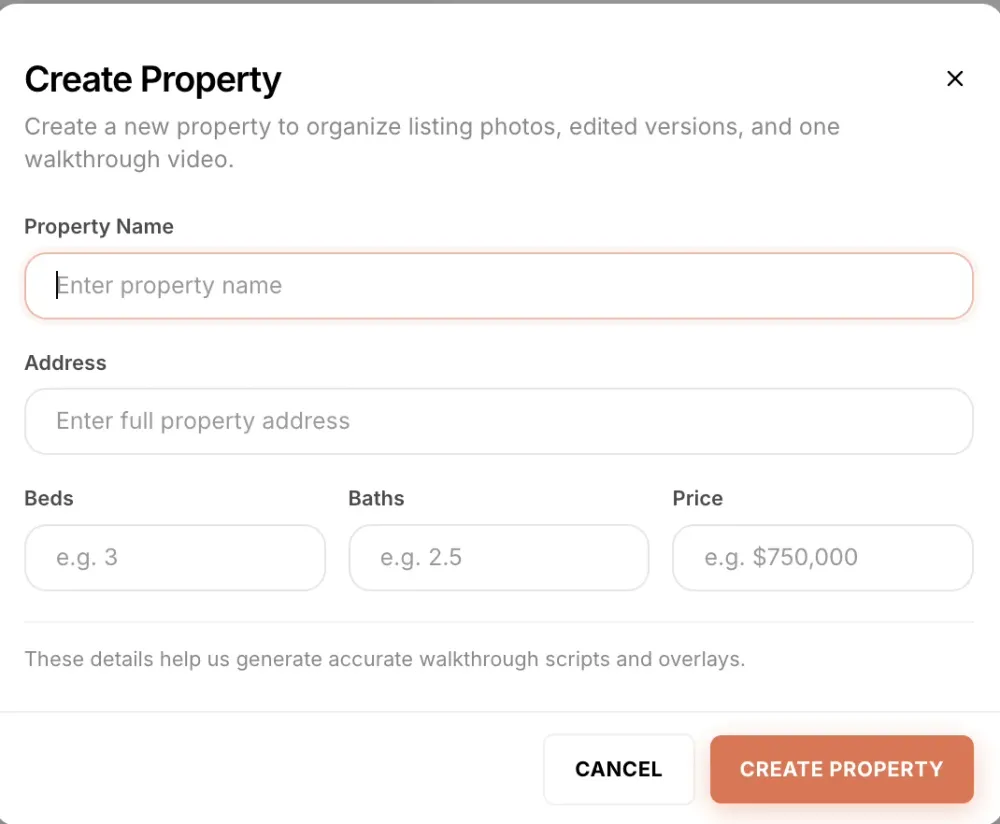
Create the property
Every listing gets its own record: name, address, beds, baths, and price. Those details keep the media organised per listing and feed the walkthrough video script later, so you never type the specs twice.
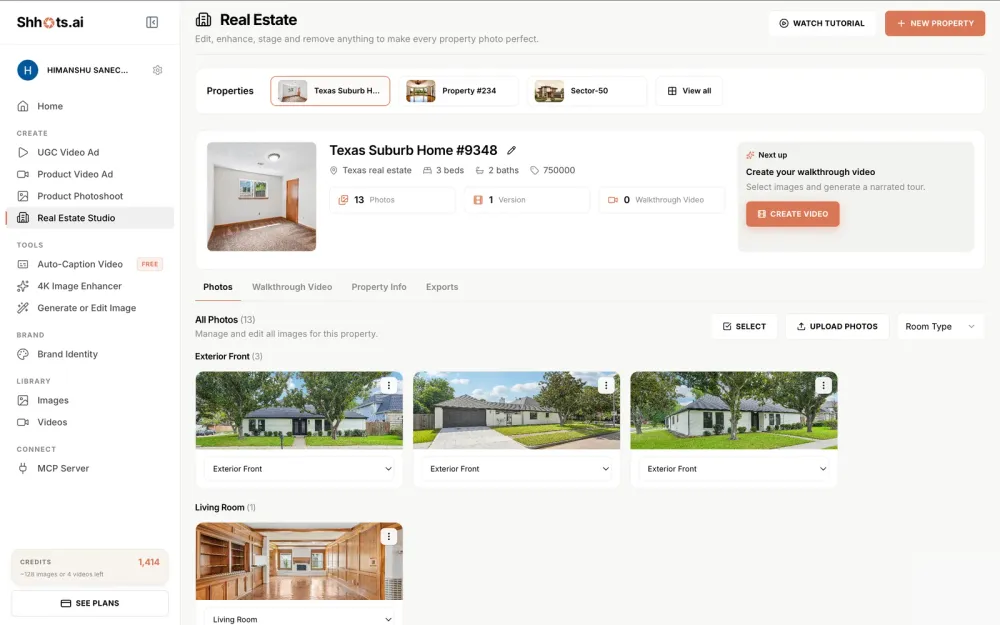
Upload the shoot, get automatic room sorting
Upload the full shoot at once. Every photo is classified by room type (exterior front, living room, kitchen, dining, bedroom, bathroom, office), so a 40-photo shoot arranges itself into a grouped gallery. Any photo can be reassigned from one dropdown.
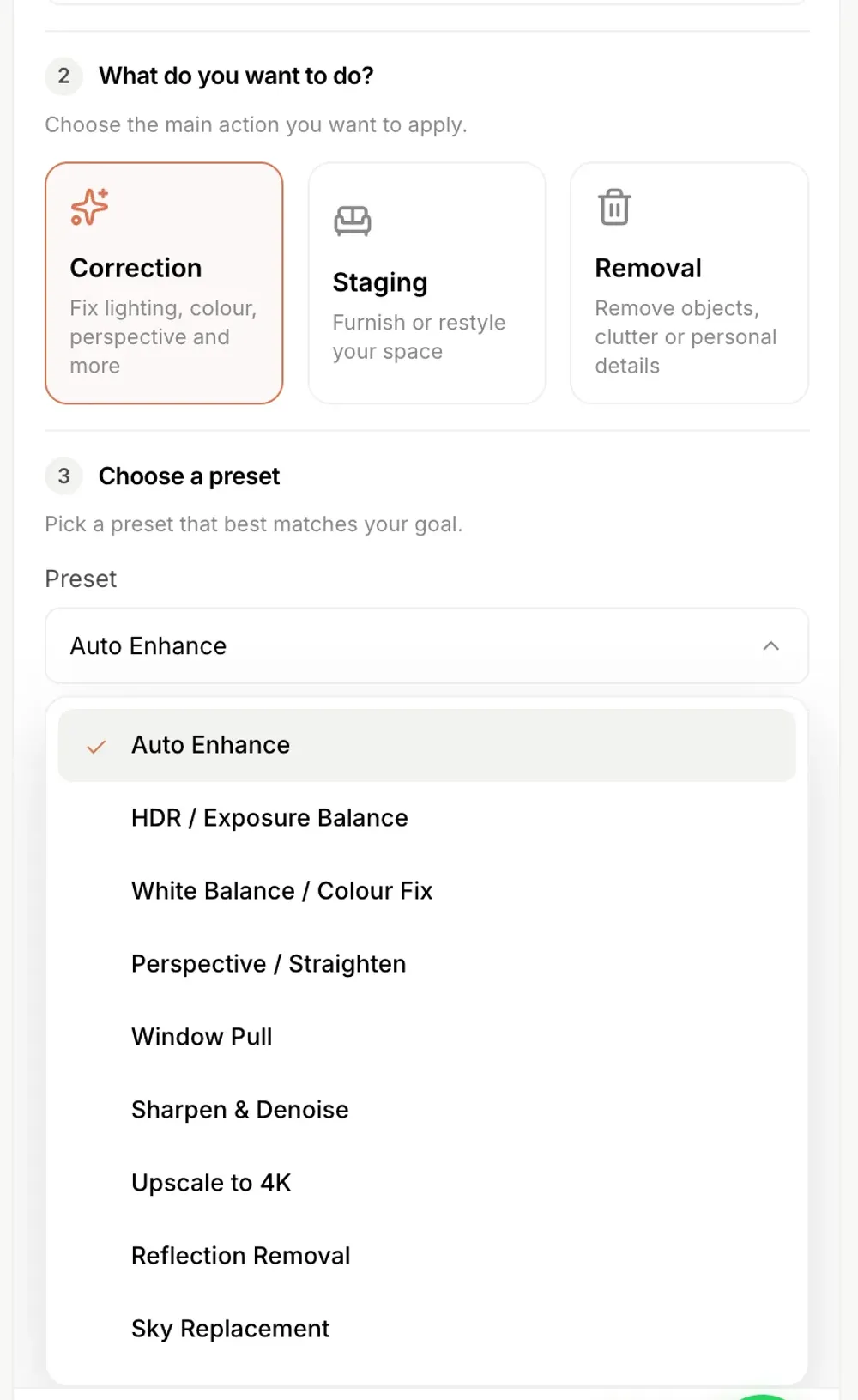
Pick an action and a preset
Choose Correction, Staging, or Removal, then a named preset from the list. Set how many variations you want, add a one-line comment if something specific must be preserved, and generate. No prompt writing at any point.
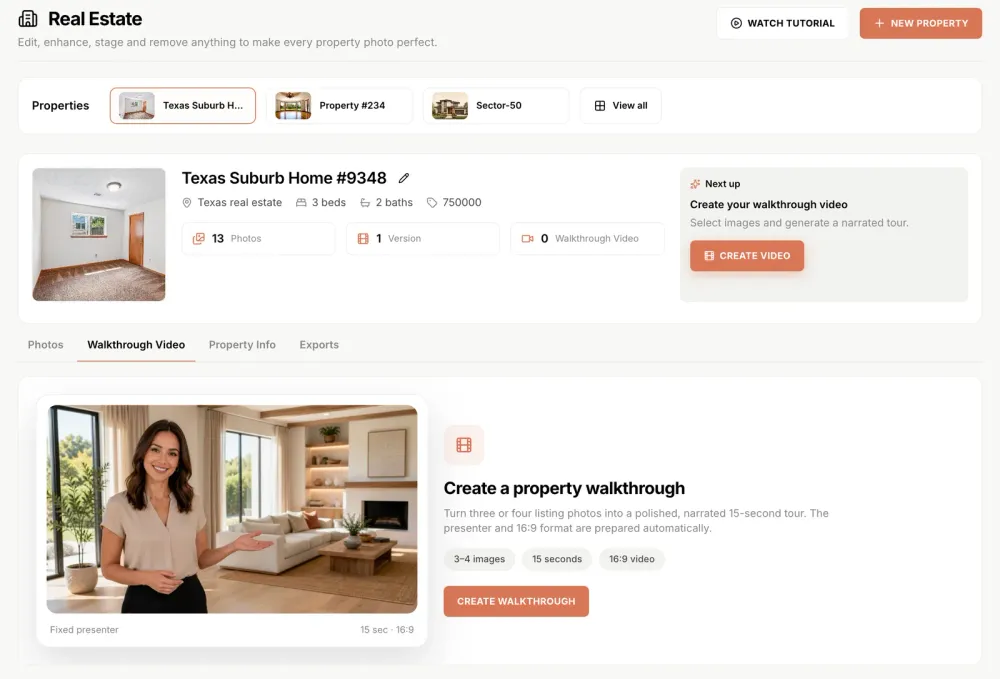
Review the versions and export
Compare each generated version against the untouched original, which stays saved beside it, then export watermark-free at full resolution with the commercial license included. The finished gallery can also feed a narrated walkthrough video, that lives on its own page.
Demo
The sky changes. The house does not.
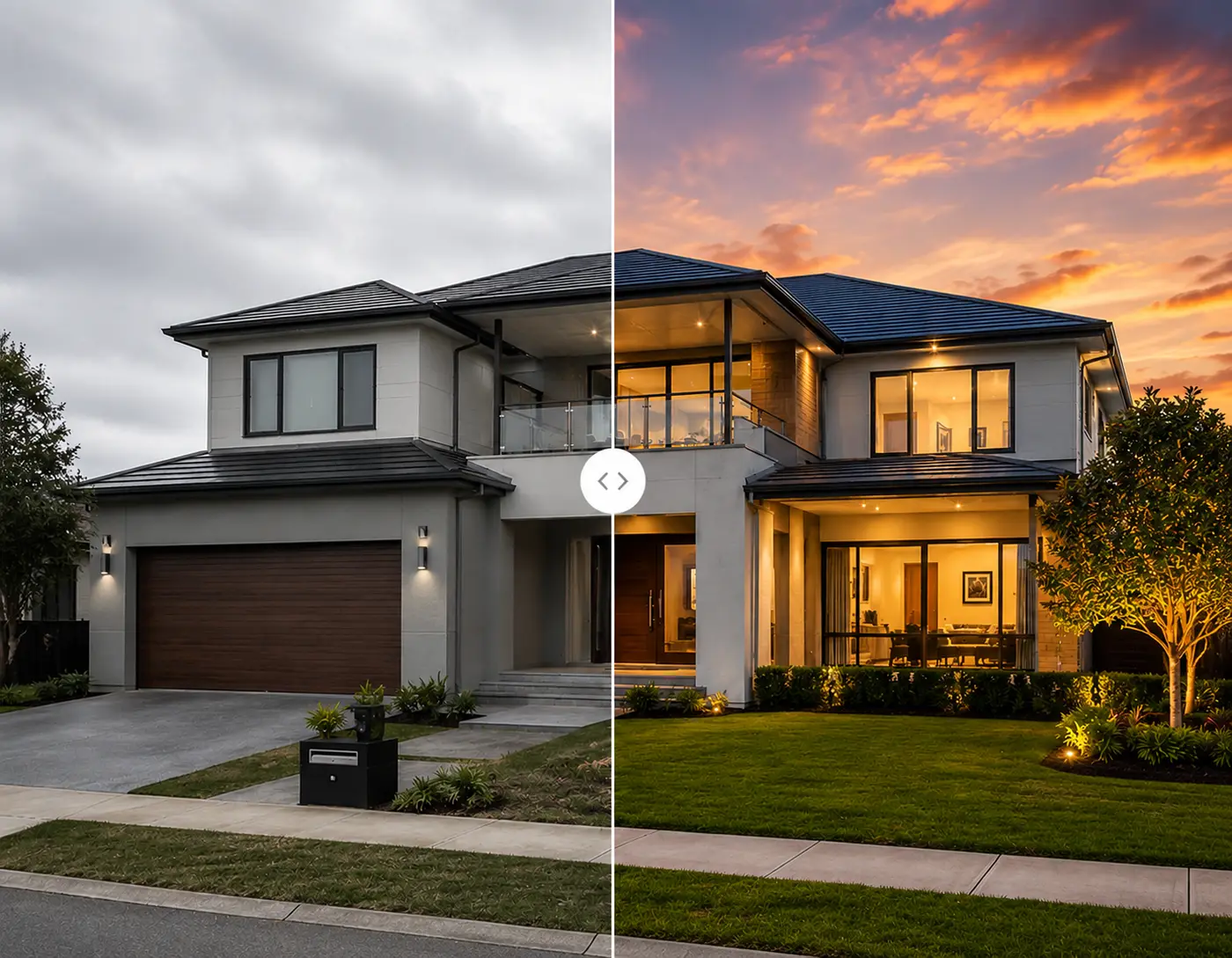
Sky Replacement on a real exterior shot, dragged against the untouched original. Watch the roofline, windows, stone façade, and driveway hold their exact positions while the sky, grass, and pathway change.
Three actions, sixteen presets
Pick what you want done. Never how to say it.
Every edit runs through a named preset under one of three actions, so results stay identical across a 30-photo shoot. An optional comments field is there when one image needs something specific: a nudge, never a requirement.
Correction
Nine presetsFix lighting, colour, perspective and more
Staging
Three modes × eight stylesFurnish or restyle your space
Removal
Four presetsRemove objects, clutter or personal details
Correction
Auto Enhance
A balanced overall correction in one click. The default, and enough for most photos.
Correction
HDR / Exposure Balance
Recovers blown-out windows and dark corners in the same frame, from a single exposure. No bracketing.
Correction
White Balance / Colour Fix
Removes the colour cast that mixed indoor lighting always leaves behind.
Correction
Perspective / Straighten
Corrects converging verticals and tilted horizons from wide-angle interiors.
Correction
Window Pull
Replaces washed-out window glare with the actual outdoor view: pool, ocean, skyline.
Correction
Sharpen & Denoise
Cleans up soft or grainy shots, including phone photos taken in low light.
Correction
Upscale to 4K
Lifts low-resolution images to print and MLS quality, ready for brochures and signage.
Correction
Reflection Removal
Clears mirror and glass reflections, the photographer included.
Correction
Sky Replacement
Swaps a grey overcast sky for a clear one, masking cleanly around rooflines and trees. For a full twilight conversion, see day to dusk.
Staging
Stage empty room
Furnishes a vacant space from scratch, with lighting and shadow matched to the photograph.
Staging
Restyle room
Keeps the existing layout and replaces the furniture and decor with a new aesthetic.
Staging
Occupied to Vacant
Strips a furnished room back to empty, then stages it fresh in the style you pick.
Removal
Remove furniture
Empties a lived-in room so buyers see the space itself, not the seller’s sofa.
Removal
Object removal
Takes out one specific thing: the bin, the pet bed, the cables, the car on the driveway.
Removal
Declutter
Clears countertops, shelves, and floors across the whole frame in a single pass.
Removal
Privacy Blur
Obscures family photos, documents, and personal details before the listing goes public.
Each staging mode carries eight named styles, the full breakdown lives on the AI virtual staging page, so the three modes cover 24 combinations before you have typed a word.
Beyond correction
The same gallery also stages and films itself.
Correction is one of three actions in the studio. Once the shoot is clean, the same property gallery feeds virtual staging and a narrated listing video, on the same credits. Both have their own page with the full detail.
Virtual staging
Eight styles, three modes, about $0.45 an image
Furnish an empty room, restyle a dated one, or clear a seller’s furniture and stage it fresh. Modern, Scandinavian, Luxury, Coastal, Farmhouse, Minimalist, Boho, and Mid-century, all structure preserving, all under a minute.
See AI virtual stagingListing video
A 15-second narrated walkthrough from listing photos
Pick three or four finished photos, set the tour order, and render a 16:9 walkthrough with an on-camera presenter. The script is written from your property record and stays editable, with toggles for price and agent name.
See the video generatorRunning this across many listings a month? Bulk real estate photo editing covers the whole-shoot and multi-property workflow for brokerages, portals, and photography companies.
Before & after
Real listings, real before-and-afters.
Drop in your own listing photo to see the same transformation on your shoot. Watermark-free output included.
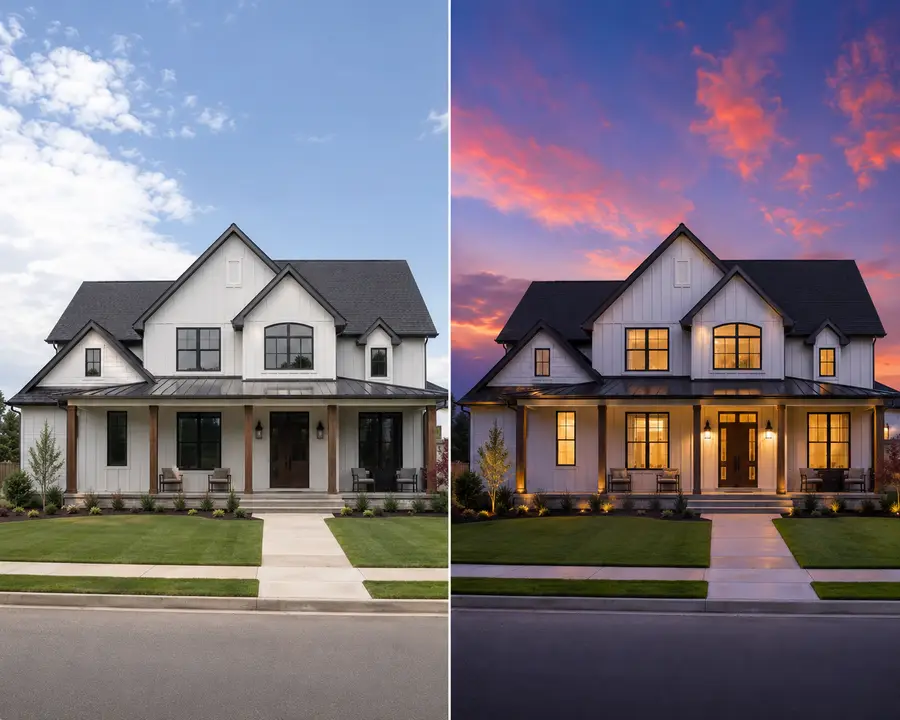
Exterior · daytime → twilight
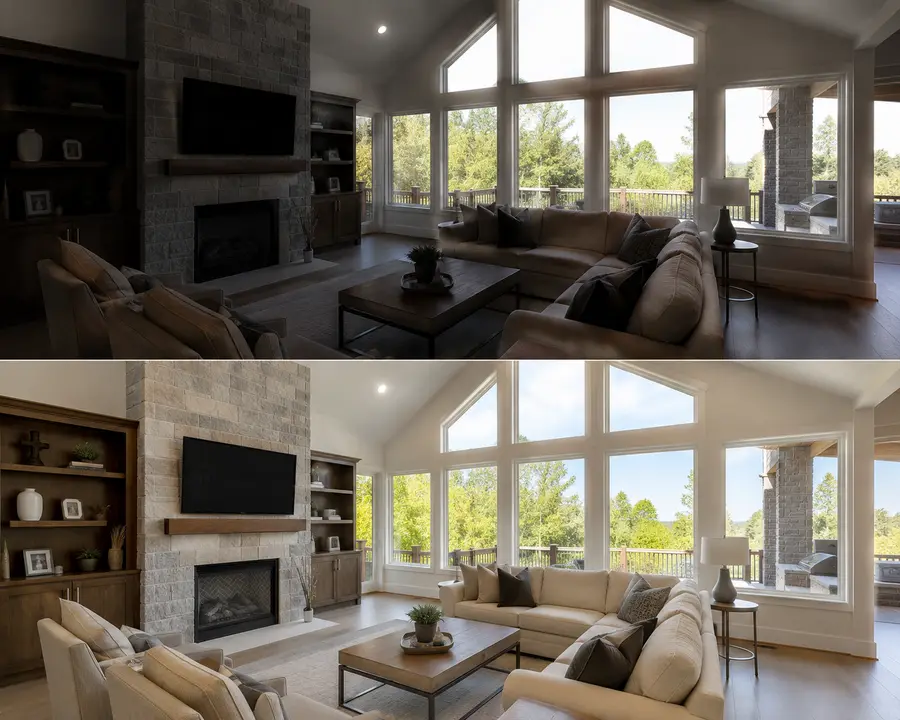
Interior · HDR balancing
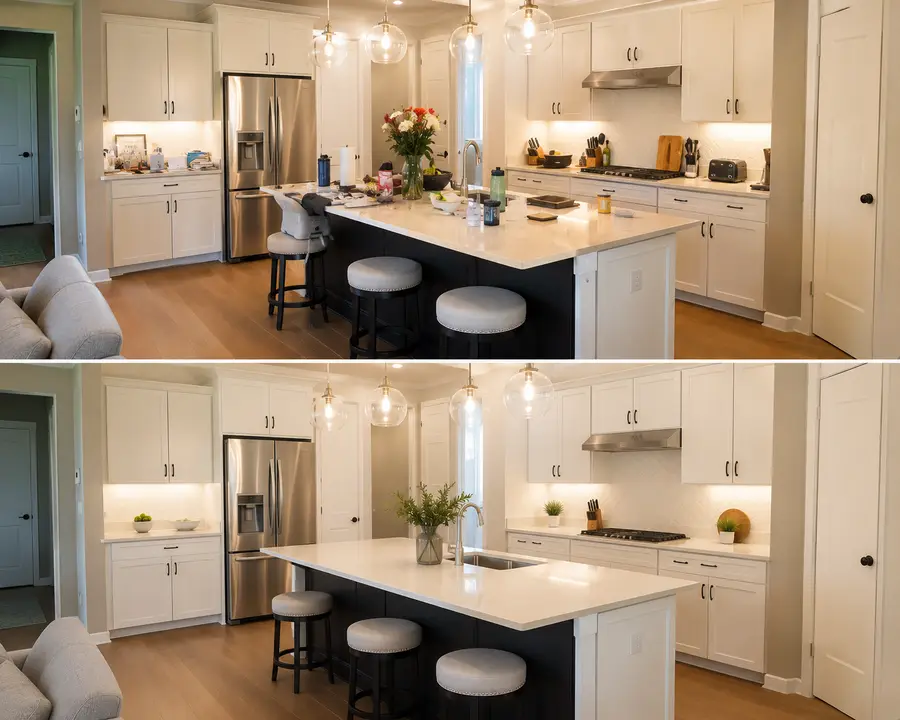
Kitchen · clutter removal
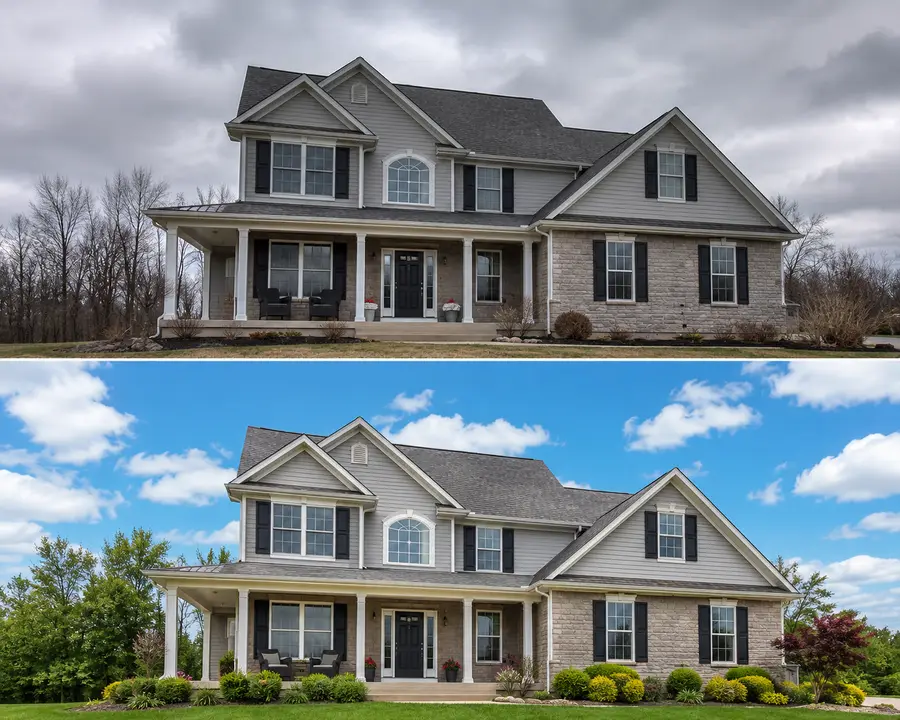
Exterior · sky + lawn
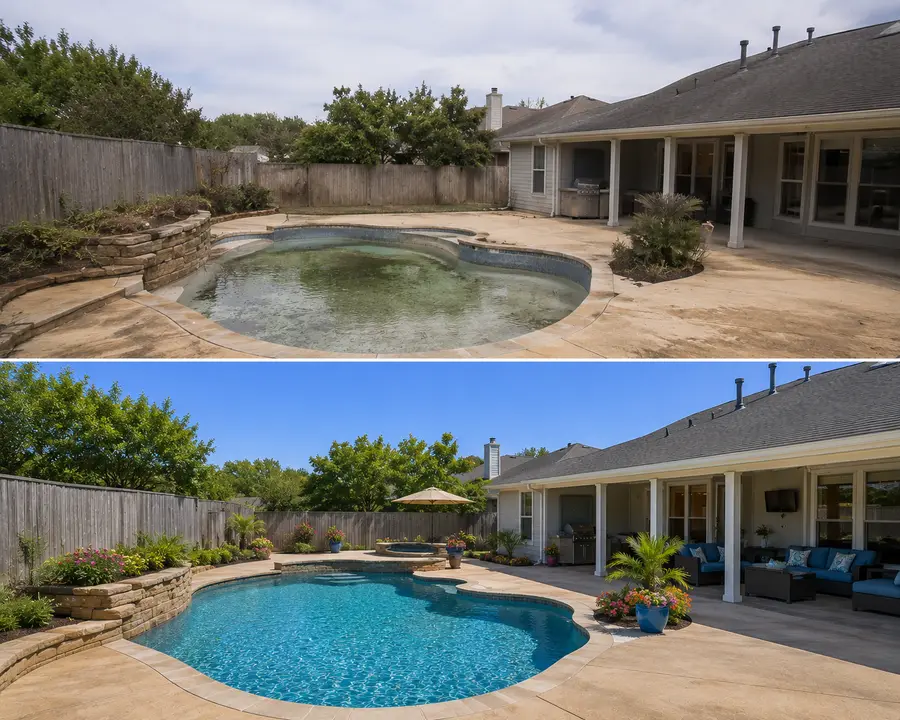
Backyard · pool restoration
Services vs software
Real estate photo editing services, priced against doing it yourself.
Most people searching for real estate photo editing services are comparing outsourced vendors, who bill per photo per job. Here is that menu against a flat credit plan. Service prices are the published rates at BoxBrownie and Styldod, verified August 2026.
| Job | Outsourced editing service | Shhots AI |
|---|---|---|
| Image enhancement / correction | $1.60 to $2.00 a photo | 55 credits, about $0.45 |
| Day to dusk / twilight | $4.00 to $5.00 a photo | 55 credits, about $0.45 |
| Sky replacement | Often bundled with enhancement | 55 credits, about $0.45 |
| Object or clutter removal | $4.00 to $10.00 a photo | 55 credits, about $0.45 |
| Virtual staging | $16 to $30 a photo | 55 credits, about $0.45 |
| Turnaround | 12 to 48 hours | Under a minute |
| Revisions | 1 to 2 free, then billed | Regenerate for 55 credits |
| Billing | Per photo, per job | Flat $49 a month, 6,000 credits |
The honest trade is judgement. A service puts a human editor on every frame and will catch things a preset does not. Software gives you the frame back in a minute for cents, so you fix problems by regenerating. Below roughly one listing a month the service stays simpler. Above it, the per-photo bill is the thing that stops making sense. Photographers running volume should start with bulk real estate photo editing, and the premium edit every service charges most for has its own page: AI day to dusk photo editing.
Removal
Remove furniture and clutter from listing photos.
Digital decluttering is its own job, and it is the one sellers notice. Four named presets handle it, each 55 credits and under a minute, the same as any other generation.
Remove furniture
Empties a lived-in room so buyers judge the space instead of the seller's sofa. Pair it with staging to go from occupied to freshly furnished in two generations.
Object removal
Takes out one specific thing: the bin, the pet bed, the cables, the car on the driveway. The rest of the frame is left alone.
Declutter
Clears countertops, shelves and floors across the whole frame in one pass. This is the preset that does the most work on a kitchen.
Privacy blur
Obscures family photos, documents and personal details before the listing goes public. Required more often than agents expect on occupied listings.
One caution that applies to all four: removal is for clutter and personal effects, never for defects. Editing out damage crosses from presentation into misrepresentation, and no disclosure label fixes it. The MLS and state disclosure guide sets out where that line sits.
Built for
Realtors, photographers, and the teams behind them.
AI real estate photo editing serves three different jobs: the listing agent shipping same-day photos, the photographer killing the post-production bottleneck, and the brokerage standardising look across an entire MLS feed.
Realtors & listing agents
The whole listing pipeline before lunch on listing day: correct the shoot, stage the empty rooms, remove the seller’s clutter, and ship the teaser video, without a single vendor email.
Real estate photographers
Remove the post-production bottleneck. Hand RAWs to the AI, ship the gallery before you leave the property, and double the listings you can take per week.
Brokerages & teams
One visual standard across every agent and every photographer. Because media is filed per property, nobody digs through a shared drive for “final_v3_edited” again.
Interior designers
Restyle a client’s actual room in eight aesthetics using photos of their real space. The structure never changes, so they see a genuine preview instead of an inspiration board.
Short-term rental hosts
Airbnb and Vrbo photos drive occupancy directly. Correct the lighting, declutter the counters, and blur anything personal before the listing goes live.
High-volume property brokers
Builder floors, society listings, and resale flats usually arrive as raw phone photos. Auto Enhance plus Declutter turns an unusable shoot into a publishable one.
Compare
AI real estate photo editing vs. manual editing services.
Every line item that adds up on your editing invoice, turned into an instant feature on Shhots AI.
| Feature | Manual editing service | Shhots AI |
|---|---|---|
| Photo edit, per image | $1.50–$3.00 | ~$0.45 |
| Edit turnaround | 12–48 hours | Under a minute |
| Virtual staging | Separate vendor, $16–$75/image | Included, same credits |
| Room-type sorting | You rename files | Automatic |
| Listing video | Videographer + edit | 15s narrated, built in |
| Original kept on file | Your own backups | Every version, per property |
| Commercial license | Per-image fees | Included free |
| Watermarks | On free tiers | Never |
| Pricing | Per-photo fees | Flat plan from $49/mo |
Shhots AI figures are based on 55 credits per image generation on the Pro plan ($49/month, 6,000 credits, refreshed each billing cycle). Credits are one shared pool across every Shhots AI feature, so ~$0.45 is a ceiling rather than a forecast. Manual staging range reflects published 2026 industry pricing guides.
FAQ
AI real estate photo editing, answered.
Everything realtors, photographers, and brokerages ask before they switch from manual editing to Shhots AI.
What are the best AI tools for real estate photo editing in 2026?
The category splits three ways in 2026. Batch correction tools like AutoHDR handle exposure and sky work from about $0.37 an image with a 20 to 30 minute turnaround. Managed services with a human in the loop run $1.10 to $2.25 an image, with PhotoUp billing in credits and BoxBrownie charging $2 for image enhancement and billing day to dusk, item removal and staging separately. Shhots AI sits in the first group at about $0.45 an image, under a minute, with correction, object removal, virtual staging and listing video sharing one credit pool on the $49 a month Pro plan. Which is right depends on volume: below roughly five listings a month the editing hours are small enough that outsourcing buys little, and above fifteen the time saved is worth more than the per-image gap.
What is AI real estate photo editing?
AI real estate photo editing uses artificial intelligence to enhance and retouch listing photos automatically: sky replacement, HDR balancing, white-balance correction, perspective straightening, window pull, reflection removal, and clutter removal. Instead of hand-editing each photo in Lightroom or Photoshop, you upload a listing shoot and the AI returns MLS-ready images in minutes.
What is Real Estate Studio on Shhots AI?
Real Estate Studio is the property workspace that AI real estate photo editing runs inside. Every listing gets its own property record with name, address, beds, baths, and price. Uploaded photos are sorted automatically by room type, every edit runs through a named preset instead of a prompt, and each generated version is saved against the property alongside the untouched original. The same gallery then feeds a 15-second narrated walkthrough video. It is included on the Pro and Scale plans.
How does Shhots AI real estate photo editing work?
Create a property, upload the shoot, and the photos sort themselves by room type: exterior, living room, kitchen, dining, bedroom, bathroom, office. Select an image and pick one of three actions: Correction, Staging, or Removal. Each opens a short list of named presets. Choose how many variations you want, optionally add a one-line comment like "keep the warm tone", and generate. Each image generation costs 55 credits and takes under a minute.
Do I need to write prompts to edit listing photos?
No. Real Estate Studio is promptless by design. Every edit runs through a named preset (Auto Enhance, Sky Replacement, Stage empty room, Declutter, and so on), which is what makes results repeatable across a 30-photo shoot. An optional comments field lets you add one specific instruction per generation, but it is never required.
Is there a free AI real estate photo editing tool?
Most free AI real estate photo editors watermark output, cap resolution, or limit you to a handful of edits per day, none of which is usable for an MLS listing. Shhots AI has no free tier. Real Estate Studio is included on the Pro plan at $49/month (6,000 credits) and the Scale plan at $99/month (12,000 credits), at full resolution, watermark-free, with a commercial license included. Cancel anytime.
Can the AI replace skies in real estate photos?
Yes. AI sky replacement is one of the most common edits for exterior real estate photos. Shhots AI detects the sky region, masks it cleanly around rooflines, trees, and power lines, and inserts a natural blue sky or golden-hour sky with matched lighting on the rest of the scene.
Can the AI do HDR real estate photo editing?
Yes. Shhots AI handles HDR real estate photo editing without bracketed exposures. The AI balances over-exposed windows, lifts dark interior shadows, and recovers detail in highlights, the same effect you get from a manual three-exposure HDR blend, but in a single pass on a single file.
Can I edit a whole listing shoot in one go?
Yes, and that is the workflow the studio is built around. Upload the full shoot to a property and every photo sorts itself by room type, so you work through a grouped gallery preset by preset instead of opening files one at a time. For brokerages, portals, and photography companies running this across many listings a month, see bulk real estate photo editing.
Will the AI change the structure of the room?
No, and this is the constraint the whole studio is built around. Walls, windows, doors, floors, ceilings, built-ins, and sightlines stay exactly where they are in the original photo. The AI corrects, furnishes, or empties the space without redrawing it, so the room a buyer sees in the listing is the room they walk into on the tour.
How much does AI real estate photo editing cost per image?
Every image generation costs 55 credits, which works out to roughly $0.45 on the Pro plan at $49 a month for 6,000 credits, or about the same on Scale at $99 a month for 12,000 credits. There is no per-listing minimum and no per-photo invoice. Outsourced editing services generally quote $1.50 to $3.00 per image for correction, with a 12 to 48 hour turnaround.
How is this different from aihomedesign.com or Photofy?
Shhots AI is a complete creative studio: AI photo editing, virtual staging, listing videos, and social-ready exports in one workspace, on one subscription. Most dedicated real estate editing services charge per image on top of a subscription; Shhots AI bundles Real Estate Studio into the $49/month Pro plan, and the same credits cover product photography, video generation, and 4K upscaling for the rest of your marketing stack.
How fast is AI real estate photo editing?
Under a minute per image generation, versus the 12 to 48 hours a human editing service takes and the 24 to 72 hours typical of manual virtual staging. Because it is that fast, you can generate several staging styles of the same room and pick the one that sells the space best instead of committing to one and waiting two days to see it.
Can I use AI-edited real estate photos commercially?
Yes. Every Shhots AI plan ships watermark-free output with a full commercial license. Use the edited photos in the MLS, on Zillow, Realtor.com, Redfin, your brokerage site, brochures, and paid Facebook or Google ads without restriction. Remember to label virtually staged images as virtually staged, which most MLS rules and NAR’s Code of Ethics require.
What resolution does Shhots AI export at?
Up to 4K. Shhots AI exports edited real estate photos at full input resolution, and an Upscale to 4K preset sits right inside the Correction list, so low-resolution phone shots can be lifted to print-ready sizes for brochures, signage, and large-format displays without leaving the property.
Does it keep the original photo?
Yes. Every edit is saved as a new version against the property and never overwrites the original, so the untouched file stays one click away. That matters beyond convenience: California’s AB 723, in effect since 1 January 2026, requires a disclosure near any digitally altered listing image plus a link to the original, unaltered version.
What do realtors use to edit photos?
Three routes, in rough order of how common they are. Most agents send the shoot to their photographer, who either edits in Lightroom or outsources it to a service at $1.60 to $2.00 a photo. Some outsource directly to an editing service themselves. A growing number now run the shoot through AI editing software, which is the same job at about $0.45 a photo and under a minute per image instead of a 12 to 48 hour turnaround.
How do you enhance real estate photos?
The standard pass is four moves in order: correct the exposure so the windows are not blown out and the corners are not black, fix the white balance that mixed indoor lighting always skews, straighten the converging verticals a wide-angle lens creates, then clear the clutter. Sky replacement and a twilight conversion come after that on exteriors. On Shhots AI each of those is a named preset at 55 credits, so a full shoot is a sequence of presets rather than a Lightroom session.
Can AI edit real estate photos well enough for the MLS?
Yes, and MLS acceptability is about disclosure rather than image quality. Correction work such as exposure, white balance and straightening is ordinary photo editing that no board asks you to label. Virtual staging and materially altered images do need a label under most MLS rules, and some boards treat sky replacement and twilight conversion the same way. Output here is full resolution and watermark-free, and the untouched original stays saved beside every version so you can always produce the before file.
What are the MLS photo requirements I should edit toward?
Every MLS writes its own photo rules, and three requirements repeat across most of them: a minimum resolution, no branding, watermarks, or contact information on the image, and a disclosure label on materially altered photos. Shhots AI output is watermark-free at full resolution with a 4K upscale preset, and the untouched original stays saved for the disclosure side. Check your own board's spec sheet before listing day; our state and MLS disclosure guide covers the label rules board by board.
Is Shhots AI a real estate photo editor or an editing service?
It is a real estate photo editor you run yourself, in the browser, rather than a service that queues your shoot behind a human editor. That is the whole speed difference: a service quotes 12 to 48 hours because a person edits each file, and software returns each generation in under a minute for about $0.45. Nobody reviews your photos, so run the before-and-after comparison yourself before the gallery goes live.
Will AI real estate photo editing replace human photographers?
No. The photographer still captures the listing; AI replaces the post-production bottleneck. It removes the 1 to 3 hour edit cycle per shoot, so the same photographer can ship same-day listings without outsourcing edits or staying up till midnight in Lightroom.
Is this an AI real estate photo editing app or web tool?
Shhots AI runs entirely in the browser, with no desktop install, no plugin, and no GPU on your laptop required. Upload, edit, and download from any modern browser on Mac, Windows, iPad, or Chromebook.
Real Estate Studio
One property workspace, five ways in.
You are here
AI real estate photo editing
Sky replacement, HDR from one exposure, window pull, and clutter removal, 16 promptless presets at ~$0.45 an image.
AI virtual staging
Furnish empty rooms in 8 named styles across 3 modes, structure preserved, under a minute per image.
AI day to dusk editing
Daytime exteriors converted to twilight in under a minute, about $0.45 a photo, house unchanged.
AI real estate video generator
15-second narrated walkthrough videos with an on-camera presenter, built from 3–4 finished listing photos.
Bulk real estate photo editing
Whole-shoot and multi-property workflows for brokerages, portals, and real estate photography companies.
AI for real estate agents
The overview: the listing jobs AI genuinely does, per-listing economics, and where to start.

Ship your next listing before you leave the property.
Create your first property on Shhots AI and run a listing through it. Correction, virtual staging, clutter removal, and a 15-second narrated walkthrough video on one subscription. Watermark-free, commercial license, cancel anytime.
6,000 credits · Real Estate Studio included on Pro & Scale · Cancel anytime · Commercial license included
The studio
AI real estate photo editing fits inside the full Shhots AI workflow.
The same workspace that edits a 30-photo listing also generates cinematic walkthrough videos, virtually stages empty rooms, upscales older photos to 4K, and produces social-ready ads for open houses. One subscription, every format real estate marketing actually needs.
AI Virtual Staging
Furnish an empty room, restyle a dated one, or clear a seller’s furniture and stage it fresh. Eight named styles across three modes, structure preserved.
AI Real Estate Video Generator
Three or four finished photos become a 15-second narrated walkthrough in 16:9 with an on-camera presenter and a script from your property record.
Bulk Real Estate Photo Editing
Whole-shoot and multi-property workflows for brokerages, listing portals, property managers, and photography companies.
AI for Real Estate Agents
The category overview: the four listing jobs AI genuinely does, what it costs, what it cannot do, and where to start.
AI Product Photography
Same studio-quality engine powers ecommerce hero shots. Useful for real estate teams that also list staged furniture, décor, or short-term rental amenities.
Image to Video
Turn a single edited listing photo into a 5 to 10 second cinematic walkthrough clip, perfect for Reels, TikTok, and Zillow video tours.
4K Image Upscaler
Upscale older or low-resolution listing photos to print-ready 4K before the AI edit pass. Sharp on every screen, brochure, and yard sign.
AI Video Generator
Generate listing teaser videos with motion, voiceover, and captions. Cinematic walkthroughs from a still gallery, the companion to AI photo editing.
Image Ad Generator
Drop edited listing shots into platform-ready Facebook, Instagram, and Google ad creatives. Open-house promos in minutes.
Marketing Studio
The full Shhots AI workspace: photo editing, virtual staging, video, ads, and upscaling on one subscription. Built for real estate marketing teams.
Pricing
Real Estate Studio is included on Pro at $49 a month for 6,000 credits and Scale at $99 a month for 12,000 credits. One credit pool across every feature.
Related guides
Go deeper on listing media
Staging, disclosure, listing video, and what a finished before-and-after should look like.
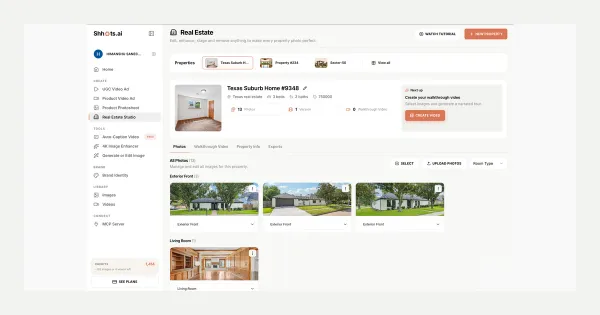
Real Estate Studio: AI Virtual Staging & Listing Videos
Real Estate Studio is live on Shhots AI, promptless photo correction, virtual staging in 8 styles, clutter removal, and 15-second narrated walkthrough videos. On Pro and Scale.
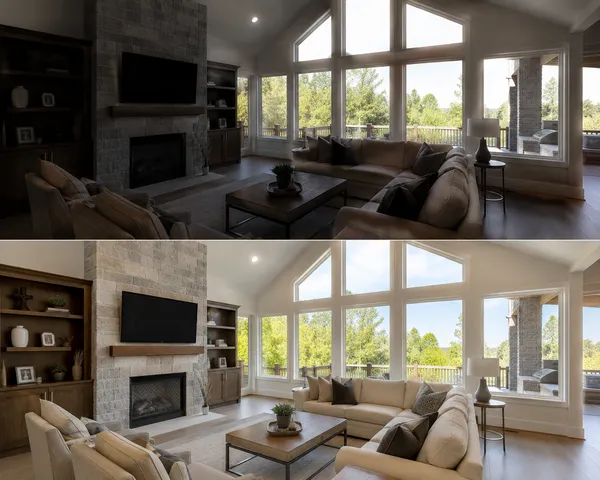
HDR Real Estate Photography: Bracketing vs AI in 2026
HDR real estate photography explained: why listing photos need it, how bracketing and flambient work, and when single-exposure AI HDR replaces both.
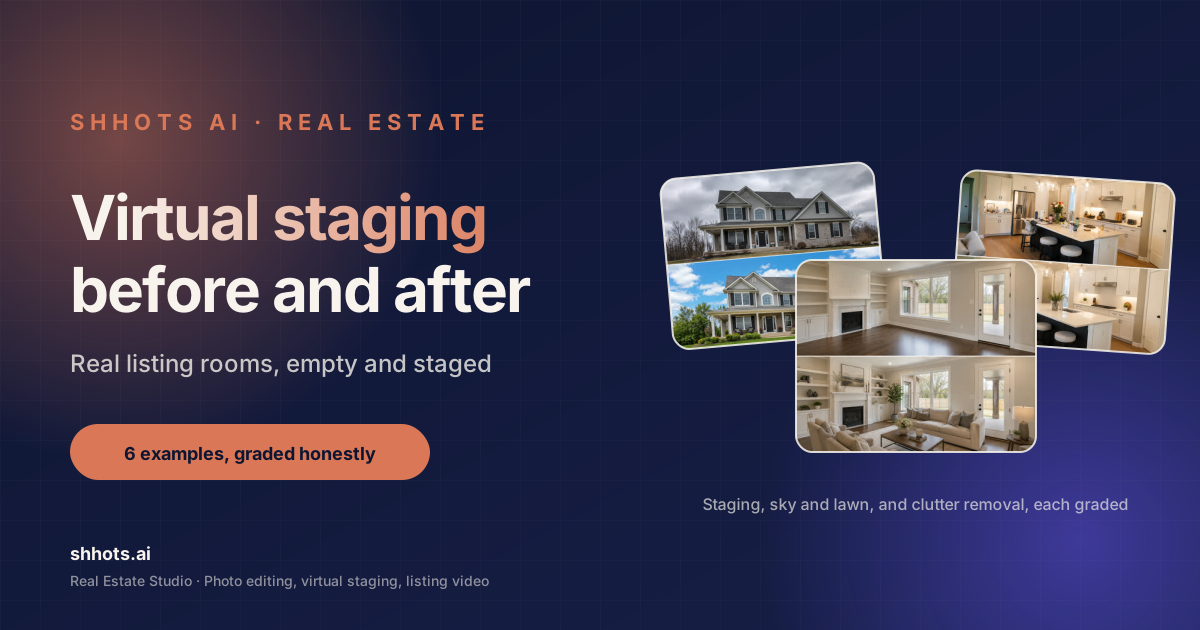
Virtual Staging Before and After: 6 Real Listing Examples
Six real virtual staging before and after examples, from empty living rooms to twilight exteriors. What changed, what stayed, and how to judge a good result.
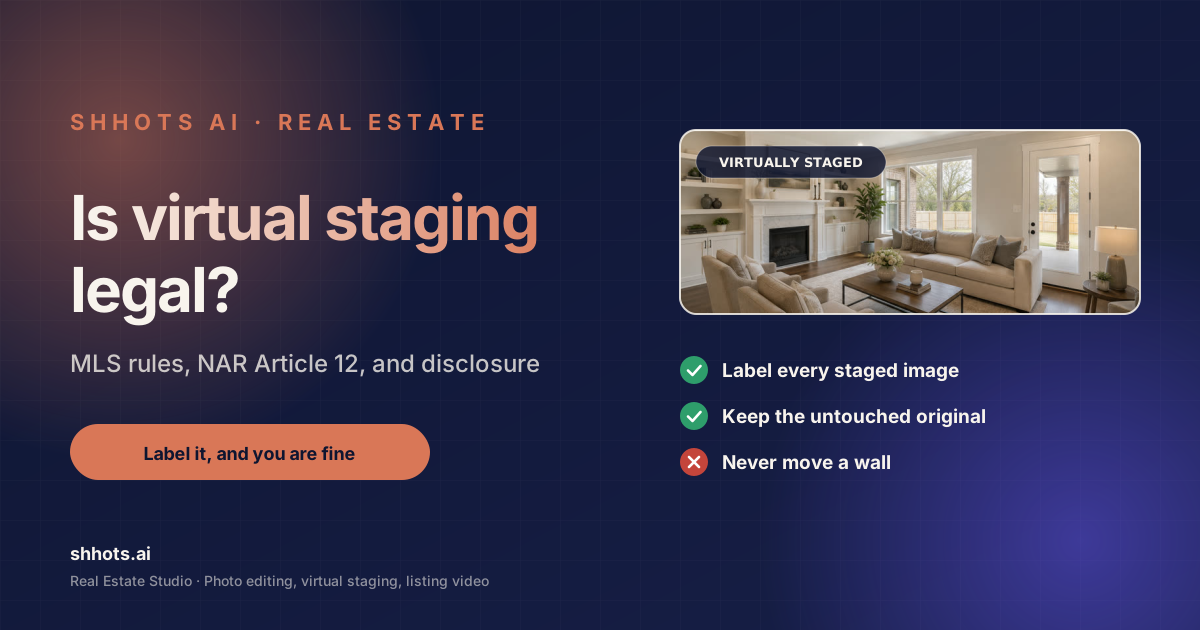
Is Virtual Staging Legal? State + MLS Rules, Verified 2026
Is virtual staging legal? Yes, with disclosure almost everywhere. AB 723, NAR Article 12, and per-MLS labeling rules verified against primary sources.
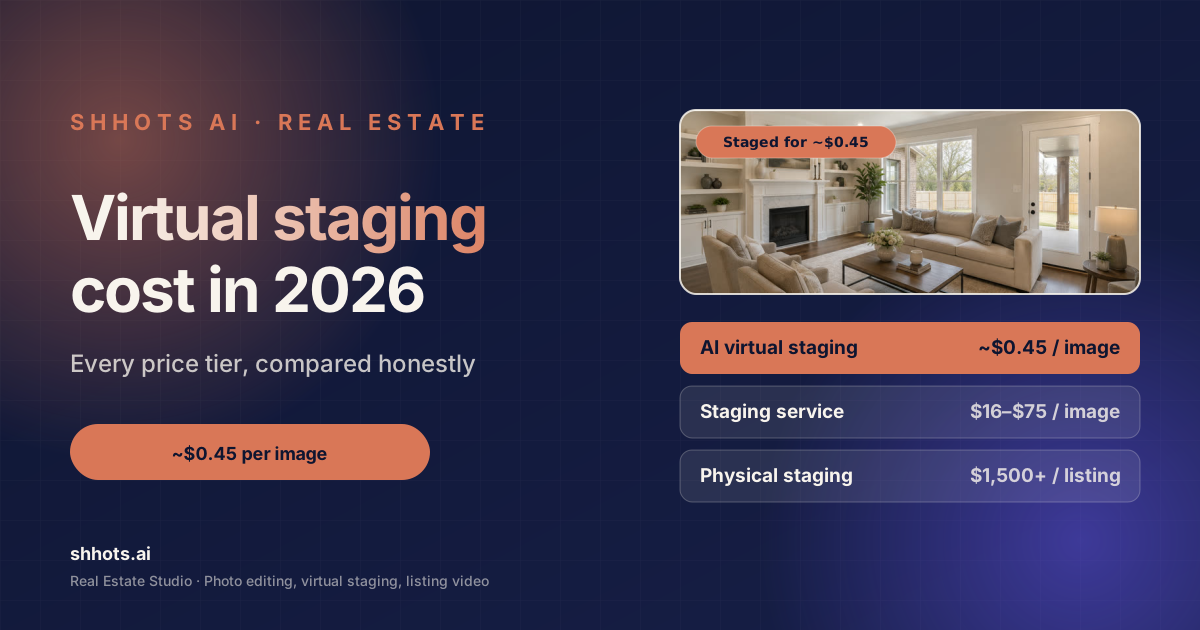
Home Staging Cost in 2026: Virtual Staging vs Real Staging
What home staging costs in 2026. Real staging runs $832 to $2,917 a listing, virtual staging $0.45 to $75 an image. Sourced numbers and hidden fees.

How to Make a Real Estate Video in 5 Steps (No Camera)
How to make a real estate video from listing photos in about five minutes. The full workflow, what to shoot, script structure, and where to post each cut.
Deep dive
The complete guide to AI real estate photo editing.
Seven short reads that cover the workflow end to end: why the MLS is moving to AI editing, what actually gets automated, HDR without brackets, virtual staging, video, and how Shhots AI compares.
01 · Why now
Why AI real estate photo editing is taking over the MLS
Five years ago, every real estate photo went through a human editor. A photographer would shoot the listing on a Saturday, ship RAWs to an editing service in Manila or Bangalore on Saturday night, and get the gallery back on Monday afternoon. That is two full days a listing sat without photos. AI real estate photo editing collapses that timeline to minutes. Shhots AI is built so the photographer can ship the gallery before the homeowner has finished locking up.
02 · What's automated
AI photo editing for real estate listings: what actually gets automated
The bulk of real estate post-production is repetitive: balance an over-exposed window, lift a dark interior corner, swap a flat grey sky for a clean blue one, tidy the grounds, straighten the verticals on a wide-angle interior. Each of those is now one named preset: HDR / Exposure Balance, Window Pull, Sky Replacement, Declutter, Perspective / Straighten. The AI handles the masking, the colour grading, and the relighting; you stay in control of the action, the preset, how many variations to generate, and an optional one-line note per image.
03 · HDR
AI HDR real estate photo editing without bracketed exposures
Traditional HDR for real estate needs three bracketed exposures (minus 2, zero, and plus 2) blended manually in Lightroom or Photoshop. Shhots AI synthesises HDR from a single exposure. The AI infers shadow detail and highlight recovery from the scene, so the photographer can shoot one frame per room and trust the AI to deliver a balanced HDR result. For listings shot on iPhone or Android by the listing agent, this is the difference between an MLS-quality photo and a snapshot.
04 · Virtual staging
AI virtual staging for empty listings
A correction pass fixes how a room is lit. It cannot fix a room being empty, and an empty room is the hardest thing for a buyer to judge because there is no reference object to read the scale against. That is a staging job rather than an editing one, and it runs from the same gallery for 55 credits an image against $1,500 to $4,000 to physically stage a listing. Full detail on modes, styles, and disclosure is on AI virtual staging.
05 · Beyond stills
AI photo and video editing tools for real estate
Listing portals surface properties with video above properties without, so the gallery is no longer the whole job. The sequence that works is correct first, stage second, film third, because a generated walkthrough is assembled from the stills you feed it and inherits every blown-out window you left in. Once the gallery is finished, three or four photos become a narrated 16:9 walkthrough on the AI real estate video generator, with vertical cuts from image to video and burned-in subtitles from the caption generator.
06 · The landscape
Best AI photo editing tools for real estate in 2026
The crowded field of AI real estate photo editing tools mostly falls into three camps: single-feature point tools (sky replacement only, virtual staging only), legacy services that wrap manual editing with an AI label, and full creative studios. Shhots AI sits in the third camp. The pricing is a simple monthly subscription. The output is watermark-free with a full commercial license on every plan. And the same dashboard handles the rest of real estate marketing: listing video, open-house ads, brochure-ready 4K upscales, and bulk batch processing for portfolio managers.
07 · Free tier truth
Is there a free AI real estate photo editing tool?
Strictly free AI real estate photo editors exist, but they all share the same three limits: watermarked output, capped resolution, and a hard daily edit count. None of those are usable for an MLS listing. Shhots AI has no free tier and no per-photo billing. Real Estate Studio is included on the $49/month Pro plan (6,000 credits) and the $99/month Scale plan (12,000 credits), watermark-free, at full resolution, with a commercial license included, cancel anytime. At 55 credits per image generation, a single Pro month covers a full batch of listings for most solo agents.
Where to start
Run your next listing through the AI.
Sign up for the $49/month Pro plan, create your property, and upload a single exterior shot. Run Auto Enhance, then Sky Replacement, then stage the empty living room in two styles. By the time you would normally email RAWs to an editor, the gallery and the walkthrough video are both done.