
Disclosure: Shhots AI is our product. Every price, plan and feature below was read on the vendor's own pricing, product, help or App Store page on 23 November 2026. We researched the third-party tools and did not run paid tests of them. Shhots AI is our product, and it is labelled as ours wherever it appears.
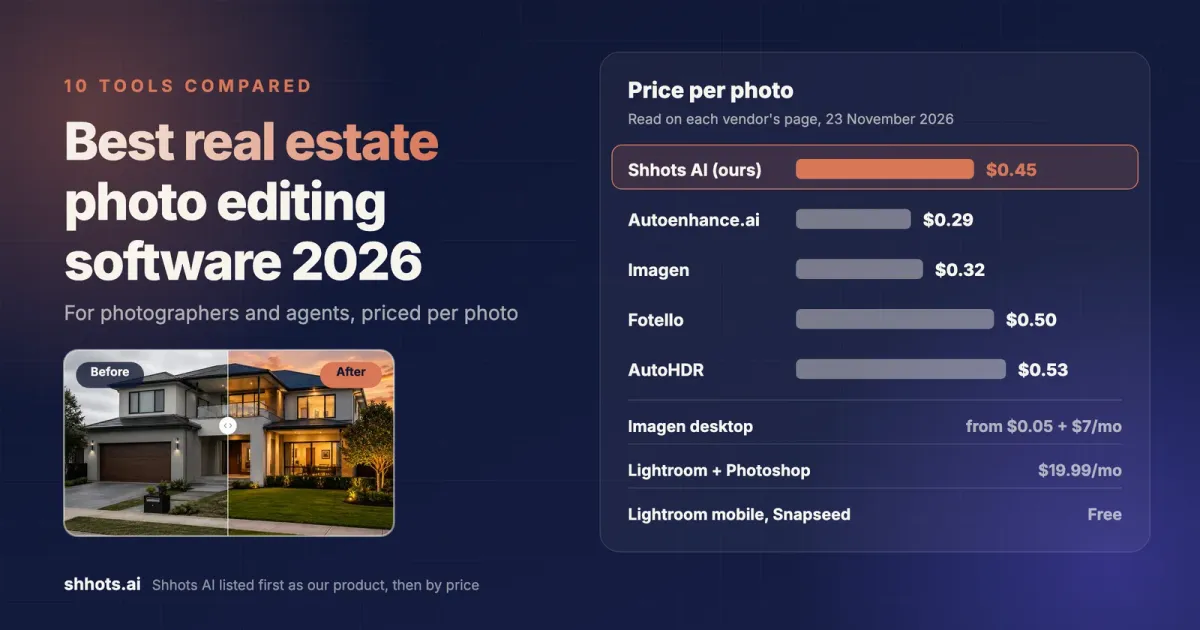
The best real estate photo editing software in 2026 depends on what you shoot: brackets on a tripod, or one frame on a phone. Photographers who bracket get the lowest per-photo prices from AI editors: Autoenhance.ai at $0.29 an image on its current offer, Imagen for Real Estate at $0.32, AutoHDR at $0.53 a credit on Standard. Agents shooting single exposures need a tool that balances one frame, and Shhots AI (our product) does that at about $0.45 an image with staging and listing video on the same credits. Adobe’s Photography plan, $19.99 a month for Lightroom Classic and Photoshop, is still the tool for hand edits.
Below: a quick pick by situation, a price table for all 10 tools, the cost of one 25-photo listing in each, and a section per tool. Every price was read on the vendor’s own page on 23 November 2026.
Which real estate photo editing software should you pick?
Start from your input files and your volume.
| If you | Use | Price (read 23 November 2026) |
|---|---|---|
| Shoot on a phone, one exposure per room, and also need staging or video | Shhots AI (our product) | About $0.45 an image on Pro, $49/month |
| Shoot 3 or 5 brackets and deliver many listings a week | AutoHDR or Autoenhance.ai | $0.53 a credit on AutoHDR Standard 500, less on yearly plans; $29/month for 100 images at Autoenhance.ai on its limited offer |
| Want the cheapest per-photo rate with no subscription | Imagen for Real Estate | $0.32 a photo, pay as you go |
| Run a photography business and want booking and delivery in the same tool | Fotello | $0.50 a photo pay as you go, or a free plan with Fotello branding |
| Want your own editing style applied inside Lightroom Classic | Imagen desktop app | From $0.05 a photo plus $7/month, or $129/month billed yearly |
| Hand-blend flambient or fix one hero shot | Lightroom Classic plus Photoshop | $19.99/month for both |
| Need to spend nothing | Snapseed, Lightroom mobile, or the free allowances below | $0 |
| Want a person to edit every frame | BoxBrownie or PhotoUp | $0.76 to $2.00 a photo by plan, covered in our outsourcing guide |
The split that decides most of this is brackets versus single exposure. AutoHDR’s own guide tells you to shoot “3 or 5 bracketed exposures per angle.” An agent with a phone has one frame per room, and that changes the shortlist.
How do the 10 tools compare on price per photo?
| Tool | Type | Price per photo | Input it expects | Sky, window, staging | Free option | Turnaround |
|---|---|---|---|---|---|---|
| Shhots AI (our product) | AI, web | About $0.45 (55 credits on Pro, $49/month) | Single exposure | Sky, window pull, clutter removal, staging | No free tier | Under a minute an image |
| AutoHDR | AI, web | $0.43 to $0.80 a credit by plan; $0.53 on Standard 500 ($265/month) | 3 or 5 brackets; single exposure accepted | Sky, twilight, staging, decluttering | 10 credits a month | 15 minutes, per the company |
| Autoenhance.ai | AI, web | $0.29 on the $29/month offer (100 images); $0.75 pay per image | Brackets, up to nine merged; single images accepted | Sky, window pull | Watermarked previews, no account | 5 to 10 minutes a shoot, per the company |
| Fotello | AI, web, plus booking and delivery | $0.50 pay as you go; $16 a listing on Essential | Single exposure, flash, brackets, flambient | Twilight and staging at $1 each | Free plan, 30 photos a listing, Fotello branding | ”Delivered instantly,” per the company |
| Imagen for Real Estate | AI, web | $0.32 pay as you go | HDR Merge of brackets; JPEG, RAW, HEIC | Sky, window pull, staging, twilight | 100 free edits at signup | First batch under 10 minutes, per the company |
| Imagen desktop | AI with Lightroom Classic | From $0.05 plus $7/month; Limitless $165/month or $129 billed yearly | Your Lightroom catalog | Real estate tools on Limitless | 1,000 free edits | Not stated |
| Lightroom Classic | Desktop | $19.99/month with Photoshop | Brackets for HDR Photo Merge | By hand; Generative Remove for objects | No | Your time |
| Photoshop | Desktop | Same $19.99/month plan | Any | Sky Replacement built in | No | Your time |
| Lightroom mobile | Phone app | Free download; Premium from $1.99/month | Phone photos | By hand | Yes | Your time |
| Snapseed | Phone app | Free | Phone photos | Perspective and healing only | Yes, fully free | Your time |
“Per the company” means the vendor states the turnaround and we did not time it. AutoHDR charges one credit per image, and only when you download it; uploading and previewing are free, according to its upload guide.
What does a 25-photo listing cost in each tool?
Per-photo prices are hard to compare across subscriptions, credits and per-listing plans. Here is the same job, 25 finished photos, priced from each vendor’s published rate. The arithmetic is ours.
| Tool | Cost of 25 photos | How we got there |
|---|---|---|
| Autoenhance.ai | $7.25 | $0.29 an image on the $29/month offer |
| Imagen for Real Estate | $8.00 | $0.32 a photo |
| Shhots AI (our product) | About $11.25 | 1,375 credits at the Pro rate |
| Fotello | $12.50 | $0.50 a photo, pay as you go |
| AutoHDR | $13.25 | 25 credits at $0.53 |
| Autoenhance.ai, no subscription | $18.75 | $0.75 an image |
| PhotoUp, single exposures | $27.50 to $32.50 | 1 credit each at $1.10 to $1.30 |
| PhotoUp, HDR brackets | $34.38 to $40.63 | 1.25 credits each |
| BoxBrownie | $50.00 | $2 image enhancement each |
The AI editors land between $7 and $19 for the listing. Human services land between $27 and $50 at their pay-as-you-go and pack prices. Two exceptions: PhotoUp’s monthly plans, billed quarterly from $39 a month, bring its credits to $0.76 to $0.80, about $19 to $20 for 25 single exposures, and BoxBrownie showed prices 20% lower on 24 November 2026, which takes its listing to $40. Staging and twilight change the order: BoxBrownie charges $30 a staged image and $5 for day to dusk, Fotello charges $1 for each, and on Shhots AI they cost the same 55 credits as a correction.
What are the best AI real estate photo editing tools in 2026?
These five take a shoot in the browser and return finished files without a person editing each one. Shhots AI is first because it is our product and the only one built around a single exposure. The other four were built for photographers who shoot brackets or flash, and they differ most in how they price.
1. Shhots AI Real Estate Studio (our product): one exposure, plus staging and video
Shhots AI is ours, so weigh this entry accordingly. Real Estate Studio runs in the browser and edits from a single exposure: HDR from one frame, sky replacement, window pull, clutter removal and auto enhance, plus virtual staging and narrated listing videos from the same gallery.
Each image generation costs 55 credits, about $0.45 on Pro ($49 a month, 6,000 credits) or Scale ($99 a month, 12,000 credits). Real Estate Studio is on Pro and Scale only; Starter at $19 a month does not include it. There is no free tier.
Where it loses: if you already shoot clean brackets, AutoHDR, Autoenhance.ai and Imagen merge real captured exposures at $0.29 to $0.53, and captured light beats reconstructed light on a hard window. There is no human reviewer and no revision queue; you regenerate instead. Where it fits: an agent with a phone, one frame per room, who also needs two rooms staged and a listing video. The preset list is on the AI real estate photo editing page, and brokerages running many listings can start from bulk real estate photo editing.
2. AutoHDR: the bracket specialist
AutoHDR is built around bracketed exposures. Its recommended settings say to shoot “3 or 5 bracketed exposures per angle at ±2 EV apart.” A single exposure per angle is accepted “if needed,” for exteriors or when only one frame is usable, and the guide says the result lacks the range of a merged set.
Pricing is credits, and one credit covers one image:
- Free: 10 credits a month, extra credits at $0.80 each.
- Standard: $265 a month for 500 credits, $0.53 each, unused credits roll over.
- Enterprise: $960 a month for 2,000 credits, $0.48 each, with a dedicated account manager.
- Yearly billing is “up to 15% off,” per the pricing page.
Beyond HDR, the homepage lists sky replacement in three styles, day to dusk, virtual staging, grass greening, TV screen replacement, fire in the fireplace, object removal and auto-decluttering. It integrates with delivery software including Dropbox and has an API. The homepage says edits “land in your delivery page in 15 minutes.”
Earlier this year AutoHDR was quoted at “from $0.37” with a 20 to 30 minute turnaround, including on this site. On 23 November 2026 the lowest published rate was about $0.43 a credit, on Enterprise billed yearly. For the full breakdown and six alternatives with prices, read our AutoHDR alternatives guide.
3. Autoenhance.ai: the lowest subscription rate this month
Autoenhance.ai has the lowest per-image price on this list right now, with a caveat. The Essential plan shows $29 a month for 100 images, marked down 50% from $58 as a limited offer, with extra images at $0.29. Without a subscription, pay per image is $0.75. Unused credits carry to the next month, and files are kept for 45 days.
It takes both kinds of input. Its help article says the uploader auto-detects brackets and merges up to nine per image, and you can mix single frames into the same upload. You pay per final image you download, so a three-bracket set counts as one image. Listed features include sky replacement, window pulling, perspective correction, white balance, relighting and RAW support. The homepage says a full shoot is edited “in 5 to 10 minutes.”
You can preview watermarked edits with no account. Budget at $0.58 an image ($58 for 100) in case the offer ends before your second month.
4. Fotello: editing inside a photography business platform
Fotello sells itself as a real estate media platform: booking, delivery, payments and an agent portal, with AI editing inside. That makes its pricing per listing rather than per photo on the subscription plans.
- Free: $0 a listing, up to 30 photos a listing, with Fotello branding.
- Pay as you go: $0.50 a photo, twilight $1, staging $1.
- Essential: $16 a listing, billed on 75 listings a month ($1,200), up to 50 photos a listing.
- Ultimate: $18 a listing, billed on 75 listings ($1,350), up to 75 photos, with two twilight and two staging edits a listing included.
Its pricing table lists “Single Exposure or Flash,” “Single or Multi Bracket” and “Flambient and Ambient Shots” as supported, plus RAW and JPEG. Paid plans include unlimited human revisions, completed within 6 hours according to the page. The homepage says photos are “delivered instantly, not days,” and gives no official turnaround figure. Pick it if you also want the booking and delivery side. If you only need edits, $0.50 a photo is mid-pack.
5. Imagen for Real Estate: the browser app at $0.32
Imagen is best known for its desktop app for wedding and portrait photographers, and it runs a separate browser app for real estate. That app costs $0.32 a photo, billed monthly for the photos you edit, with every tool included. New accounts get 100 free photo edits, and on 23 November 2026 a Black Friday offer gave the first 30 days for $10, up to 2,000 photos.
The tool list covers HDR Merge, sky replacement, window pull, perspective correction, object removal, virtual staging and a “digital twilight” action, plus Clip Maker for short listing clips. It accepts JPEG, RAW, HEIC and DNG. The page says a first batch is typically ready in under 10 minutes. It does not state whether a single exposure is balanced the way a bracket set is, so check that on your own files if you shoot one frame.
Which desktop photo editing software for real estate has AI built in?
Desktop software costs a flat monthly fee and your own time. It wins on control: you decide every slider, and nothing leaves your machine until you export.
6. Adobe Lightroom Classic: the standard for bracket merges
Lightroom Classic comes in Adobe’s Photography plan at $19.99 a month (annual, billed monthly), which includes Photoshop and 1TB of storage. The cheaper $11.99 Lightroom plan covers the cloud-based Lightroom app only.
For real estate, the feature that matters is HDR Photo Merge. Select your brackets, merge, and Lightroom writes a new file with an HDR.dng suffix, stacked with the originals. Auto Align handles small shifts between frames, and the Deghost setting runs from None to High for moving trees or curtains. Batch merging a whole shoot works, though Adobe’s documentation on it is thin.
Generative Remove handles cords, bins and cars in the driveway. Adobe’s help pages say it does not currently deduct generative credits in Lightroom, and Adobe’s wording suggests that could change.
The cost is time. Our HDR real estate photography guide puts a full shoot’s edit cycle at 1 to 3 hours, which is the reason the AI tools above exist.
7. Adobe Photoshop: hero shots and flambient blends
Photoshop is in the same $19.99 plan. Two tools matter for listings. Sky Replacement (Edit > Sky Replacement) masks the sky, swaps in a preset or your own sky, and has an Edge Lighting slider to reduce halos around rooflines. And layer masks are how flambient blends are done: an ambient frame for window colour, flash frames for the room, blended by hand.
At 30 photos a listing, this is too slow for every frame. You open Photoshop for the twilight exterior that sells the house, or the room where an AI edit got the window wrong.
8. Imagen desktop: your style, applied to a Lightroom catalog
Imagen’s desktop app is a standalone app for Mac and Windows that works with Lightroom Classic catalogs, according to Imagen. You pick or train an AI Profile, and it edits the catalog with the processing done in the cloud. Imagen says it also identifies bracket sets by capture time and exposure and merges them into a new DNG.
Pricing on the main pricing page:
- Pay as you go: from $0.05 a photo plus a $7 monthly base fee.
- Limitless: $165 a month, or $129 a month billed yearly, with no per-photo cost and the real estate tools in the desktop app included.
- 1,000 free edits to start, no card needed.
The separate Imagen for Real Estate browser app above is not included in Limitless and has its own pricing. Pick the desktop app if your style lives in Lightroom and you want it applied in seconds without handing files to a service.
Is there a good real estate photo editing app for your phone?
Yes, for the hand-edit side. Neither app below merges brackets or stages rooms, but both fix the things that make agent phone photos look amateur: tilted verticals, dull colour and a stray object.
9. Lightroom mobile
Adobe Lightroom for iPhone and Android is free to download, with Premium tiers sold in-app. The App Store listing shows a 40GB Premium tier at $1.99 a month and the 1TB Lightroom plan at $9.99. Adobe’s mobile help says its HDR capture mode auto-aligns for hand movement and removes ghosting from moving objects such as cars or foliage. Shoot in that mode and you start from a better file.
10. Snapseed
Snapseed is Google’s free photo editor, and its App Store listing says it has “no subscriptions, purchases, ads, or watermarks.” The useful tools for listings are Perspective, to straighten converging walls, Healing, for small objects, and Selective, for lifting one dark corner. It has no HDR merge and no sky replacement. For a free real estate photo editor on a phone, it is the cleanest option.
Is there a free real estate photo editor?
Yes, with limits. Fully free tools are hand editors. The free AI options are allowances inside paid products.
| Free option | What you get | The limit |
|---|---|---|
| Snapseed | Full app, no watermark | Hand edits only, no HDR merge or sky replacement |
| Lightroom mobile | Free editing app | Premium features sold in-app |
| AutoHDR Free | 10 credits a month | Extra credits at $0.80 |
| Fotello Free | Up to 30 photos a listing | Fotello branding |
| Imagen for Real Estate | 100 free photo edits | One-time, at signup |
| Imagen desktop | 1,000 free edits | One-time, then pay as you go or Limitless |
| Autoenhance.ai | Previews with no account | Watermarked until you pay |
| BoxBrownie | 3 image enhancements and 1 day to dusk | New accounts only |
For one listing a month, AutoHDR’s 10 credits plus Snapseed covers a small shoot. For anything regular, every free allowance above runs out in the first week. Shhots AI is not on this list because it has no free tier.
What is the best photo editing software for real estate photography?
For a working real estate photographer, the best setup is usually two tools: one that handles the whole shoot and one for the few frames that need judgement. Which two depends on how you shoot.
| How you shoot | Whole shoot | Hard frames | Monthly cost, read 23 November 2026 |
|---|---|---|---|
| One exposure per room, phone or camera | Shhots AI (our product) | Lightroom mobile or Lightroom Classic | $49 Pro, plus Adobe if you use it |
| 3 or 5 brackets on a tripod | AutoHDR, Autoenhance.ai or Imagen for Real Estate | Lightroom Classic and Photoshop | $19.99 Adobe, plus $0.29 to $0.53 a photo |
| Flash and ambient (flambient) | Fotello, which lists flambient support | Photoshop for hand blends | $0.50 a photo pay as you go, plus $19.99 Adobe |
| Brackets, with your own editing style | Imagen desktop on your Lightroom catalog | Photoshop | From $7 a month plus $0.05 a photo, plus $19.99 Adobe |
Agents who photograph their own listings are in the first row. Most come to this software with phone photos and no time for Lightroom, which is the job Shhots AI was built for. Photographers delivering 20 or more listings a month are usually in the second row, where the AI editor replaces the overnight outsourced edit and Photoshop stays for the hero shot. Our step-by-step guide to editing real estate photos covers the Lightroom and Photoshop side.
Which real estate photo editing software works on a Mac or offline?
Every tool on this list works on a Mac. Of the Mac options, Lightroom Classic and Photoshop are the two that edit without an internet connection.
- Edits on your own machine: Lightroom Classic and Photoshop install on macOS and Windows, and their standard tools run locally. Their generative features need a connection.
- Runs in a Mac browser, needs a connection: Shhots AI, AutoHDR, Autoenhance.ai, Fotello and Imagen for Real Estate. Each uploads your photos to its own servers to edit them.
- Desktop app tied to an online account: Imagen desktop works on your Lightroom Classic catalog. Check its system requirements before relying on it away from a connection.
- iPhone: Lightroom mobile and Snapseed both edit on the phone itself.
If you need to edit on a laptop with no connection, Lightroom Classic is the answer. If you can upload, the browser tools spare you a local install and a fast GPU.
Brackets or single exposure: which input does each tool need?
This is the question to answer before price, because a tool built for brackets gives weaker results on one frame. AutoHDR’s own guide says as much about single exposures.
- Built for brackets, accepts singles: AutoHDR, Autoenhance.ai, Imagen (HDR Merge in both apps).
- Built for both, including flash: Fotello lists single exposure, flash, brackets and flambient.
- Built for single exposure: Shhots AI (our product).
- Brackets by hand: Lightroom Classic’s HDR Photo Merge, then Photoshop for flambient.
- Phone frames: Lightroom mobile’s HDR capture mode and Snapseed.
If you shoot on a tripod with bracketing, every AI editor here works and the cheapest per-photo rate wins. If you shoot handheld on a phone, start with the tools that say they balance one frame, and test the hardest window shot first. Our guide on how to edit real estate photos walks through the edit order for both kinds of shoot.
What about full-service editing like BoxBrownie and PhotoUp?
Those are services: a person edits each frame and sends it back. They cost more and take longer, and they apply judgement per photo.
- BoxBrownie: $2 image enhancement, $5 day to dusk, $5 or $10 item removal, $30 virtual staging, per its pricing page.
- PhotoUp: credits at $1.50 on demand, $1.10 to $1.30 in packs, and $0.76 to $0.80 on monthly plans billed quarterly from $39 a month, with a single shot at 1 credit, HDR at 1.25 and flambient at 1.5, and 24-hour standard delivery.
The break-even math, turnaround traps and a five-file vendor test are in our real estate photo editing outsourcing guide. If BoxBrownie is the vendor you are replacing, the BoxBrownie alternatives comparison covers the switch.
Aftershoot is not on this list. Its site sells culling, editing and retouching to photographers in general, and we did not find a real estate HDR merge or a real estate plan on its pages.
FAQ
What is the best real estate photo editing software in 2026?
Shhots AI (our product) is our pick for agents and photographers who shoot single exposures and also need staging and a listing video, at about $0.45 an image. For photographers who shoot brackets, AutoHDR, Autoenhance.ai and Imagen for Real Estate are the AI picks, at $0.29 to $0.53 a photo on 23 November 2026. For hand edits and hero shots, Adobe’s $19.99 Photography plan with Lightroom Classic and Photoshop is still the standard.
What is the best AI real estate photo editor?
The best AI real estate photo editor is the one built for your input. Shhots AI (our product) works from one exposure at about $0.45 and adds staging and video on the same credits. AutoHDR is built around 3 or 5 brackets per angle and charges $0.43 to $0.80 a credit by plan. Autoenhance.ai merges up to nine brackets and was $0.29 an image on its limited offer.
Is there a free real estate photo editing app?
Snapseed is free with no watermark, and Lightroom mobile is free to download with paid Premium tiers. Both are hand editors without HDR merging. The free AI options are allowances: AutoHDR gives 10 credits a month, Fotello’s free plan covers 30 photos a listing with its branding, and Imagen for Real Estate gives 100 free edits at signup.
What photo editing software do real estate photographers use?
Most real estate photographers use Lightroom Classic for bracket merges and Photoshop for flambient blends and hero shots, both in Adobe’s $19.99 a month Photography plan. Many now send the routine merges to an AI editor such as AutoHDR, Autoenhance.ai or Imagen and keep Photoshop for the few files that need judgement.
Do AI photo editors need bracketed exposures?
Some do. AutoHDR’s guide recommends 3 or 5 brackets per angle and says single exposures lack the full range of a merged set. Autoenhance.ai and Fotello accept both. Shhots AI (our product) is built for a single exposure, which suits phone photos.
Is Lightroom or Photoshop better for real estate photos?
Use both for different jobs. Lightroom Classic handles the whole shoot: HDR Photo Merge, colour, verticals and batch sync. Photoshop handles the few images that need layers, such as flambient blends and Sky Replacement on a hero exterior. Adobe sells them together in the Photography plan at $19.99 a month.
How much does real estate photo editing software cost per photo?
On 23 November 2026, AI editors ran from $0.29 (Autoenhance.ai on its offer) to $0.75 (Autoenhance.ai pay per image), with Imagen for Real Estate at $0.32, Shhots AI at about $0.45, Fotello at $0.50 and AutoHDR at $0.53 on Standard. Human services cost more: PhotoUp $0.76 to $2.25 a photo by plan and exposure type, BoxBrownie $2 for image enhancement.
Where to start
Take five files from a shoot you already finished: the worst blown window, a dark room, a flat-grey exterior, a room with clutter, and one you edited yourself. Run them through the free allowance of the tool that matches how you shoot, then compare against your own edit before you move a month of listings over.
More on Real Estate
All Real Estate posts- Best Virtual Staging Software 2026: 8 Tools, Real Prices The best virtual staging software in 2026, compared on verified prices, photo caps and turnaround. Shhots AI, StageHQ, REimagineHome, BoxBrownie and more.
- Real Estate Advertising in 2026: A Media Buyer's Playbook How real estate advertising actually works in 2026: what Meta's Housing category removes, what survives, budget math per listing, and the creative pipeline.
- Real Estate Reels: 10 Formats That Work in 2026 10 real estate reel formats with hooks, lengths and per-reel costs. What the 2026 Instagram algorithm rewards, and the Fair Housing lines you cannot cross.