
Disclosure: Shhots AI is our product. AutoHDR's plans, credit costs and policies were read on autohdr.com, its pricing page and its knowledge base on 23 November 2026, and every alternative's price was read on that vendor's own page the same day. User reports are attributed to their source and date. We did not run paid tests of AutoHDR or the other third-party tools; this is a researched review. Shhots AI is our product.
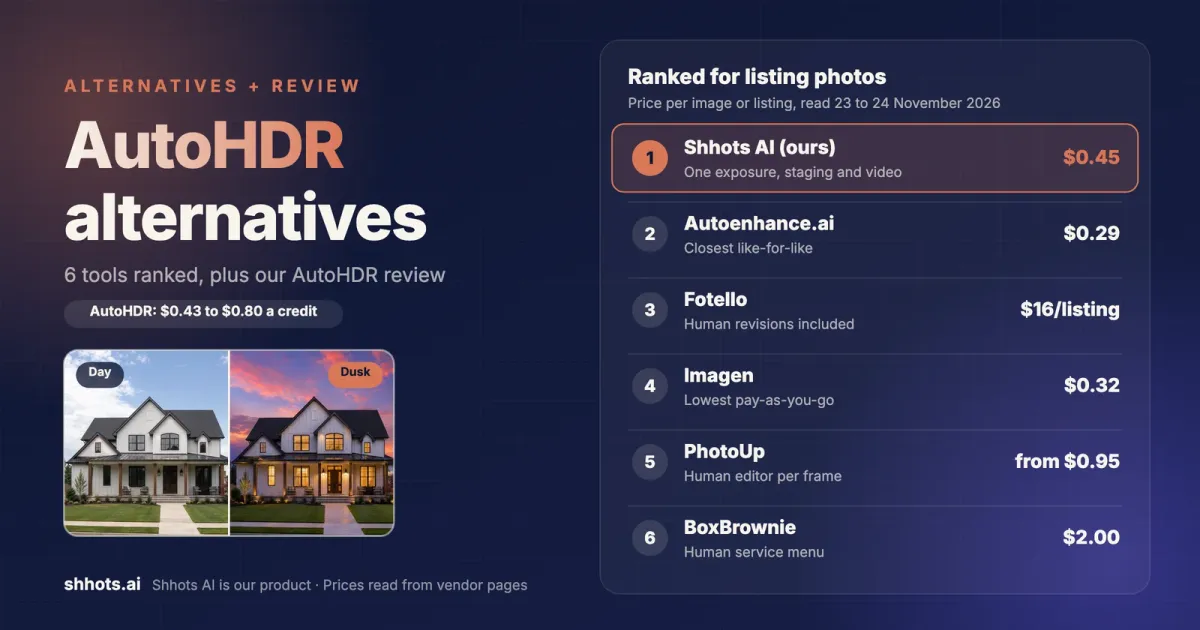
The best AutoHDR alternatives in 2026 are Shhots AI, Autoenhance.ai, Fotello, Imagen, PhotoUp and BoxBrownie. Shhots AI (our product) fits agents and photographers who shoot one exposure per room and also need staging and a listing video, at about $0.45 an image. Autoenhance.ai is the closest like-for-like for bracket shooters, at $29 a month for 100 images on its current offer. Fotello and PhotoUp put a person in the loop. Every price was read on the vendor’s own page on 23 November 2026.
AutoHDR costs $0.43 to $0.80 a credit, and a standard HDR photo uses 1 credit, charged on download. Our AutoHDR review further down covers its plans, turnaround and what users on Reddit and Trustpilot report.
Which AutoHDR alternative fits your workflow?
| If you | Pick | Price, read 23 November 2026 |
|---|---|---|
| Shoot one exposure per room and also need staging or a listing video | Shhots AI (our product) | About $0.45 an image on Pro, $49/month |
| Shoot brackets and want the same workflow for less | Autoenhance.ai | $29/month for 100 images on a limited offer; $0.75 pay per image |
| Want human revisions included in the price | Fotello | $16 to $18 a listing |
| Want the lowest pay-as-you-go rate | Imagen | $0.32 a photo |
| Want a person to edit every frame | PhotoUp | $0.95 to $1.88 for an HDR edit |
| Want staging, day to dusk and item removal from one human service | BoxBrownie | $2 enhancement, $30 staging; 20% lower on 24 November |
Why do photographers look for an AutoHDR alternative?
The reasons in the user reports and AutoHDR’s own documentation fall into six groups:
- Output quality. Critics on Reddit and Trustpilot report frames that still need manual fixes. The user reports section quotes them.
- One exposure per room. AutoHDR accepts single frames, but its documentation recommends three brackets for clear window views. Agents shooting on a phone have one frame.
- No video. AutoHDR skips video files and does not make walkthroughs.
- No editor per frame. Fix requests go to a support queue, not a per-image revision loop.
- Image licensing. Uploads grant AutoHDR a license to use photos for model development and AI training, per its FAQ.
- Low volume. Top-ups cost $0.80 a credit, and Free and Basic photos carry a watermark until purchased.
The 6 best AutoHDR alternatives in 2026
Shhots AI is first because it is our product and the only one here that edits, stages and makes a listing video on one plan. The other five are ordered by how close they sit to AutoHDR’s own workflow, from a like-for-like AI editor to human services. Every price was read on the vendor’s own page on 23 November 2026.
1. Shhots AI Real Estate Studio: best for single-exposure shoots, staging and video
Shhots AI is our product, so weigh this entry as a vendor describing itself. It is first on our list because it covers the gap that sends most people looking: AutoHDR edits photos, and Real Estate Studio edits, stages and films the same listing on one plan.
Real Estate Studio handles AI real estate photo editing from one exposure per frame, so an agent with a phone gets the same edit list as a photographer with a tripod. You pick an action (Correction, Staging or Removal) and then a named preset. There is no prompt to write.
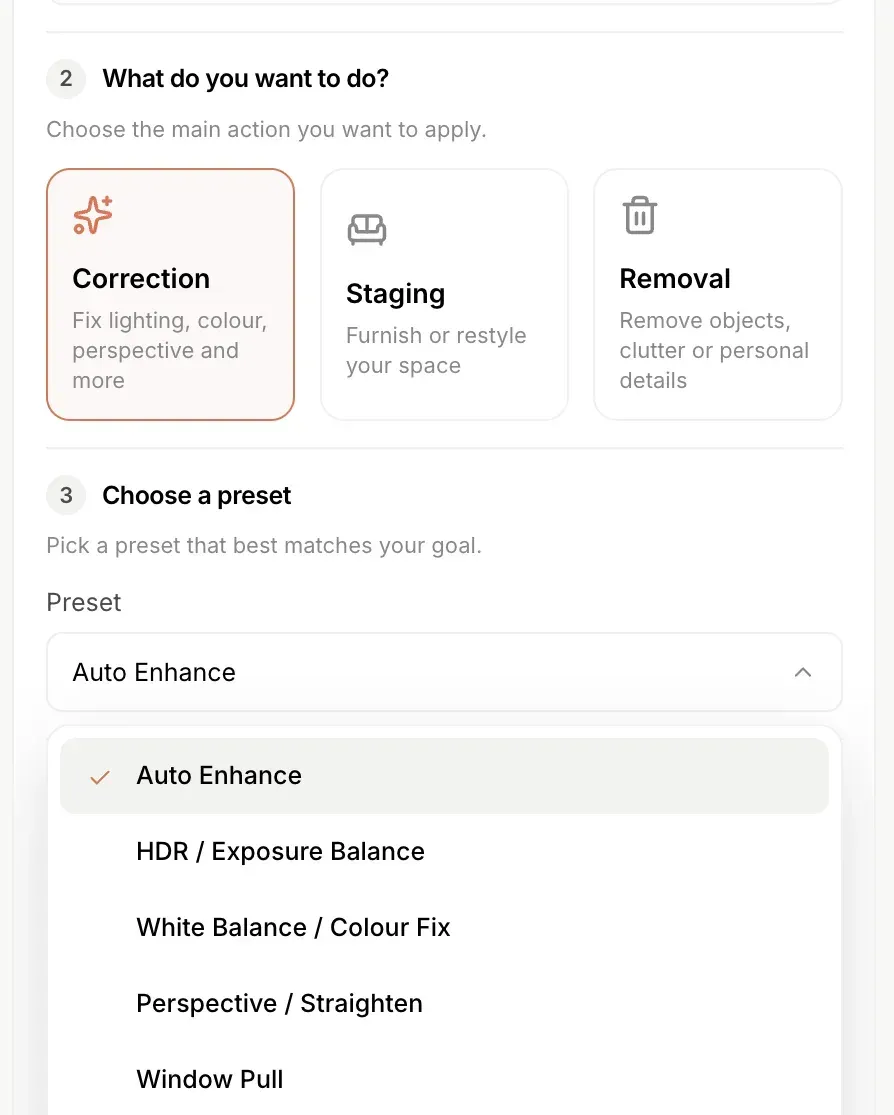
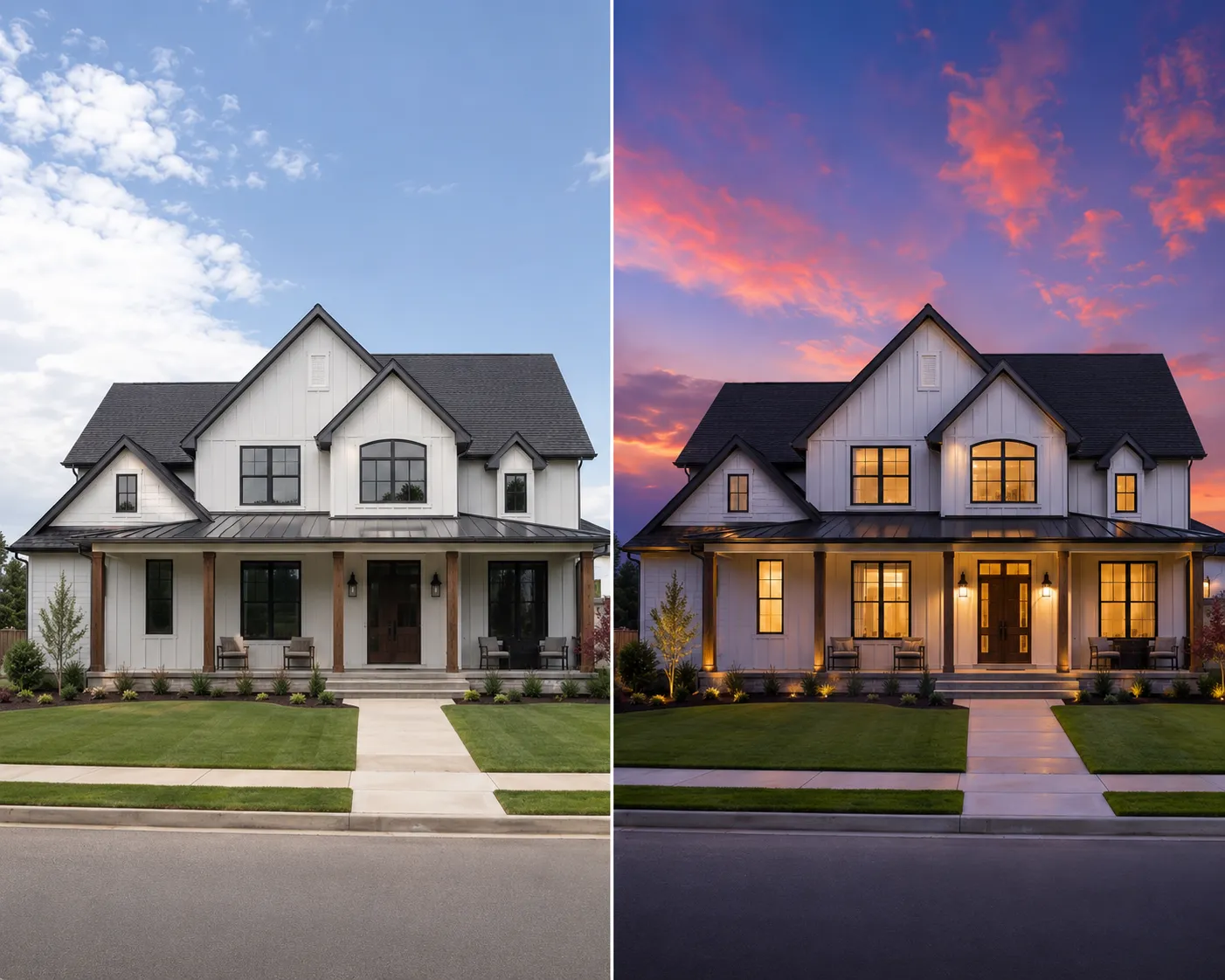
The same photos feed virtual staging and a 15-second listing video, and you can run a whole shoot through bulk real estate photo editing instead of one frame at a time. Every image generation costs 55 credits, about $0.45 on the Pro plan at $49 a month for 6,000 credits, and returns in under a minute. The untouched original stays saved beside each version, and exteriors can go from daytime to twilight in the same studio.
Where AutoHDR still wins. If you already shoot brackets and want them merged, AutoHDR, Autoenhance.ai and Imagen are built around that workflow, and Shhots AI is built around single frames. We do not integrate with Aryeo, HD PhotoHub, Spiro or Tonomo. There is no free plan on Shhots AI, and Real Estate Studio needs Pro or Scale ($99 a month).
2. Autoenhance.ai: the closest like-for-like for bracket shooters
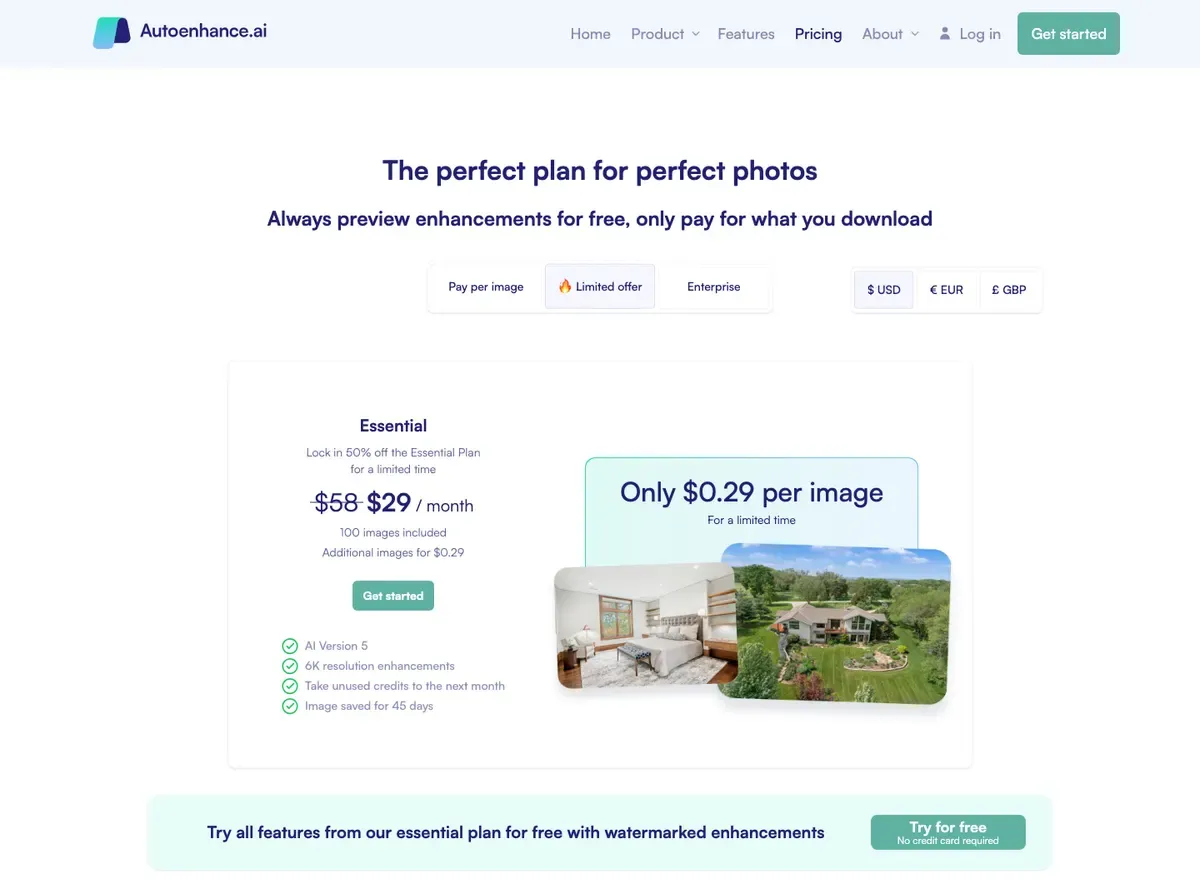
Autoenhance.ai does the same core job: it detects brackets, merges HDR, pulls windows, replaces skies and corrects perspective. Its pricing page shows the Essential plan at $29 a month for 100 images, marked as a limited-time 50% discount from $58, with extra images at $0.29. Pay per image is $0.75. You can preview watermarked edits for free without an account and only pay for downloads. The company says full shoots are edited in 5 to 10 minutes. On a per-image basis it is the cheapest option here while that offer runs.
3. Fotello: per-listing pricing with human revisions
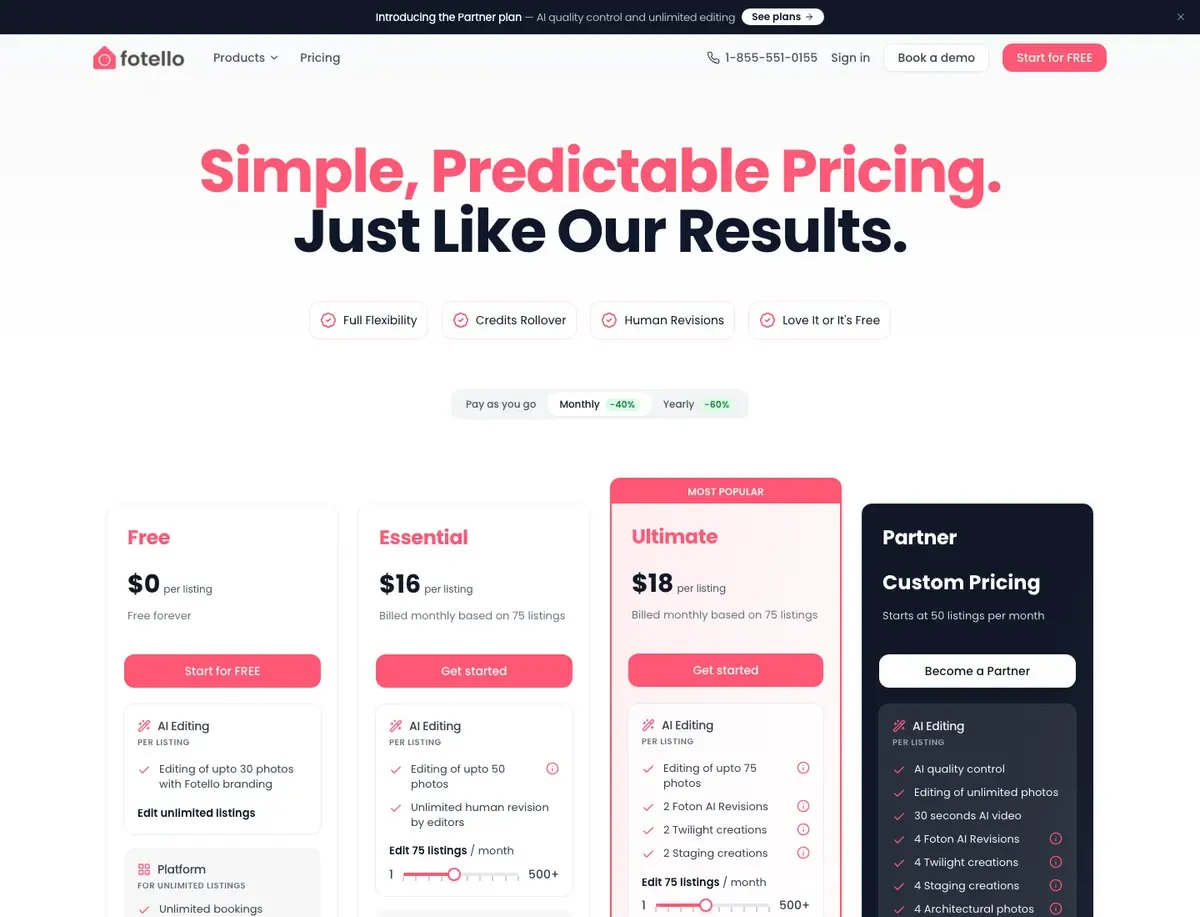
Fotello charges by listing instead of by photo. Its Free plan edits up to 30 photos a listing with Fotello branding. Essential is listed at $16 a listing for up to 50 photos, billed as $1,200 a month at the page’s default of 75 listings, and Ultimate is $18 a listing for up to 75 photos, with two twilights and two stagings included per listing. The page says an in-house team revises edits within 6 hours, as many times as needed, and accepts RAW and JPEG files from single exposures, flash, flambient or multi-bracket shoots. It suits a business with steady listing volume. At 75 listings a month minimum, it does not suit a part-timer.
4. Imagen: the lowest pay-as-you-go rate
Imagen’s real estate web app runs in the browser and handles HDR merges of 3 to 9 brackets, window pulls, sky replacement and perspective correction. Pay-as-you-go is $0.32 a photo, with a Black Friday offer of $10 for the first 30 days covering up to 2,000 photos when we read the page. New accounts can start with 100 free edits, without a watermark. Imagen says a photo expert handles fix requests flagged in the app. Photographers already using Imagen’s Lightroom-based product for other work will find this the shortest switch.
5. PhotoUp: a human editor on every frame
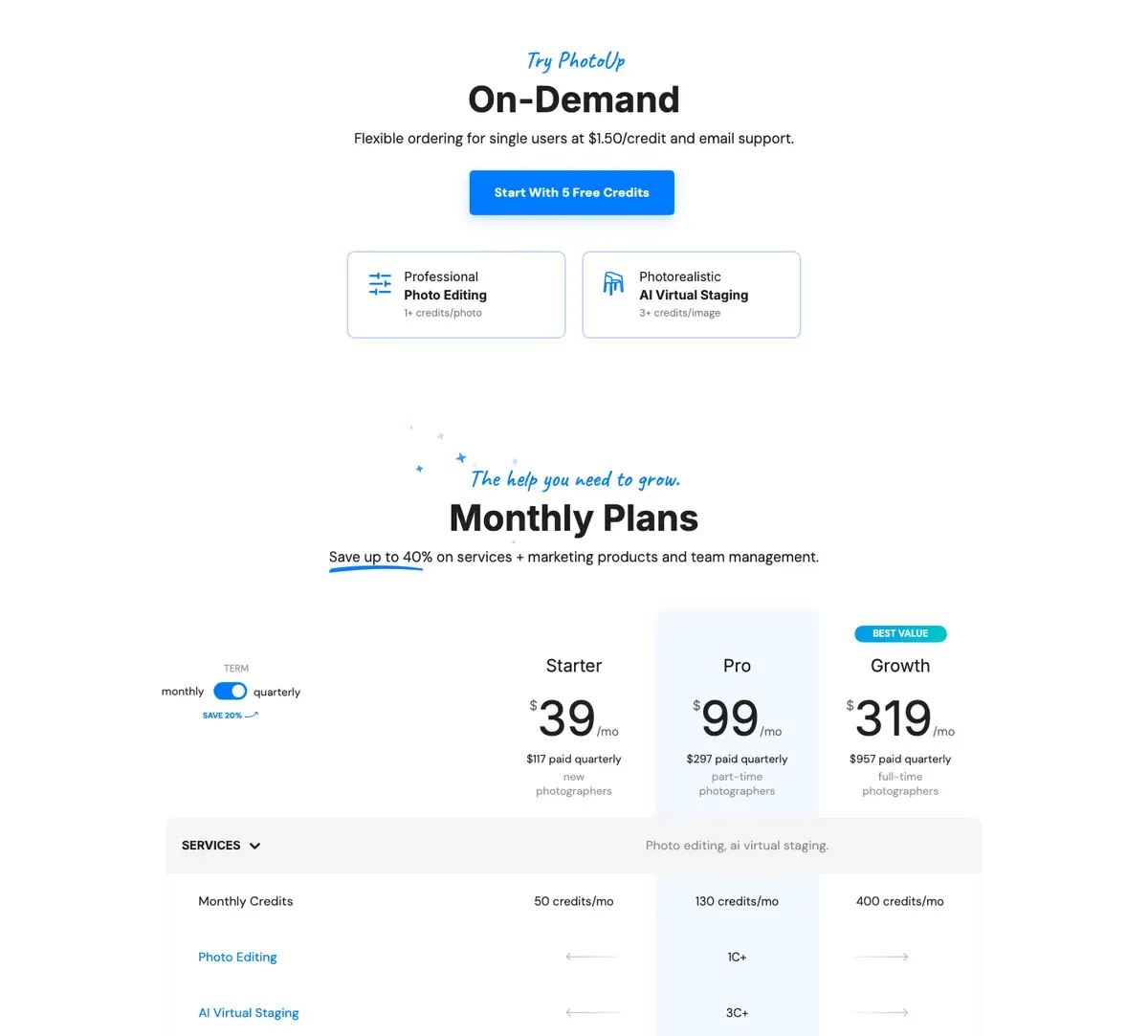
PhotoUp is a managed editing service. On-demand credits cost $1.50, and plan subscribers can buy credit packs at $1.10 to $1.30. Its monthly plans, billed quarterly, go lower: on 24 November 2026 the pricing page showed Starter at $39 a month for 50 credits, Pro at $99 for 130 and Growth at $319 for 400, or $0.76 to $0.80 a credit. HDR edits are 1.25 credits, so about $0.95 to $1.88 an image. Single-exposure edits are 1 credit and flambient 1.5. Standard delivery is 24 hours, and new accounts get 5 free credits. Per image it costs about two to four times what AutoHDR does, and you get a person instead of a model.
6. BoxBrownie: a menu of human services
BoxBrownie’s standard prices are $2 for image enhancement, $30 for virtual staging, $5 for day to dusk and $5 to $10 for item removal. When we took the screenshot below on 24 November 2026, the pricing page showed prices 20% lower: $1.60, $24, $4 and $4 to $8. That matches the 20% promotion we have seen it run before, and the page did not say when it ends.
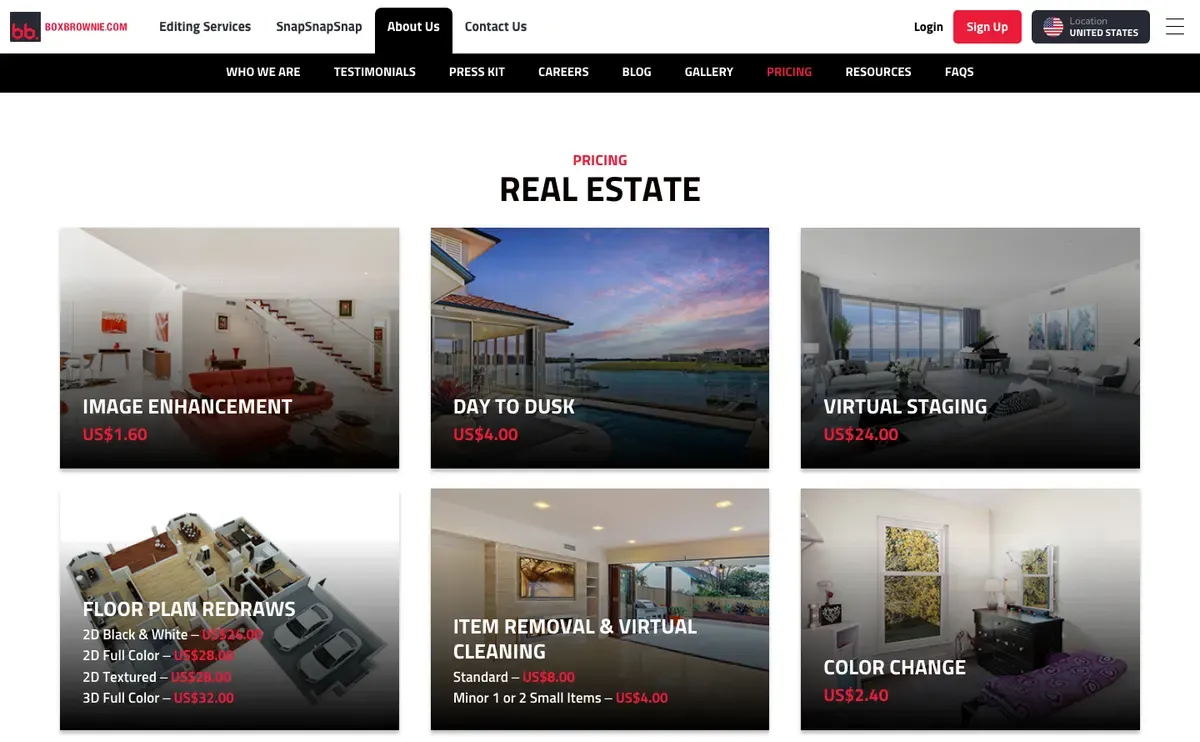
A free account comes with 3 image enhancements and 1 day-to-dusk edit. Its pricing page does not state a turnaround. Our BoxBrownie alternatives comparison covers its full menu and where it is still worth the price.
AutoHDR vs alternatives, compared
Prices read on each vendor’s own page, 23 November 2026. “Not stated” means the vendor’s page did not say.
| Tool | Price per image | Free option | Input | Turnaround (vendor’s claim) | Staging or twilight | Listing video | Human revisions |
|---|---|---|---|---|---|---|---|
| Shhots AI (our product) | About $0.45 (55 credits on Pro) | No free plan | Single exposure | Under a minute | Staging included in credits | 15-second walkthrough | Regenerate for 55 credits |
| Autoenhance.ai | $0.29 on Essential ($29 for 100), $0.75 pay per image | Free watermarked previews | Brackets or single exposure | 5 to 10 minutes a shoot | Not stated | No | Not stated |
| Fotello | $16 to $18 a listing (50 to 75 photos) | Free plan, branded | RAW or JPEG, brackets, single, flash, flambient | Not stated | 2 of each on Ultimate | 30-second AI video on Partner | Unlimited, within 6 hours |
| Imagen | $0.32 pay-as-you-go | 100 free edits at signup, no watermark | 3 to 9 brackets | First batch under 10 minutes | Not stated | Not stated | Photo expert on request |
| PhotoUp | $0.95 to $1.88 for HDR | 5 free credits | Brackets, single or flambient | 24 hours | Staging from 3 credits | No | Human service |
| BoxBrownie | $2 enhancement, $1.60 shown on 24 November | 3 free enhancements | Not stated | Not stated | Staging $30, day to dusk $5 | No | Human service |
| AutoHDR (for reference) | $0.43 to $0.80 a credit, 1 credit per HDR photo | 10 credits a month, watermarked | Brackets or single exposure | 15 to 30 minutes typical | 5 credits each | No | Support fix requests |
AutoHDR review 2026: pricing and how it works
AutoHDR is a good fit for real estate photographers who shoot bracketed exposures at volume and deliver through Aryeo, HD PhotoHub, Spiro, Tonomo or Dropbox. A standard HDR edit costs 1 credit, charged when you download the photo, and credits cost $0.43 to $0.80 depending on plan and billing. The Free plan gives 10 credits a month, the Standard 500 plan is $265 a month for 500 credits, and the company’s fulfillment policy says most orders finish within an hour, typically in 30 minutes or less. All of that was read on AutoHDR’s own pages on 23 November 2026.
It fits less well if you want a human editor on every frame, a listing video from the same tool, or a paid plan under $28.50 a month. In public reviews, support gets consistent praise and output quality draws most of the complaints.
AutoHDR at a glance
| AutoHDR, as published 23 November 2026 | |
|---|---|
| What it is | AI real estate photo editor and delivery workflow, based in Austin, Texas |
| Standard HDR edit | 1 credit per photo, charged on first download (Iris, Classic and Lisa models) |
| Credit price | $0.43 to $0.80, by plan and billing period |
| Cheapest paid plan | Basic, $28.50 a month for 50 credits |
| Free option | Free plan, 10 credits a month, watermarked until purchased |
| Input | 1 to 10 brackets per angle (3 at ±2 EV recommended), or single exposures; JPG preferred, RAW accepted |
| Turnaround | Most orders within an hour, typically 30 minutes or less, per the fulfillment policy; the homepage says 15 minutes |
| Add-ons | Virtual staging and virtual twilight at 5 credits a photo; grass and de-clutter at 1 credit |
| Video | Not supported; video files are skipped |
| Integrations | Aryeo, HD PhotoHub, Spiro, Tonomo, Dropbox, API |
What is AutoHDR?
AutoHDR is an AI editor built for real estate photographers. You upload a shoot, it groups the brackets for each angle, edits them with the model you picked, and sends the finished photos to your delivery platform. The company says it edits 25% of US real estate listings; we have no way to check that figure.
The edit list on its homepage covers the usual listing jobs:
- HDR merging with two standard looks, Classic (a punchier traditional HDR) and Lisa (more pop and deeper window pulls), plus a newer flagship model called Iris
- Sky replacement in four styles and virtual twilight
- TV screen replacement and fire added to fireplaces
- Removal of the photographer, camera, shadows, realtor signs and clutter
- Grass greening and de-duplication of near-identical frames
There is also a “creator marketplace” of models trained on named photographers’ editing styles. Those cost 2 to 5 credits a photo and are charged at upload instead of download.
For the wider category this sits in, our roundup of real estate photo editing software compares desktop editors, AI tools and services side by side.
How much does AutoHDR cost?
AutoHDR prices everything in credits. A standard HDR edit on Iris, Classic or Lisa costs 1 credit, and it is only charged when you download the photo, so processing and previewing are free. Re-downloads are free too.
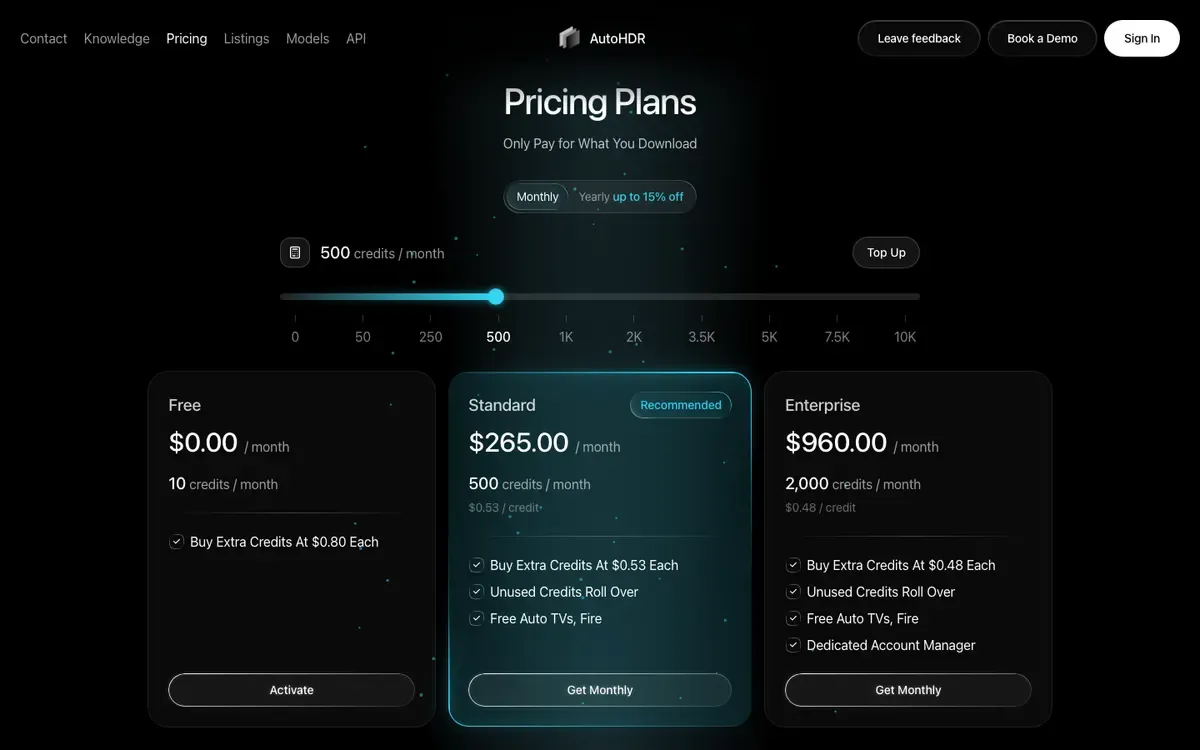
The plan ladder, from AutoHDR’s billing FAQ and pricing page, read 23 November 2026:
| Plan | Monthly price | Credits a month | Price per credit | Yearly option |
|---|---|---|---|---|
| Free | $0 | 10 | $0.80 for top-ups | No |
| Basic | $28.50 | 50 | $0.57 | $22.80 a month ($0.46 a credit) |
| Standard 250 | $137.50 | 250 | $0.55 | Monthly only |
| Standard 500 | $265 | 500 | $0.53 | $225.25 a month ($0.45 a credit) |
| Professional | $500 | 1,000 | $0.50 | $440 a month ($0.44 a credit) |
| Enterprise | $960 | 2,000 | $0.48 | $864 a month ($0.43 a credit) |
A few rules change the real cost:
- Add-ons cost extra credits. Virtual staging and virtual twilight are 5 credits a photo each. Grass replacement and de-clutter are 1 credit a photo on every plan.
- Re-edits. AI Re-Edit costs 1 credit, except on Standard 500 and above, which include 3 free re-edits per shoot.
- Automatic TV and fire are free on Standard 500 and above, and 1 credit a photo below that.
- Watermarks. On Free and Basic, photos carry an AutoHDR watermark until purchased. Standard 250 and above never show one.
- Rollover. Unused credits roll over on paid plans while the subscription is active. Dropping to Free forfeits them. Top-up credits are valid for 12 months.
- Refunds. The fulfillment policy says credits used for downloads are not refundable, and add-ons such as virtual twilight are not eligible. The team may offer a goodwill credit for accidental downloads.
So a 25-photo shoot with standard HDR edits costs 25 credits: about $13.25 on Standard 500 monthly, or $11 on Professional yearly. Add a twilight exterior and two staged rooms and it is 40 credits.
A price change worth knowing. AutoHDR used to advertise edits from $0.37 a photo, and some comparison pages still quote that figure. The lowest per-credit price published on its pages on 23 November 2026 is about $0.43, on Enterprise billed yearly ($864 a month for 2,000 credits).
Does AutoHDR need bracketed photos?
No, but it is built for them. The knowledge base says AutoHDR accepts 1 to 10 brackets per angle, recommends three at ±2 EV, and picks the best three if you send five. It also says it can produce an HDR-looking result from a single exposure, with one caveat: if you want to see out of windows, shoot at least three brackets.
Its own quality FAQ is candid about the limits. Highlight detail can only be as good as your darkest bracket captured, washed-out results almost always trace back to the bracket exposures, and it recommends ISO 200 to 400 to avoid grain. JPG is the preferred upload format. RAW works, and the FAQ says RAW files take longer to process.
If you want the background on why brackets matter for listing photos, the HDR real estate photography guide covers bracketing, flambient and single-exposure AI.
How fast is AutoHDR?
The company gives three answers. The homepage says edits land on your delivery page in 15 minutes. The fulfillment policy says most orders are fulfilled within one hour, typically in 30 minutes or less, and that orders coming through an integration can take 1 to 2 hours because of upload time. The FAQ adds that plans above 500 photos a month get priority processing, and that turnaround depends on the number of bracket frames and the file format.
One outside data point: a sponsored Fstoppers comparison published 13 May 2026 reported that AutoHDR’s sample images took almost 4 hours against a promised 30 minutes. That was one test on one day, in an article sponsored by another vendor, so weigh it accordingly.
Who is AutoHDR a good fit for?
Photographers shooting 250 or more photos a month. The per-credit price drops from $0.80 to $0.53 at Standard 500, watermarks disappear from Standard 250, and the free re-edits and priority processing start at 500.
Teams already delivering through Aryeo, HD PhotoHub, Spiro or Tonomo. AutoHDR’s pitch is that editing, revisions and delivery sit in one place. The FAQ describes automatic delivery for Aryeo and a sync-back button for HD PhotoHub and Spiro.
Photographers who already bracket. The best results in its own documentation come from three-bracket sets. If you shoot that way, AutoHDR is replacing your blend and your offshore editor.
Who should look elsewhere?
Agents and teams that need listing video. AutoHDR skips video files, and it does not generate walkthrough videos.
Anyone who wants a human editor on each frame. Fix requests go to customer support, which reviews them during operating hours. That is a support queue, which works differently from a per-image revision loop at a service like PhotoUp or BoxBrownie.
Brokerages careful about where their images go. AutoHDR’s FAQ says you keep ownership of your photos and edits, and that by uploading you grant AutoHDR a license to use them for processing, model development and AI training. Some clients will not mind. Some contracts will.
Very low volume. Below about 50 photos a month, the Free plan’s watermark and the $0.80 top-up price make a per-image service or a small monthly plan from another vendor simpler.
Is AutoHDR good? What users report
User reports split along one line: support gets praise and output quality gets the complaints. Every point below is attributed to where it was published, and none of it is something we verified ourselves.
Trustpilot. On 23 November 2026, AutoHDR’s Trustpilot page showed a 4.2 TrustScore from 11 reviews, ten of them five stars. Most of the five-star reviews, posted between August and November 2026, praise customer support response times, and one reviewer said turnaround dropped from about twelve hours with overnight editors to about thirty minutes. The one 1-star review, dated 18 September 2026, reported no time or cost savings and lower quality than human edits, while still crediting the support team. Eleven reviews is a small sample.
A Reddit thread in r/RealEstatePhotography. A thread criticizing AutoHDR’s software, posted around June 2026 with replies running into November, collects anonymous users on both sides. The original poster said the software is good when it works and that human editors were cheaper and less stressful for them. Several users in the thread said it saves time, with one saying it “does 90% of the work”, and said they still finish in Lightroom and check every photo before delivery. One user who tried both AutoHDR and Fotello said AutoHDR worked a bit better, and another said newer models give much better results than older ones. Critics in the thread said it needs an editor to fix its mistakes, and one said they used it for two months without delivering any of its output. One photographer said AI editing does not suit their split of 72 dpi files for MLS and 300 dpi files for print. These are individual, unverified accounts from one thread.
Fstoppers, 13 May 2026. The sponsored comparison mentioned above tested Imagen, AutoHDR and Fotello on one property. The author reported skewed verticals in a kitchen frame and a green tint in one AutoHDR image, said window pulls worked across all three tools, and picked Fotello. The article is labeled sponsored, and Fotello is the vendor it recommends.
We could not read AutoHDR’s Capterra or G2 pages, both of which blocked our access, so they are left out.
Budget review time either way: most working photographers in these sources still check every AutoHDR frame before it goes to a client.
Is AutoHDR the same as “auto HDR” on a phone?
No. AutoHDR (one word) is the editing company. “Auto HDR” is also the name of unrelated settings on devices.
- iPhone. On the iPhone 8, 8 Plus and X, the Camera setting that blends exposures automatically was called Auto HDR. Later models call it Smart HDR, and from the iPhone 13 onward HDR runs automatically without a switch, according to Apple’s iPhone User Guide.
- Windows 11. Auto HDR is a display setting that makes older SDR games look closer to HDR on an HDR monitor. Microsoft documents it under Settings > System > Display.
For listing photos, a phone’s HDR mode does part of the job at capture: it keeps windows from blowing out as badly. It does not straighten verticals, fix mixed white balance or remove clutter. Our guide on how to edit real estate photos walks through those steps.
How to choose between AutoHDR and the alternatives
You are an agent or marketer shooting on a phone. Bracket-first tools assume a tripod workflow. A single-exposure tool fits better, and if you also need staging and a video for the same listing, Shhots AI covers all three on one plan. Our guide on how to edit real estate photos shows the same edits done by hand.
You shoot brackets and deliver through Aryeo or HD PhotoHub. Stay with AutoHDR or trial Autoenhance.ai at the $29 offer. The integration is the reason to pay AutoHDR’s higher per-credit price.
You want a person to fix what the model gets wrong. Fotello includes human revisions in the listing price, and PhotoUp puts an editor on every frame for about $0.95 to $1.88 an HDR image.
You want desktop control instead of a web app. Lightroom Classic, Photoshop and Imagen’s desktop app are compared in our best real estate photo editing software roundup.
You are still deciding whether to edit in-house at all. The real estate photo editing outsourcing breakdown runs the per-shoot math against your own editing hours.
FAQ
What is the best AutoHDR alternative?
Shhots AI (our product) is the best AutoHDR alternative for agents and photographers who shoot one exposure per room and also need virtual staging and a listing video, at about $0.45 an image on the $49 Pro plan. For bracket shooters, Autoenhance.ai is the closest match on workflow and price, at $29 a month for 100 images on its current offer. Fotello suits teams that want human revisions included.
Is there a free AutoHDR alternative?
Imagen comes closest: new accounts can start with 100 free edits, with no watermark. Autoenhance.ai shows free watermarked previews without an account, Fotello’s Free plan edits up to 30 photos a listing with Fotello branding, PhotoUp gives 5 free credits and BoxBrownie 3 free enhancements. Shhots AI has no free plan. AutoHDR’s own Free plan is 10 credits a month, watermarked until purchased.
What is cheaper than AutoHDR?
Autoenhance.ai at $0.29 an image on its current $29 offer and Imagen at $0.32 a photo both cost less per image than any AutoHDR plan, whose credits run $0.43 to $0.80. Shhots AI works out to about $0.45 an image on Pro, below AutoHDR’s monthly plans and level with its Standard 500 yearly rate. Prices read 23 November 2026.
Is AutoHDR good?
AutoHDR is good at standard bracketed HDR edits for photographers at volume, according to most users in the sources we read. Users on Trustpilot and Reddit praise its time savings and support, and critics on both report frames that still need manual fixes. Most photographers in those sources check every image before delivery.
How much does AutoHDR cost?
AutoHDR costs $0.43 to $0.80 per credit, and a standard HDR edit uses 1 credit, charged on download. Plans run from Free (10 credits a month) through Basic at $28.50 a month for 50 credits and Standard 500 at $265 a month for 500 credits. Virtual staging and twilight cost 5 credits a photo. Prices read on 23 November 2026.
Does AutoHDR have a free trial?
AutoHDR has a Free plan instead of a timed trial: 10 credits a month at $0, with an AutoHDR watermark on photos until they are purchased. Processing and previewing are free, and credits are only deducted when you download finished photos.
Can AutoHDR edit single-exposure photos?
Yes. AutoHDR’s FAQ says it edits single exposures and can produce an HDR-looking result from one frame. It recommends at least three brackets if you need clear views through windows.
Does AutoHDR do virtual staging or video?
AutoHDR does virtual staging at 5 credits a photo, in five room types and three furniture styles. It does not process or generate video; video files uploaded with a shoot are skipped.
How long does AutoHDR take?
AutoHDR’s fulfillment policy says most orders finish within one hour, typically in 30 minutes or less, and orders from integrations can take 1 to 2 hours. Its homepage says 15 minutes. Plans above 500 photos a month get priority processing.
Where to start
Take one recent shoot you have already delivered and run it through AutoHDR’s Free plan and one alternative from the table. Ten credits covers about ten frames, which is enough to compare window pulls and verticals side by side before you commit to a plan. If single-exposure editing plus staging fits your listings better, the Pro plan is $49 a month.
More on Real Estate
All Real Estate posts- Best Virtual Staging Software 2026: 8 Tools, Real Prices The best virtual staging software in 2026, compared on verified prices, photo caps and turnaround. Shhots AI, StageHQ, REimagineHome, BoxBrownie and more.
- Real Estate Advertising in 2026: A Media Buyer's Playbook How real estate advertising actually works in 2026: what Meta's Housing category removes, what survives, budget math per listing, and the creative pipeline.
- Real Estate Reels: 10 Formats That Work in 2026 10 real estate reel formats with hooks, lengths and per-reel costs. What the 2026 Instagram algorithm rewards, and the Fair Housing lines you cannot cross.