Disclosure: Shhots AI is our product.
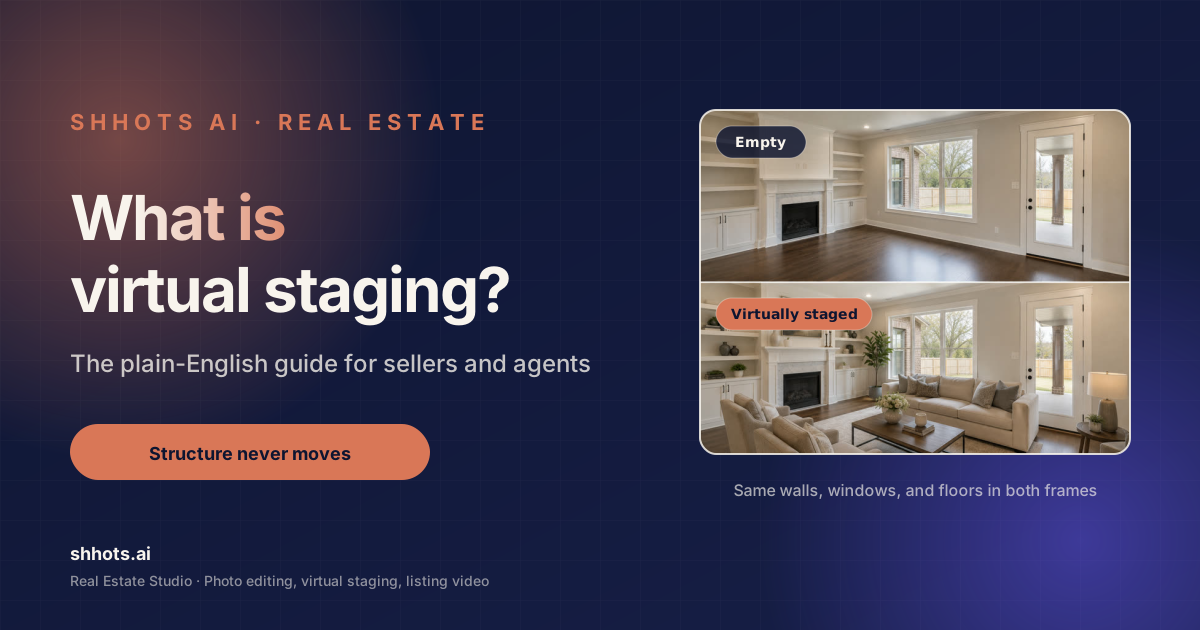
Virtual staging is the practice of adding furniture, rugs, art, and decor to a photograph of a room using software, so that buyers browsing a listing see a furnished space instead of bare walls. The room itself is never changed. Only the contents are added.
Digital staging and virtual home staging are the same thing under different names. The process, the cost and the disclosure rules below apply whichever term a vendor or an MLS uses.
That is the whole idea, and it is the whole of what is virtual staging as a practice. Everything else on this page is detail: what it costs, who uses it, whether you have to tell anyone you did it, and the specific situations where staging a photo makes a listing worse rather than better.
If you want to try it on a room right now, the AI virtual staging page walks through the three modes and eight styles, and AI for real estate agents covers where staging sits among the other listing jobs. If you want to understand the practice first, keep reading.
Virtual staging at a glance
| Question | The short answer |
|---|---|
| What is it | Adding furniture and decor to a listing photo with software; the room’s structure never changes |
| What it costs | About $0.45 a photo with AI staging, $16 to $75 a photo at a staging service, $1,500 to $4,000 to physically stage a listing |
| How long it takes | Under a minute with AI, 24 to 72 hours at a service |
| Is it legal | Yes, with a “virtually staged” label; NAR Article 12 and most MLS rules require disclosure |
| Who uses it | Listing agents, real estate photographers, brokerages, developers, and short-term rental hosts |
| When to skip it | Occupied homes that photograph well, and any photo where the edit would hide a defect |
Figures as of September 2026; the cost guide carries the full pricing table.
What is virtual staging, exactly?
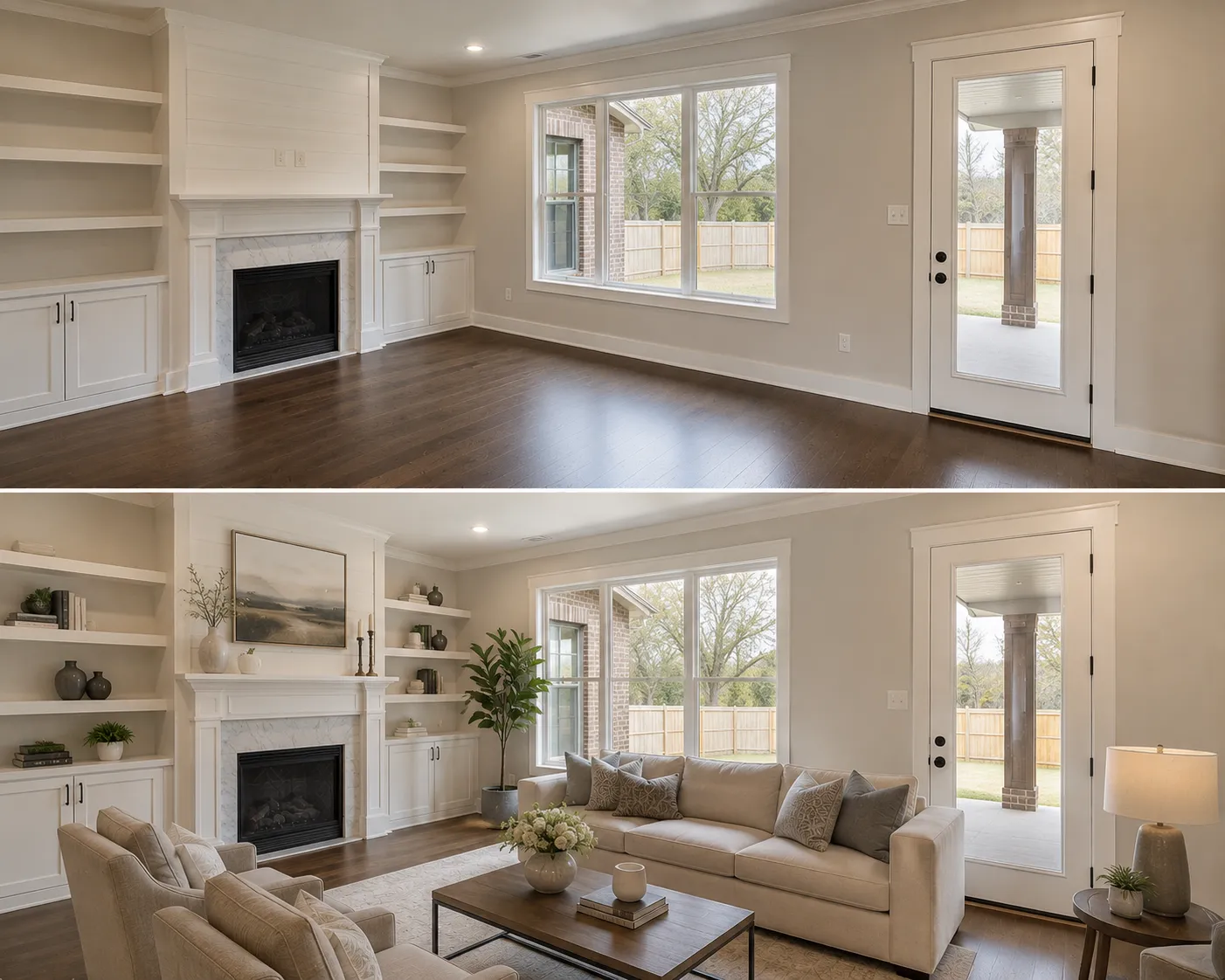
Virtual staging takes an existing photograph of a room and adds furnishings to it digitally. A sofa appears where there was empty floor. A bed appears in a bare bedroom. A dining table appears in a room that reads as a corridor without one.
The distinction that matters is between the contents of a room and the structure of a room:
- Contents are what a physical stager would carry through the front door. Sofas, beds, dining sets, rugs, lamps, art, plants, cushions, and the styling on countertops and shelves. These are what virtual staging adds.
- Structure is the room itself. Walls, windows, doors, floors, ceilings, built-in cabinetry, radiators, and sightlines. These should never change. If a buyer measures a room off your photo, the measurement has to hold when they walk in.
Any tool that widens a room, adds a window, or moves a wall to make the composition work has stopped doing virtual staging and started doing something you can be held liable for. On Shhots AI the structure is locked by design, which is a constraint rather than a feature.
Virtual staging versus physical staging
Physical staging means renting furniture and having a stager arrange it in the actual house. It works, buyers respond to it, and it is expensive and slow. You are paying for furniture rental, delivery, an installation crew, a design fee, and usually a minimum rental period measured in months.
Virtual staging produces the same effect in the photograph, which is where most buyers form their first impression anyway. It does nothing for the in-person showing, because the house is still empty when they walk through the door.
That difference is the honest trade. Physical staging sells the house at the viewing. Virtual staging sells the click that gets them to the viewing.
Virtual staging versus 3D rendering
A 3D render builds the room from scratch in modelling software, usually from floor plans, and is what developers use to sell units that do not physically exist yet. It is slower, more expensive, and completely fabricated.
Virtual staging starts from a real photograph of a real room. That is why it can be used on an existing listing and a render usually cannot.
How does virtual staging work?
Two broad approaches exist, and the difference shows up in your invoice.
Managed services put a human designer behind an upload form. You send photos and a brief, a designer does the work in Photoshop or 3D software, and you get files back in one to three days. Quality is generally good. Revisions cost time and often money.
AI virtual staging uses an image model to generate the furnishings directly onto the photo. The turnaround collapses from days to under a minute, and the price per image drops by roughly two orders of magnitude. The trade is that you are picking from what the model does well rather than briefing a designer on exactly what you want.
On the AI side there are two more shapes worth knowing about. Prompt-driven tools ask you to describe what you want in writing, which gives you flexibility and gives you inconsistency across a thirty-photo shoot. Preset-driven tools give you named styles instead, which is what keeps every room in one listing looking like it belongs to the same house.
The three staging modes
Real listings are rarely tidy, so a staging tool that only handles empty rooms handles maybe half of your actual shoot. The three situations you run into are:
- Stage an empty room. The vacant case. The AI furnishes bare floor and matches the furniture lighting and shadows to the photograph, so the sofa sits in the same light as the boards it stands on.
- Restyle a furnished room. The layout stays and the pieces change. This is for a room that reads as dated rather than empty, and it is the mode interior designers use to show a client their own living room in a different direction.
- Occupied to vacant, then stage. The seller still lives there and their furniture is working against the listing. The room is stripped back to an empty shell and then staged fresh.
That third mode is the one most tools charge extra for or do not offer at all, and it is the one you need most often on a real pipeline, because most sellers have not moved out yet.
Staging styles
Style is the second half of the instruction. A good set covers the range of buyers you actually meet rather than one designer’s taste. The eight on Shhots AI are Modern, Scandinavian, Luxury, Coastal, Farmhouse, Minimalist, Boho, and Mid-century.
Matching style to buyer beats matching style to your own preference every time. A downtown one-bedroom stages Modern or Minimalist. A four-bedroom in a family suburb stages Farmhouse or Scandinavian. A waterfront property stages Coastal. Buyers rarely notice the style consciously; the wrong one simply makes the room feel like it belongs to someone else.
If you want to see what a good result looks like before you judge your own, the virtual staging before and after examples walk through six real rooms.
What does virtual staging cost?
There are three price tiers in this market and they are far enough apart that they are genuinely different products. Physical staging runs $1,500 to $4,000 per listing and takes one to two weeks to book and install. Managed virtual staging services charge $16 to $75 per image and return files in 24 to 72 hours. AI virtual staging costs about $0.45 per image on Shhots AI and returns a result in under a minute.
The Shhots AI figure is 55 credits per generated image on the Pro plan, which is $49 a month for 6,000 credits, or roughly 109 generated images. The Scale plan is $99 a month for 12,000 credits.
What that price gap actually changes is behaviour, not budget. At $60 an image you stage the living room and stop. At $0.45 you stage every room that is empty, run two styles on the ones that matter, and pick between them. The second workflow produces a better listing, and it is only possible when a mistake costs less than a coffee.
For the full breakdown, including what a month of listings costs at each plan level, see the virtual staging cost guide.
Is there free virtual staging software?
Free virtual staging tools exist and they are useful for exactly one thing, which is finding out whether you like the workflow before paying for it.
For a live listing they hit the same three walls every time. Output arrives with a watermark across it. Resolution is capped below what the MLS accepts. And there is a hard cap on daily generations that makes a full shoot impossible. Any one of those rules out MLS use on its own.
Shhots AI has no free tier, which is worth saying plainly rather than burying. Virtual staging is on the Pro plan at $49 a month and the Scale plan at $99 a month, at full resolution, watermark-free, with a commercial licence.
Is virtual staging legal?
Yes, in every US state and in most markets internationally. Virtual staging is a normal, widely used part of real estate marketing.
The obligation attached to it is disclosure. In almost every jurisdiction you have to label a virtually staged image as virtually staged, somewhere a buyer will actually see it.
Three sources of that obligation:
- NAR Article 12. The REALTOR Code of Ethics requires members to present a true picture in their advertising. A staged photo without a label can fail that test.
- MLS rules. Most MLS systems require a label on any materially altered photograph. The specific wording and placement varies, so check your own board’s photo policy rather than assuming.
- State law. Several states have added their own disclosure statutes covering digitally altered listing images, some of which require a link to the unaltered original.
What actually gets agents into trouble is narrower than people expect. It is rarely the staging. It is structural edits that misrepresent the space, and edits that hide a defect a buyer would reasonably want to see. A sofa that is not there is understood by everyone. A crack that has been painted out is not.
Keeping the untouched original on file is the practical protection, and it is why Shhots AI saves every generated version beside the original rather than overwriting it. The full picture is in the virtual staging rules and disclosure guide.
What is virtual staging used for, and by whom?
The short answer to what is virtual staging used for is: making a room legible to someone who is not standing in it. Six groups do that for a living.
Listing agents use it on vacant listings, which is the obvious case, and on occupied listings where the seller’s furniture is hurting the photos, which is the more common one.
Real estate photographers use it to add staging to their package without subcontracting the work. Shoot the property, stage the empty rooms, hand over a gallery that includes both the staged versions and the untouched originals.
Brokerages use it to hold a consistent visual standard across a team. Named styles are what make that possible, because the Coastal bedroom one agent ships looks like the Coastal bedroom another agent ships.
Interior designers use restyle mode to show clients their actual room in a different direction. Because the structure never changes, the client sees a preview of their own space rather than a mood board of someone else’s.
Short-term rental hosts use it because Airbnb and Vrbo ranking is driven heavily by photo quality, and a tired lounge photographs like a tired lounge no matter how good the property is.
Developers use it to sell pre-completion units from a single finished show home, staged in several directions to match different buyer segments.
When you should not virtually stage
Staging is not free of cost even at $0.45, because every staged image adds a disclosure obligation and a small amount of buyer scepticism. Four cases where it is the wrong call:
The room already photographs well. If the space is furnished, tidy, and shot properly, restyling it adds a label to your listing and gains you nothing.
The property is a teardown or a renovation project. The buyer is pricing the structure and the plot. Furniture in the photos is noise, and it can read as an attempt to distract from the condition.
The staging would imply something conveys. If a buyer could reasonably read the staged photo as a statement about what comes with the house, you have created a problem. This bites hardest with built-in-looking pieces and appliances.
The gap between staged and real is too wide. Staging an immaculate Scandinavian living room into a house that shows as cluttered and dark sets up a viewing where the buyer feels misled. The photo got the click and lost the sale.
A useful test: would you be comfortable standing in the empty room with the buyer, holding the staged photo, having them compare the two? If yes, stage it. If no, do not.
Virtual staging and the rest of the listing
Staging one room is rarely the whole job. A typical listing shoot needs three things done to it, in this order.
Correct first. Blown-out windows, colour casts from mixed indoor lighting, and converging verticals from a wide-angle lens are all fixable, and they all make staging worse if you leave them until after. A staged room built on a badly exposed photo is a badly exposed photo with furniture in it. This is the AI real estate photo editing half of the workflow.
Stage second. Once the light is right, furnish the rooms that need it.
Film third. Listing portals surface properties with video above properties without, and a generated walkthrough is assembled from the stills you feed it. Doing this last means the video inherits the corrected, staged versions rather than the originals. See the AI real estate video generator for how three or four photos become a fifteen-second narrated walkthrough.
Teams running this across many properties a month should look at bulk real estate photo editing, which covers the whole-shoot workflow rather than the single-room one.
How to virtually stage a room, step by step
The workflow on Shhots AI runs like this.
- Create the property. Name, address, beds, baths, price. Every staged version files itself against that listing, which matters more than it sounds when you have forty active properties.
- Upload the shoot. Photos sort themselves by room type across exterior, living room, kitchen, dining, bedroom, bathroom, and office.
- Pick the room and the Staging action. Then choose a mode: stage empty, restyle, or occupied to vacant.
- Pick a style. One of eight. Add a one-line comment if something specific has to survive, such as keeping a particular rug.
- Generate. 55 credits per image, under a minute, and the untouched original stays saved beside every version.
- Compare and pick. Running the same room in two or three styles is normal and cheap. Put them side by side and choose.
No prompt writing at any point. That is deliberate, because prompts are what make a thirty-photo shoot look like thirty different houses.
Here is that workflow running end to end on a real listing:
Does virtual staging actually help sell a house?
The honest answer is that it helps the listing get attention, and attention is upstream of everything else.
Buyers filter online before they ever contact an agent. A portal thumbnail of a bare room gets scrolled past because there is nothing in it to hold the eye and nothing to judge the scale against. The same room with a bed in it reads as a bedroom that fits a king.
That is the mechanism, and it is worth being precise about it rather than overclaiming. Staging does not make a small room big or a dark room bright. It makes an empty room legible. If you want to dig into the research on how staging affects buyer behaviour, NAR publishes a profile of home staging that is updated periodically and is a better source than any vendor’s marketing page, including this one.
The other half of the answer is speed. A listing that goes live with finished, staged photos on day one captures the burst of attention a new listing gets. A listing that goes live with placeholder photos and gets updated on day four has already spent that burst.
What is virtual staging not?
Half the confusion in this category comes from three neighbouring practices that get called the same thing.
It is not photo correction. Fixing exposure, white balance, or a converging vertical changes how the room was captured, not what is in it. That is photo editing, it carries lighter disclosure obligations in most markets, and it is a separate step you should run first.
It is not object removal. Taking the seller’s clutter off a kitchen counter empties the frame rather than furnishing it. Removal and staging often run on the same listing, and they answer different questions.
It is not a 3D render or a virtual tour. A render builds the room in modelling software. A virtual tour stitches real photography into a navigable walkthrough. Virtual staging sits between them: a real photograph with generated contents.
Holding those apart matters practically, because your MLS may treat each one differently, and because buying a tool that only does one of them leaves you paying for the others separately.
Virtual staging FAQ
What is virtual staging in real estate?
Virtual staging in real estate is the practice of digitally adding furniture and decor to a photograph of a property so buyers see a furnished room instead of an empty one. The structure of the room stays exactly as photographed and only the contents are added. It is used mainly on vacant listings and on occupied listings where the seller’s own furniture is hurting the photos.
What does virtually staged mean on a listing?
It means the furniture you can see in that photo was added digitally and is not physically in the property. The label is a disclosure, required by most MLS rules and by NAR Article 12, and it tells you that the room will be empty or differently furnished when you view it. The walls, windows, and floors in the image should be exactly as they are in reality.
What is the typical price range for virtual staging?
Between about $0.45 and $75 per image depending on the approach. AI virtual staging on Shhots AI is 55 credits per generated image, roughly $0.45 on the $49 a month Pro plan. Dedicated virtual staging services generally charge $16 to $75 per image. Physical staging, which involves real furniture, runs $1,500 to $4,000 for a whole listing.
Is virtual staging worth it?
On a vacant listing, almost always, because an empty room is the hardest thing for a buyer to judge from a photograph. On an already well-furnished listing, usually not, since restyling adds a disclosure obligation without changing how legible the room is. Stage when the room is hard to read from photographs; an attractive room that already reads clearly does not need it.
Do MLS rules require you to label staged photos?
Yes, in almost every jurisdiction. Label the image as virtually staged somewhere the buyer will see it. NAR Article 12 requires a true picture in advertising, most MLS systems require a label on materially altered photos, and several states have their own statutes. Keeping the unedited original on file is good practice and is required in some places.
Can virtual staging remove existing furniture?
Yes. That mode is usually called occupied to vacant. It strips a lived-in room back to an empty shell and then stages it fresh in whichever style you choose. This is the mode you need when the seller still lives in the property, which is most of the time.
How long does virtual staging take?
AI virtual staging returns a generated image in under a minute. Managed virtual staging services typically quote 24 to 72 hours. Physical staging takes one to two weeks to book and install, and usually carries a minimum rental period of several months.
Does virtual staging change the room?
It should not, and on a properly built tool it cannot. Walls, windows, doors, floors, ceilings, and built-ins stay exactly as photographed, and only furniture and decor are added. If a tool is widening rooms or adding windows, that is misrepresentation rather than staging, and it is the thing that actually creates legal exposure.
What is the best virtual staging software?
It depends on whether you need one hero image or a whole shoot. For a single flagship photo where you want a designer’s judgement, a managed service is defensible. For a full listing, or for several listings a month, an AI studio that also handles photo correction and listing video costs less and turns around in minutes instead of days. Shhots AI sits in the second group, at $49 a month on Pro. For a tool-by-tool comparison with verified prices, see the Virtual Staging AI alternatives guide.
Is digital staging the same as virtual staging?
Yes. Digital staging, virtual home staging and virtual furniture staging are different names for the same practice: furniture and decor added to a photograph with software, with the room’s structure left as photographed. Some MLS boards use “digitally staged” as their label wording, which is why the term turns up in rulebooks. The cost, the workflow and the disclosure rules are identical whichever name a vendor uses.
Is AI virtual staging the same as 3D staging?
No. 3D staging, sometimes called 3D rendering, builds the room from scratch in modelling software, usually from floor plans, and is what developers use to sell units that do not exist yet. AI virtual staging starts from a real photograph of a real room and adds only the contents. A render can show any room you like. A staged photo can only show the room that was photographed, which is why it can be used on an existing listing and a render usually cannot.
Related reading
- Virtual staging cost in 2026, every price tier compared, including the fees that are not on the quote
- Is virtual staging legal?, MLS rules, NAR Article 12, and a disclosure template you can reuse
- Virtual staging before and after, six real listing rooms, and how to grade your own results
Where to start
Take the emptiest room in a listing you are working on right now and stage it in two styles. It costs 110 credits, takes about three minutes, and tells you more than any comparison table can.
Start on Pro at $49 a month, compare plans on pricing, or read the AI virtual staging page for the full detail on modes, styles, and disclosure.