Disclosure: Shhots AI is our product. Every Amazon rule on this page was read from Amazon's Seller Central help pages (US) on 6 November 2026 and is linked under Sources. Amazon edits these pages without notice, so check them before a large upload.
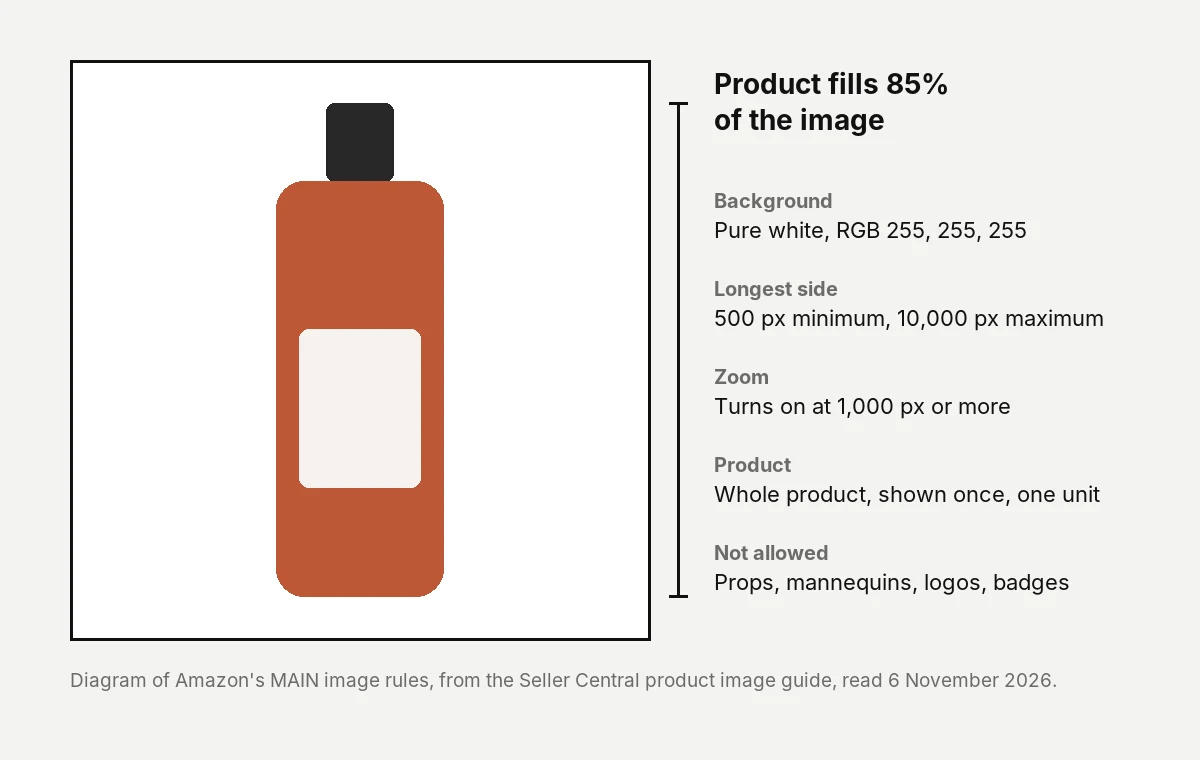
Amazon product images must be JPEG, TIFF, PNG or non-animated GIF, between 500 and 10,000 pixels on the longest side, and 1,000 pixels or more if you want zoom. The main image needs a pure white background (RGB 255, 255, 255) with the product filling 85% of the frame. Every listing needs at least one compliant main image, and Amazon recommends six more images and one video. These rules come from Amazon’s Seller Central product image guide, read on 6 November 2026.
| Requirement | Amazon’s rule | Required? |
|---|---|---|
| File format | JPEG, TIFF, PNG or non-animated GIF | JPEG recommended |
| Image size | 500 px minimum and 10,000 px maximum on the longest side | Yes |
| Zoom | 1,000 px or more on the longest side turns zoom on | Recommended |
| Resolution | At least 72 dpi | Yes |
| Quality | Clear, not pixelated, no jagged edges | Yes |
| Color mode | RGB | Preferred |
| Main image background | Pure white, RGB 255, 255, 255 | Yes |
| Main image fill | Product is 85% of the image | Yes |
| Image count | At least one main image; six more and one video recommended | One required |
What size should Amazon product images be?
Between 500 and 10,000 pixels on the longest side. Images under 500 pixels cannot be uploaded at all. Amazon recommends 1,000 pixels or more, because that is the point where the zoom function turns on.
Two details from the guide that most size charts leave out:
- Amazon tells you not to enlarge small images artificially. A 400-pixel supplier photo stretched to 1,000 pixels meets the number and fails the quality rule, which asks for a clear, non-pixelated image with no jagged edges.
- The guide sets no aspect ratio. It only limits the longest side. Square images fill the gallery frame best, which is why most sellers use them, but a square is a convention on Amazon, not a rule on this page.
Resolution must be at least 72 dpi, and the color mode should be RGB. Amazon’s technical file requirements say CMYK is “not preferred” and should be converted to RGB before upload, and that grayscale is acceptable only for gray or silver metal products.
What are Amazon’s main image requirements?
The main image is the first image on the detail page and the one shown in search results. Amazon’s product image guide sets these rules for it:
- 85% fill. The product takes up 85% of the image.
- Pure white background. RGB 255, 255, 255, so every product looks consistent in search.
- The whole product, once. Nothing cut off, and one view only, not front and back together.
- One unit, plus any accessories that come with it.
- A realistic, professional image that shows the real scale, quantity and color of the product.
- No placeholders. The first image you upload defines the product, and a temporary placeholder can block your real image later.
- No packaging, unless the packaging is a feature, such as a carrying case or a gift basket.
- No props or accessories that are not included, and no part of a mannequin, whether clear, solid, flesh-toned or a hanger.
Category rules sit on top of these. Adult clothing is shown on a standing model. Footwear is a single shoe facing left at a 45-degree angle. Clothing accessories and multipacks are shown flat with no model. Amazon also says only a limited number of product types may use a lifestyle image as the main image, and points to its product page style guide for the list.
Does an Amazon main image have to be on a white background?
Yes. The main image must have a pure white background at RGB 255, 255, 255. Off-white, light gray and soft shadows that tint the background all fail the rule as written. The white rule applies to the main image. Other images in the gallery can show the product in use, in a scene, or with other angles, as long as they follow the rules for all images below.
What file formats does Amazon accept?
JPEG (.jpg or .jpeg), TIFF (.tif or .tiff), PNG (.png) and non-animated GIF (.gif). JPEG is the format Amazon recommends. It does not accept EPS, BMP or PDF, or application files such as PSD and AI.
For file preparation, Amazon asks for minimal or no compression: save JPEGs at the highest quality, avoid re-saving the same JPEG during editing, do not compress TIFFs, and flatten all layers.
If you upload in bulk, the file name matters. The legacy naming format is the product identifier, the variant code and the extension, separated by periods, for example B000123456.MAIN.jpg. Spaces, dashes or extra characters stop the image from uploading.
How many images should an Amazon listing have?
At least one compliant main image. Amazon recommends at least six additional images and one video. The guide does not state a maximum on this page; each additional image is an “image variant” with its own code.
| Image type | Variant code | What it is for |
|---|---|---|
| Main image | MAIN | Shown in search and first on the detail page |
| Variants | PT01 to PT99 | Other angles, the product in use, accessories, details |
| Angle shots | TOPP, BOTT, LEFT, RGHT, FRNT, BACK, SIDE | Specific sides of the product |
| Swatch | SWCH | Color sample thumbnail for listings with versions |
| Safety and compliance | PS01 to PS06 | Warning and safety information |
| Ingredients | INGR | Ingredient information |
| Multipack | DTLS | Several items packaged together |
Amazon’s guide says uploading an image does not guarantee it is shown. Amazon selects and arranges images from every seller on the listing, and a selected image can take up to 24 hours to appear.
What is not allowed on any Amazon product image?
Every image on a listing, main or not, must accurately represent the product and match its title. Amazon’s product image guide bans the following on all of them:
- Images of customer reviews, five-star imagery, or claims such as free shipping
- Seller-specific information
- Text or pricing details on swatch images
- Amazon logos and trademarks, including “Amazon”, “Prime” and “Alexa”
- Amazon badges or anything that looks like one: “Amazon’s Choice”, “Best seller”, “Top seller”
- Nudity or sexually suggestive images
Text on secondary images is a separate question. Amazon’s upload images page says that if your images contain text, it must be in the country’s official language or English, which is the basis for infographic images in the gallery.
Can you use AI-generated images on Amazon?
Amazon’s image guide does not ban AI-generated product images. It holds them to the same rules as any other image: the main image has to be a realistic, professional-quality picture that shows the product’s real scale, quantity and color. An AI image that changes the label, the proportions or the color fails that rule the same way a bad retouch does.
There is one rule written specifically for AI. If an image contains a photorealistic person who was entirely generated by AI, you must tag the file before upload:
- Add the keyword
contains-synthetic-performerto thedc:subject(XMP) field, using an IPTC-compatible metadata editor. - Amazon then adds a disclosure for shoppers where a jurisdiction requires it.
- No tag is needed when the image shows only real people, even AI-edited ones, when it shows no people, or when the people are not photorealistic.
The same tag applies to videos.
What are Amazon’s product video requirements?
For listing videos, Amazon’s shoppable video guide lists MOV or MP4, up to 5 GB, up to 1080p, in 16:9 or 9:16. Our Amazon listing video guide covers the full table, how to add a video in Seller Central, and the separate specs for Sponsored Brands video ads.
Why is my Amazon listing image not showing?
Four causes come straight from Amazon’s pages:
- It has not been 24 hours. A selected image can take up to a day to appear.
- The file failed a technical rule. Images under 500 pixels, in an unsupported format, or with a bad file name never enter the system.
- The image broke a content rule and was removed.
- Amazon chose a different image. It picks from all sellers on the listing, so yours may not be displayed even when it is compliant.
A listing with no compliant main image can be removed from search until one is uploaded, which is what a suppressed listing usually means.
How do you make compliant Amazon images without a photoshoot?
Shhots AI turns one product photo into the full set a listing needs: a main image on pure white, lifestyle scenes, infographic images with text, and A+ content sizes. A product image costs 11 credits, and the Starter plan is $19 a month for 2,000 credits, with a commercial license. Check the main image against the eight rules above before you upload, because accuracy to the real product is Amazon’s test, whatever made the picture.


Both images above were made on Shhots AI from one photo of the bottle. They are secondary-slot images, a styled studio shot and a lifestyle shot, not main images. See AI product photography for the workflow.
FAQ
What size should Amazon product images be?
Amazon product images must be between 500 and 10,000 pixels on the longest side. Amazon recommends 1,000 pixels or more, which turns on the zoom function. Resolution must be at least 72 dpi.
Does the Amazon main image need a white background?
Yes. Amazon’s product image guide requires the main image to have a pure white background at RGB 255, 255, 255, with the product filling 85% of the image. Other gallery images can use scenes and props.
Does Amazon accept PNG images?
Yes. Amazon accepts JPEG, TIFF, PNG and non-animated GIF files, and recommends JPEG. It does not accept BMP, EPS, PDF or PSD files.
How many images can an Amazon listing have?
Every listing needs at least one compliant main image. Amazon recommends at least six additional images and one video. Its product image guide does not state a maximum.
Do Amazon product images have to be square?
No. Amazon’s product image guide limits only the longest side, 500 to 10,000 pixels, and sets no aspect ratio. Square images are a common choice because they fill the gallery frame.
Can I use AI-generated images on Amazon?
Yes, if they follow the image rules. The main image must realistically show the product’s true scale, quantity and color. Images with a photorealistic, fully AI-generated person must carry the contains-synthetic-performer metadata tag.
Why does my Amazon listing say no image available?
Usually because no image has cleared Amazon’s checks yet. Per Amazon’s product image guide, images under 500 pixels or in an unsupported format cannot be uploaded, non-compliant images can be removed, and a selected image takes up to 24 hours to appear.
Do the same image rules apply outside the US?
This page covers Amazon’s US help pages. Amazon lets you upload one global image set or country-specific sets, and text on images must be in the country’s official language or English.
Sources
- Amazon Seller Central, Product image guide, read 6 November 2026
- Amazon Seller Central, Technical image file requirements, read 6 November 2026
- Amazon Seller Central, Upload images, read 6 November 2026
- Amazon Seller Central, Shoppable video guide, read 6 November 2026