
Disclosure: Shhots AI is our product.
Seedance, through Dreamina or CapCut, is the best free AI image to video generator in 2026: daily refreshing credits, no watermark, and commercial use allowed on the free tier. Kling gives the most free credits a day but watermarks them and blocks commercial use. For a product ad you can legally run, the cheapest watermark-free route is a paid plan, and the lowest entry is Shhots AI at $19/mo. All ten free tiers are ranked below by what they actually export, checked on 9 September 2026.
Last updated: September 2026.
| Tool | Free tier (Sep 2026) | Watermark on free | Commercial use on free | Clip length on free |
|---|---|---|---|---|
| Seedance (Dreamina, CapCut) | Daily refreshing credits | No | Allowed | Up to 30s on 2.5 |
| Kling AI | 66 credits a day | Yes | Not allowed | About 5s |
| Pika | 80 credits a month, 480p | Yes | Allowed | 5s |
| Hailuo AI (MiniMax) | Daily free credits | Yes | Check terms | About 6s |
| PixVerse | 60 credits a day, 540p to 720p | Yes | Paid only | 5 to 8s |
| Google Veo (Flow, Gemini) | Small daily credit pool, 720p | Yes | Check terms | About 8s |
| Runway | 125 one-time credits | Not stated | Limited by the cap | About 5s |
| Adobe Firefly | Free daily generations | Yes | Paid only | 5s |
| Wan 2.2 and other open models | Free if self-hosted | No | Allowed | Depends on your GPU |
| Shhots AI | No free tier; $19/mo | No | Full commercial license | Up to 30s |
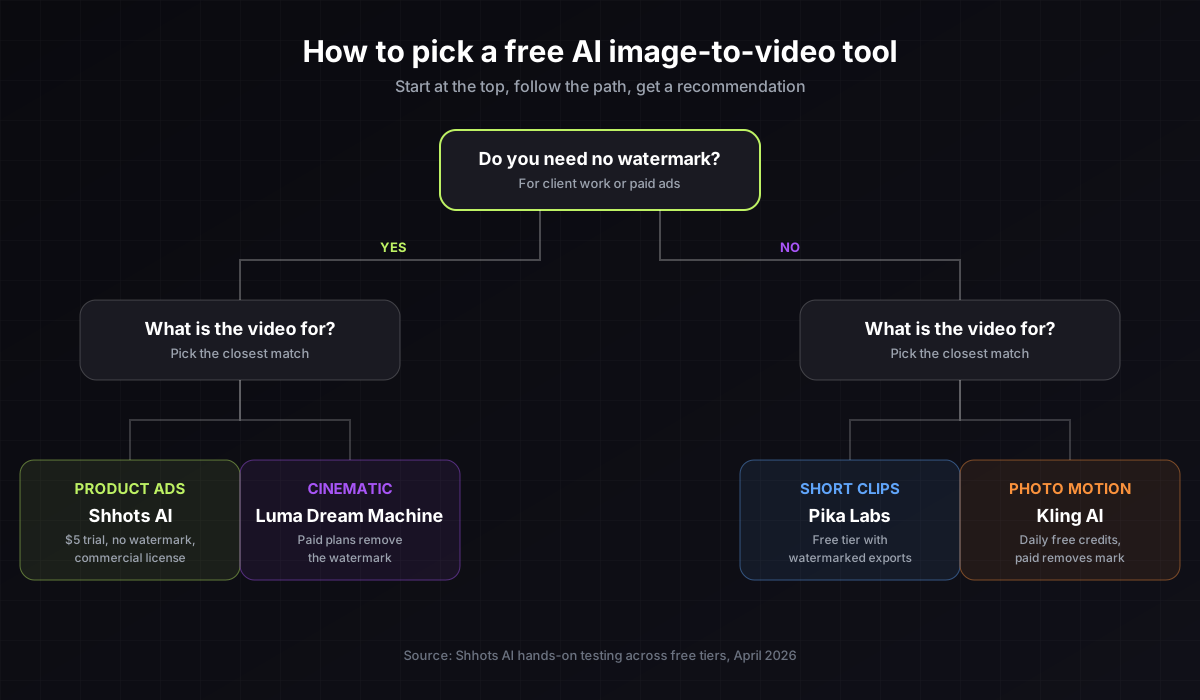
Most “free” AI video tools add a watermark to every export. That is fine for a quick test and useless for a product ad, a client video, or a paid social campaign. This guide splits the tools into the ones that export clean for free, the ones that watermark until you pay, and the cheapest paid route when the free tiers run out.
Quick picks
- Best free tier overall: Seedance through Dreamina or CapCut
- Most free credits per day: Kling AI (watermarked)
- Best free quality: Google Veo through Flow, if you can live with the cap
- Cheapest paid clean export for social clips: Pika at $8/mo billed annually
- Cheapest paid clean export for product ads: Shhots AI at $19/mo
How we picked
Four questions, in order:
- Does the free tier export a usable file, or only a preview?
- Is the export watermark-free?
- Can you use the output commercially without paying?
- How long is the clip and at what resolution?
Free tiers were checked on each vendor’s pricing page on 9 September 2026. Where a vendor hides its plan table behind a login, we say so rather than guess. Tools that only preview and force a paid signup before download were excluded.
Free tools that export with no watermark
1. Seedance through Dreamina or CapCut
Seedance is ByteDance’s video model, and its free tier is the most usable one on this list. Credits refresh daily, exports carry no watermark, and commercial use is allowed. Seedance 2.5 generates a native 30-second clip in one pass, the longest single take of any free model.
- Free tier: daily refreshing credits on Dreamina and CapCut
- Watermark: no
- Commercial use: allowed
- Catch: peak-hour queues, and paid tiers differ by host
2. Wan 2.2 and other open-source models
Open-weight video models like Wan 2.2 are free, unlimited, and watermark-free if you run them yourself. You need a GPU with plenty of memory or a hosted notebook, and some patience with setup. Output quality is close to the mid-tier hosted tools.
- Free tier: fully free, self-hosted
- Watermark: no
- Commercial use: check each model’s license; most permit it
- Catch: setup and hardware. This is a developer route, not a marketer route.
Free tiers with a watermark, removed when you pay
3. Kling AI
Kling gives 66 free credits a day, the most generous daily allowance here, and its human motion and lip sync are the best in the group. The free tier watermarks every export and is non-commercial. Kling’s membership page renders no prices to a crawler; secondary reporting puts Standard around $7 to $10/mo as of August 2026, and our Kling AI pricing post has the credit math.
- Free tier: 66 credits a day
- Watermark: yes on free
- Commercial use: paid plans only
4. Pika
Pika’s free tier is 80 credits a month at 480p with a watermark, image-to-video only. The cheapest paid plan is the lowest on this list: $8/mo billed annually ($96/yr) for 700 credits, 1080p, and no watermark, verified 9 September 2026.
- Free tier: 80 credits a month, 480p
- Watermark: yes on free, removed on Standard
- Commercial use: allowed
5. Hailuo AI (MiniMax)
Hailuo refreshes free credits daily and produces lifelike motion, especially faces and micro-expressions. Speed depends on server load. The site does not render its paid prices to a crawler; secondary reporting placed the entry plan near $9.99/mo in August 2026.
- Free tier: daily credits
- Watermark: yes on free
- Commercial use: check the terms before running an ad
6. PixVerse
PixVerse gives 60 free credits a day at 540p to 720p with a watermark, and its template effects make it popular for stylized social clips. Paid plans, around $10/mo as of August 2026, remove the watermark and raise output to 1080p.
- Free tier: 60 credits a day
- Watermark: yes on free
- Commercial use: paid plans
7. Google Veo through Flow and Gemini
Veo 3.1 is the highest quality model in this list, and Google gives a small daily credit pool through Flow and the Gemini app that covers a handful of 720p clips. Google AI Pro at $19.99/mo (US price, August 2026) opens higher quality and more volume.
- Free tier: small daily pool, 720p
- Watermark: yes on free
- Commercial use: check Google’s terms for your plan
8. Runway
Runway’s free plan is 125 one-time credits, enough for a couple of Gen-4.5 clips at 60 credits per 5 seconds. Once they are gone, Standard is $12/mo billed annually ($15 monthly) for 625 credits with no watermark, verified 9 September 2026.
- Free tier: 125 credits, one time
- Watermark: not stated on free; none on paid
- Commercial use: paid plans
9. Adobe Firefly
Firefly offers free daily generations across image, video, and audio with limits that reset each day. Video on the free tier is watermarked and short. Standard is $9.99/mo for 2,000 credits, about 20 five-second videos, verified 9 September 2026. Firefly’s draw is licensing: Adobe indemnifies commercial use on paid plans.
- Free tier: daily generations with limits
- Watermark: yes on free
- Commercial use: paid plans, with indemnity
The cheapest watermark-free route for product ads
10. Shhots AI
Shhots is not free, and we make it. It is here because it is the lowest-cost way to get a product ad you can legally run: $19/mo Starter with 2,000 credits, no watermark on any plan, and a full commercial license. Unlike the tools above, it does not just animate the photo you upload. It places an AI actor with your product using an image model, then animates that frame with Veo 3, Kling 3, or Seedance 2.5.
- Free tier: none
- Watermark: no
- Commercial use: full license on every plan
- Clip length: up to 30 seconds
Try it on the image to video page, or read the full ranked comparison in the best AI image to video generator guide.
Which one should you pick
- You want to test ideas for free and post the result: Seedance through Dreamina or CapCut.
- You want the most free credits and do not mind a watermark: Kling.
- You want the best quality on a free tier: Veo through Flow, within the daily cap.
- You want a cheap clean export for social clips: Pika at $8/mo annual.
- You sell products and run paid ads: Shhots AI at $19/mo.
- You are a developer with a GPU: Wan 2.2.
Why most free tools add a watermark
Every generation costs the vendor GPU time. The watermark is how a free user pays: the logo travels with the clip and brings in the next signup. If the video stays private, a watermark is fine. If it goes on a paid ad, a store page, or a client deck, budget for the cheapest paid tier that removes it, or use a tool that includes a commercial license at a low entry price.
What to check before you sign up
- Does it export, or only preview? Some free tiers show the result and lock the download.
- Is the watermark removable on a paid tier? A few never remove it.
- Does the free tier allow commercial use? Kling’s does not.
- Does it support your aspect ratio? 9:16 for TikTok and Reels, 1:1 for feeds, 16:9 for YouTube.
- How long is the clip? Most free tiers cap at 5 to 8 seconds; Seedance 2.5 reaches 30.
FAQs
Is there a free AI image to video generator with no watermark?
Yes. Seedance exports clean on the free tier through Dreamina and CapCut, and open models like Wan 2.2 are watermark-free if you self-host. Every other hosted tool here watermarks free exports until you pay.
Which free AI video tool has the best quality?
Google Veo through Flow, then Kling. Both watermark free output and cap daily volume. Seedance 2.5 is close behind and the only free tier that exports clean.
Can I use a free AI video generator for paid ads?
Only if the free tier allows commercial use. Seedance and Pika allow it; Kling does not. Read the terms before spending money on media. Shhots includes a commercial license on every paid plan from $19/mo.
How long can a free AI video clip be?
Most free tiers cap each clip at 5 to 8 seconds. Seedance 2.5 generates 30 seconds in one pass. Longer ads are stitched from several clips.
Is there a free AI image to video generator with no credit limit?
Not hosted. Every hosted free tier caps daily or monthly credits. Unlimited free output means running an open model on your own GPU.
Do free AI video tools work on a phone?
Most run in the browser and CapCut has a native app, so yes. Generation is slower on free tiers and depends on your connection.
Bottom line
Free AI image to video tools are good for testing ideas, and Seedance is good enough to post. For product ads, paid social, or client work, plan to pay something. The cheapest serious option is the Shhots AI $19/mo Starter plan: 2,000 credits, no watermark, and a full commercial license. The full ranked list of paid tools is in the best AI image to video generator guide.