Disclosure: Shhots AI is our product.
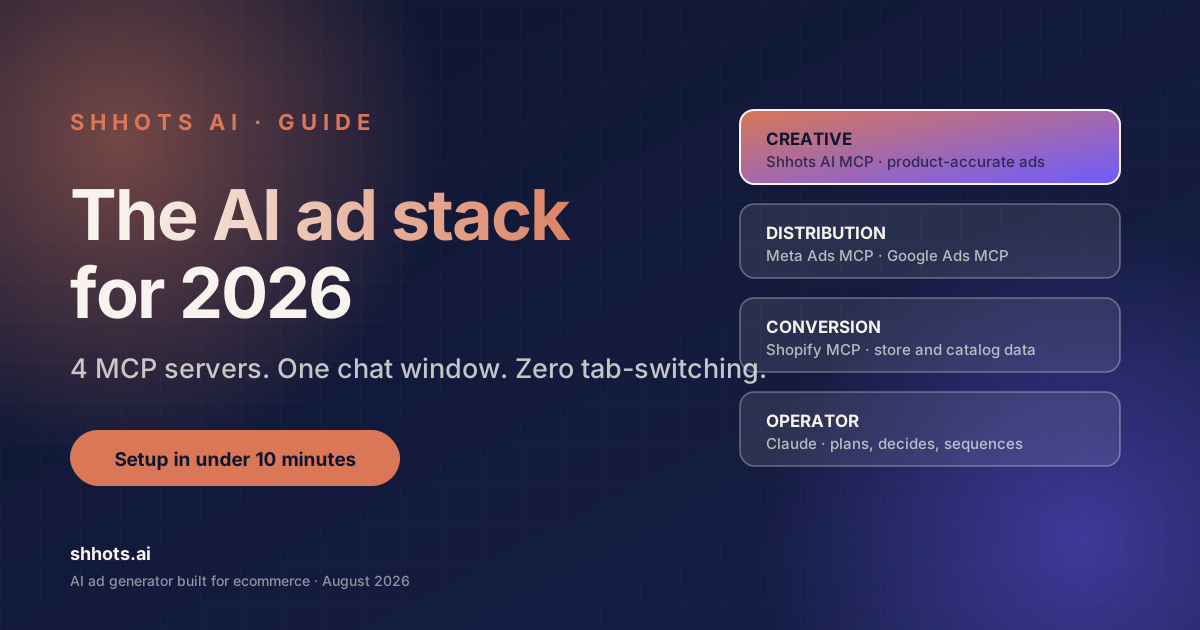
The AI ad stack in 2026 is four MCP servers connected to one chat window. Shhots AI creates the ad creative from your real product photos. Meta and Google MCP servers draft and analyze the campaigns. Shopify’s MCP answers whether the landing page converts. Claude operates all of them in a single session. This guide covers the full stack, what each layer actually does today, what it still cannot do, and how to wire it together in under ten minutes.
For years, running product ads meant living in five browser tabs: a design tool, an ad account, a spreadsheet, a store admin, and a chat with your freelancer. Every handoff between tabs lost context and added days. MCP collapsed those handoffs into one conversation.
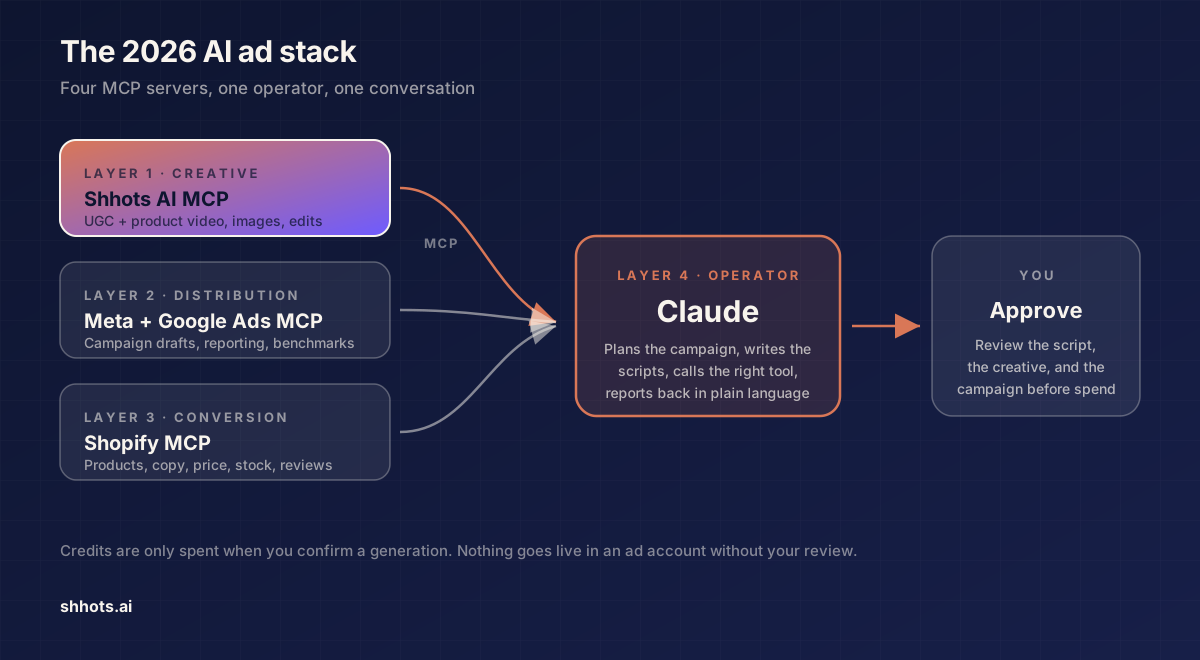
Table of Contents
- What is the AI ad stack?
- Why 2026 is the year the stack became real
- Layer 1: Creative. Shhots AI MCP
- Layer 2: Distribution. Meta and Google Ads MCP
- Layer 3: Conversion, Shopify MCP
- Layer 4: The operator, Claude
- What a full session looks like
- Setting up your AI ad stack
- What the stack cannot do yet
- FAQ
What is the AI ad stack?
An AI ad stack is a set of MCP servers that give an AI assistant direct, permissioned access to the tools that create, distribute, and measure advertising. MCP stands for Model Context Protocol, an open standard created by Anthropic that lets AI assistants call external tools securely through OAuth.
The 2026 version of the stack has four layers:
| Layer | Job | MCP server |
|---|---|---|
| Creative | Generate product images and video ads | Shhots AI MCP |
| Distribution | Draft, launch, and read ad campaigns | Meta Ads MCP, Google Ads MCP |
| Conversion | Check store data, products, landing pages | Shopify MCP |
| Operator | Plan, decide, and coordinate the other three | Claude |
Each layer existed before as a separate product with its own interface. The stack removes the interfaces. You describe the outcome, and the operator calls the right tool.
Why 2026 is the year the stack became real
Four platform decisions inside a single spring made the stack possible.
- Amazon moved first, in February 2026.
- Google shipped its official Google Ads MCP server in April 2026, maintained by the Google Ads API team. It launched read-only: it can read every metric, budget, and status in your account, but it cannot pause a campaign, change a bid, or create an asset.
- Meta followed a day later with Meta Ads AI Connectors. A hosted MCP server at
mcp.facebook.com/adsexposing 29 Marketing API tools, plus a CLI. It is free during open beta, and unlike Google’s server it includes write access. - TikTok announced its own Ads MCP server at TikTok World on 13 May 2026. As of this writing it is an announcement rather than a self-serve product. There is no public install path yet, so do not plan a quarter around it.
Shopify had already open-sourced its AI Toolkit on 9 April 2026, and every eligible store now exposes a Storefront MCP endpoint by default, giving agents structured access to products, catalog, and store data.
One thing to be clear about, because it is the most common misconception: Meta’s server grants real write access. Authorisation happens through a Meta Business OAuth dialog with three scope tiers, read-only, read/write, and read/write/financial, granted per user and per ad account. There is no universal “everything arrives paused” guarantee baked into the protocol. If you want a hard safety gate, grant read-only scope and let the stack draft in chat, or keep write scope and make reviewing in Ads Manager a non-negotiable step. Decide that before you connect, not after.
The missing piece was creative that could handle a real product. General image and video models produce beautiful footage and routinely distort labels, bottle shapes, and logos. An ad stack that misrepresents the product it advertises is a liability. That gap is what Shhots AI MCP fills.
Layer 1: Creative: Shhots AI MCP
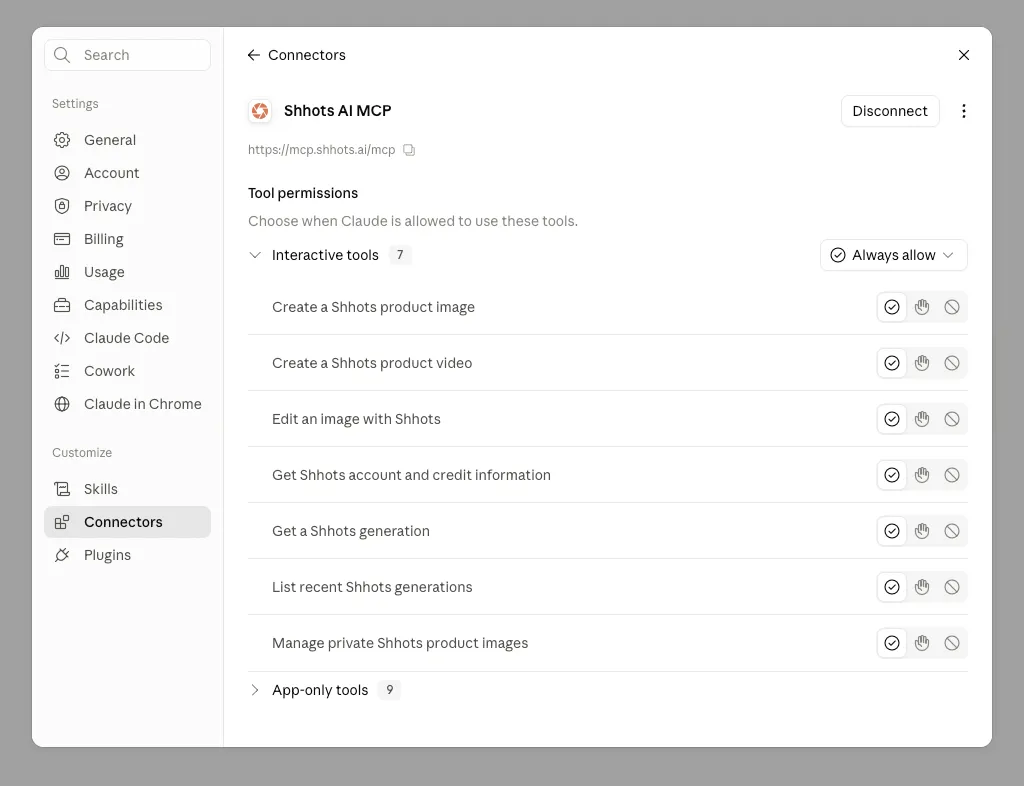
Shhots AI generates UGC video ads, cinematic product films, and AI product photoshoots by compositing AI actors and scenes around your actual product, preserved accurately from a single photo. Its MCP server exposes seven interactive tools to any MCP client:
| Tool | What it does |
|---|---|
| Create a Shhots product video | 7 formats, 5/10/15 seconds, 9:16, 1:1, or 16:9 |
| Create a Shhots product image | 4 styles across 5 aspect ratios |
| Edit an image with Shhots | Plain-English edits to any generated result |
| Manage private Shhots product images | Your private product library |
| List recent Shhots generations | Session history |
| Get a Shhots generation | Status and result of a single job |
| Get Shhots account and credit information | Plan and credit balance |
Three design choices make it the right creative layer for an ad stack.
Active product persistence. Upload a product photo once. Every follow-up image, video, and edit in the session reuses it automatically. “Make me five more in different formats” is a complete instruction.
Claim safety. The tools refuse to invent product benefits, certifications, ingredients, pricing, or performance claims. Scripts can only use facts visible on the product or supplied by you. Your ad account stays clean and your compliance reviewer sleeps.
Transparent cost. Every generation shows its credit quote before it runs, and credits are only spent when you confirm. A product image costs 11 credits, plus 1 credit to analyze each newly imported product photo. A 10-second UGC ad costs 551 credits and a 15-second UGC ad costs 826. Product ads cost 577 and 852 respectively. The MCP server is included on the Pro and Scale plans, see pricing.
Real output from this layer
These three vertical ads were generated through the Shhots MCP server inside Claude, from a single product photo each. No studio, no actor booking, no editing pass.
Note what is happening in the middle of that clip: the creator holds the jar, opens it, and scoops from it, and the product stays the same object across the cut. That continuity is the whole reason a dedicated creative layer exists in this stack.
Layer 2: Distribution: Meta and Google Ads MCP
Once the creative exists, distribution happens in the same chat. The Meta Ads MCP server exposes 29 tools across reporting and insights, campaign management, catalog operations, account diagnostics, and dataset operations. Because it includes write access, it can build campaigns, ad sets, and ads directly. Which is exactly why the scope tier you grant at OAuth time matters.
Google’s server is read-only, which makes it the analysis half of the pair: pull search term reports, spot wasted spend, and compare performance across campaigns, all through conversation. Any change you decide on still gets made by you, in the Google Ads UI.
A practical pattern for solo founders and small teams:
- Shhots generates 3 creative variants for one product.
- Meta MCP drafts a test campaign with all 3 as separate ads.
- You review every draft in Ads Manager before anything is set live.
- Three days later, ask Claude to read the results and tell you which hook won.
Media buyers spent a decade doing step 4 with CSV exports. Now it is a sentence. If creative testing is the bottleneck you are trying to break, the deeper playbook is in how to scale campaigns using AI-generated ads.
Layer 3: Conversion: Shopify MCP
When a campaign underperforms, the eternal question is whether the problem is the ad or the landing page. With Shopify’s MCP in the same session, Claude can pull the product page copy, price, reviews, and stock status while it reads the campaign metrics. The diagnosis happens in one place, with all the evidence on the table.
For Shopify and DTC founders, this layer also feeds the creative layer. Claude can read your best-selling product’s description and hand those verified facts to Shhots as script material, which keeps every generated ad grounded in what your store actually claims. If you run a store and want that loop without the MCP setup, Shopify video generation does the same job from a product URL.
Layer 4: The operator: Claude
The operator layer is what makes this a stack instead of a pile of integrations. Claude plans the campaign, writes the scripts and treatments, decides which tool to call, sequences the calls, and reports back in plain language.
This is also where the advantage lies for non-experts. You do not need prompt engineering for video models, because Claude writes the treatment. You do not need to know Marketing API field names, because the MCP servers translate. The skill that matters now is knowing your product and your customer.
The Claude AI video generator guide walks through the creative half of this in detail, prompt by prompt.
What a full session looks like
A realistic brief for the stack:
“Here’s a photo of our new pet shampoo. Make a 15-second UGC ad for TikTok and a square lifestyle image for Instagram, then draft a $50/day Meta test campaign with both.”
What happens:
- Shhots analyzes the product photo (1 credit) and stores it as the active product for the session.
- Claude writes a claim-safe script and treatment, and shows you both for approval.
- On your confirmation, Shhots generates the 9:16 UGC video (826 credits) and the 1:1 lifestyle image (11 credits).
- You ask for one edit, “warmer lighting on the image”, and the edit tool applies it to that result.
- Meta MCP drafts the campaign with both assets.
- You open Ads Manager, review, and launch.
Most of the elapsed time is render time. The same deliverables from an agency typically run $500 to $2,000 and take one to two weeks.
Setting up your AI ad stack
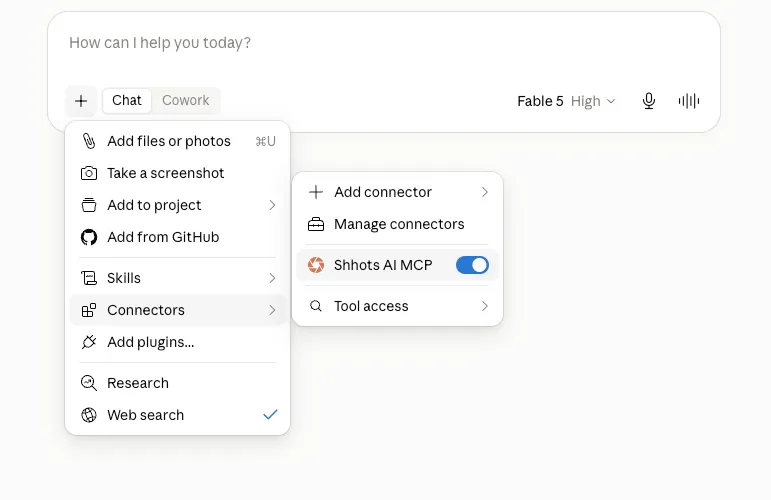
The whole stack connects through OAuth. No API keys, no developer apps.
- Connect Shhots AI MCP. In Claude, open Settings: Connectors, add a custom connector, and paste
https://mcp.shhots.ai/mcp/. Sign in to your Shhots account and approve the connection. Works on Claude web, desktop, mobile, and Claude Code, and also in ChatGPT, Gemini, Perplexity, and Cursor. Full walkthrough: the Shhots MCP page. - Connect Meta Ads MCP. Add
mcp.facebook.com/adsand complete the OAuth flow with your Business account. Choose your scope tier deliberately. - Connect Google Ads MCP. Follow the Google Ads API team’s instructions for their official server. Expect read-only.
- Connect Shopify. Enable the AI Toolkit from your Shopify admin, or use your store’s Storefront MCP endpoint.
Start with layers 1 and 4 only. Creative plus operator already replaces the most expensive part of the workflow. Add distribution once you trust the outputs.
What the stack cannot do yet
Honest limits, because a stack you misjudge will cost you money:
- Write access is real access. Meta’s connector can change live campaigns within the scope you grant. Read-only scope plus manual launch is the conservative default, and it is the one we would pick.
- Google’s server cannot change anything. It reads. Every optimization is still a manual action.
- TikTok is announced, not shipped. Coverage and write access vary across the smaller platforms too. Verify before you plan around them.
- Video render times are minutes, not seconds. Plan sessions accordingly.
- The stack cannot fix a weak offer. It compresses execution. Strategy remains yours.
If you would rather skip the assembly entirely, Shhots Done-For-You ships 30 videos and 50 images a month with a plan you approve, for $499.
FAQ
What is an AI ad stack?
An AI ad stack is a set of MCP servers connected to an AI assistant that together create ad creative, draft and analyze campaigns, and read store data from one conversation. The 2026 stack pairs Shhots AI for creative with Meta, Google, and Shopify MCP servers, operated by Claude.
Do I need to know how to code to set this up?
No. Every server in this stack connects through OAuth from the Claude settings menu. There are no API keys to manage and no developer app to register. Setup for the full stack takes under ten minutes.
Is it safe to let an AI touch my ad account?
It depends on the scope you grant. Meta’s MCP server offers read-only, read/write, and read/write/financial OAuth tiers per ad account, and write access means an assistant can change live campaigns without a separate confirmation screen. Google’s official server is read-only by design. The safest configuration is read-only scope on the ad platforms plus manual launch in Ads Manager. On the creative side, Shhots only spends credits when you explicitly confirm a generation.
How much does the creative layer cost?
The Shhots MCP server is included on the Pro plan ($49 per month, 6,000 credits) and the Scale plan ($99 per month, 12,000 credits). A product image costs 11 credits, a 10-second UGC ad costs 551 credits and a 15-second UGC ad costs 826, and every generation shows its exact cost before it runs.
Which AI assistants support this stack?
Claude has the deepest support, across web, desktop, mobile, and Claude Code. Shhots AI MCP also works in ChatGPT, Gemini, Perplexity, and Cursor, though ad platform server support varies by client. For running the creative loop from an always-on ChatGPT agent, see ChatGPT Dots and Shhots AI.
Can I use the stack without Shopify?
Yes. The conversion layer is optional. Creative plus operator is the minimum useful stack, and it works for Amazon and Etsy sellers, marketplace brands, and anyone running ads to a non-Shopify landing page. See Amazon listing videos and Etsy listing videos for the marketplace version.