

Creative fatigue on Meta is what happens when the people your ad reaches have seen the same image or video too many times, so fewer of them engage and your cost per result climbs. Meta flags it in the Delivery column of Ads Manager: Creative limited when cost per result is above your past ads but under twice as much, and Creative fatigue when it is twice as much or more (Meta Business Help Center). The fix Meta recommends first is a new ad with a materially different image or video, with the original left running.
The catch is timing. Meta’s label arrives after cost per result has already moved, and it only appears on ad sets with a single creative. This guide covers the metrics that move earlier, why fatigue behaves differently under Meta’s Andromeda retrieval system, what Meta counts as a new creative, how often to refresh at different spend levels, and how to add new ads without restarting the learning phase more than once. Every Meta rule below was read from the Business Help Center and Meta’s own announcements on 17 November 2026.
What is creative fatigue on Meta ads?
Meta’s definition is short: creative fatigue “occurs when an audience has seen the same creative too many times.” People become less likely to engage, and that leads to a higher cost per result.
Two details in Meta’s help page matter more than the definition:
- Meta counts every recent exposure of the image or video, including exposures from other campaigns run from your Page. Duplicating a winning video into a new campaign does not reset its fatigue clock.
- The status compares cost per result against ads you ran in the past, not against the ad’s own first week.
| Meta status | When it appears | Where you see it |
|---|---|---|
| Fatigue warning before launch | Meta predicts creative fatigue may occur in the first 7 days | Before you publish |
| Creative limited | Cost per result is higher than your past ads, but less than 2x | Delivery column, ad set or ad |
| Creative fatigue | Cost per result is 2x your past ads or more | Delivery column, ad set or ad |
Source: About creative fatigue recommendations in Meta Ads Manager, read 17 November 2026.
Why you often won’t see Meta’s fatigue status
The feature only works on ad sets with one creative. Meta excludes Advantage+ catalog ads, dynamic creative and Advantage+ app campaigns, and the status is not available with the sales objective before an ad set is active.
If you run several ads per ad set, or flexible format ads with up to 10 creative assets in one ad (Meta, managing ad volume), Meta’s label never shows up. You have to read fatigue from the metrics yourself.
Meta’s Ads Creative Studio, where your account has it, is the other place Meta surfaces fatigue. A Creative fatigue indicator in the Actions column opens it, and its Breakdowns view compares creatives on cost per result, CTR and frequency. It only covers single image and video ads, in ad sets that have finished learning and are still delivering.
Which metrics show creative fatigue first?
Fatigue shows up in a fairly predictable order: frequency climbs, then attention metrics slip, then cost per result follows. By the time cost per result moves, you have already paid for several days of decline.
| Metric | How to get it | What fatigue looks like | Caveat |
|---|---|---|---|
| Frequency | Impressions / reach (a default Ads Manager column) | Rising week over week while budget is flat | An average. Some people saw the ad once, others many times |
| Hook rate | 3-second video plays / impressions (a custom metric you build) | Falling against the ad’s own first full week | Video only. Meta does not use the term “hook rate” |
| Hold rate | ThruPlays / 3-second video plays (custom metric) | Falling while hook rate holds | Points to the body of the video, not the opening |
| CTR (link) | Link clicks / impressions | Falling as frequency rises | Moves later than hook rate on video |
| Engagement rate ranking | Ad relevance diagnostics column | Drops a band, for example from average to below average | Needs 500+ impressions, and it is not an input to the auction |
| CPM | Cost per 1,000 impressions | Sometimes rises | Weak signal on its own. See below |
| Cost per result | Your optimization event’s cost | Climbs above your past ads | The last metric to move, and the one Meta’s status uses |
Engagement rate ranking is one of three ad relevance diagnostics. Each compares your ad against ads competing for the same audience.
Why CPM is a weak fatigue signal
Most fatigue guides list rising CPM as a symptom. Meta’s own guidance says to be careful with it: if you optimize for conversions, “looking at the cost per thousand impressions (CPM) may not be a good indicator of performance,” because the system may buy pricier impressions to get cheaper conversions (Meta, fluctuations in ad performance). CPM also rises across every advertiser in peak season. Treat CPM as a supporting signal only when it rises on one ad while the rest of the account holds steady.
Check fatigue by placement
Use Breakdown, then By delivery, then Placement in Ads Manager. A video can be exhausted in Instagram Reels while still converting in Facebook Feed, because the same people do not use every surface equally. If the decline sits in one placement, the fix may be a new cut sized for that placement rather than a new concept. Meta’s spec for every placement is in our Meta ad sizes and safe zones guide.
Meta also advises reading performance over a full week instead of by day or hour, since breakdowns show oscillations that “average out over time.” Compare 7-day windows against the ad’s own first full week, never yesterday against today.
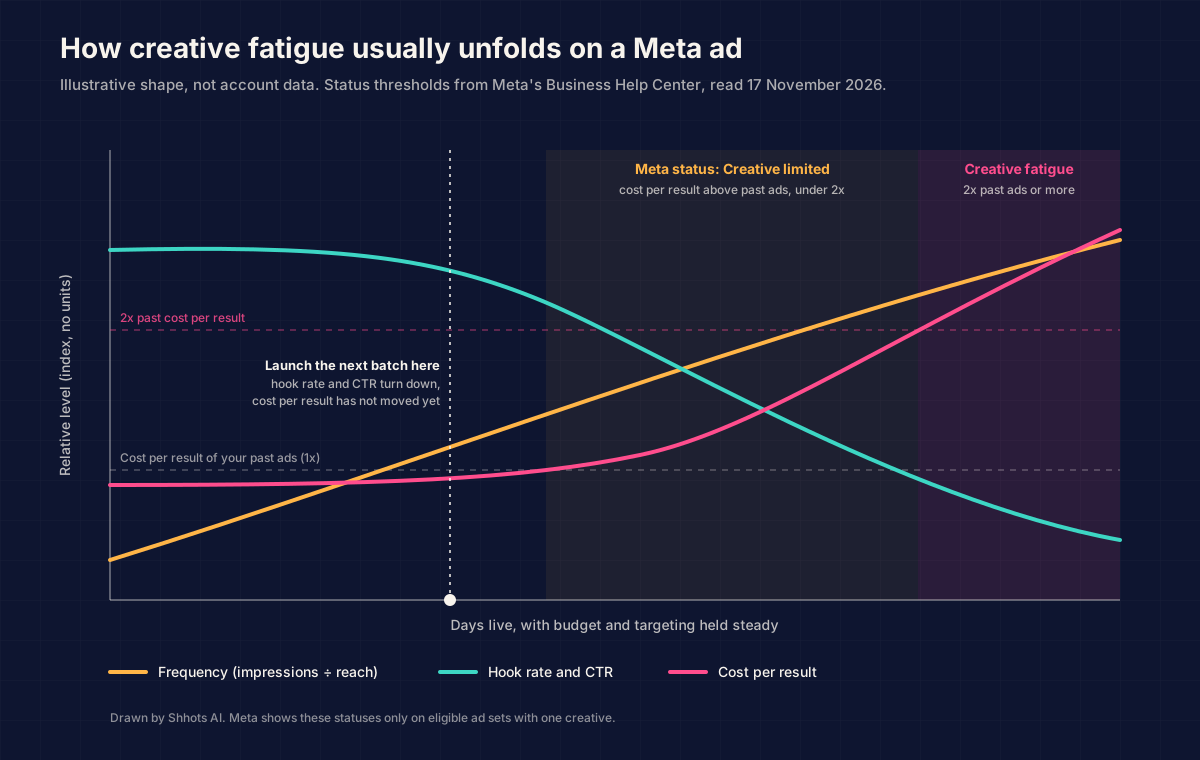
The chart is a shape, not data. Your curve will be steeper or flatter with spend and audience size. The best moment to launch the next batch is when hook rate and CTR turn down, before cost per result moves.
Is it creative fatigue or something else?
Rising costs have at least five causes that look alike on the summary row. Diagnose before you replace anything, because a new creative fixes only one of them.
| Symptom | Likely cause | Check | Fix |
|---|---|---|---|
| Frequency up, hook rate and CTR down, cost per result up on one ad | Creative fatigue | Ad-level 7-day vs first week | New concept, keep the original live |
| Frequency up, CTR steady, cost per result up | Audience saturation | Reach flattening while frequency climbs | Broaden the audience, Meta’s second recommendation |
| Cost per result up right after a change, status reads “Learning” | Learning reset | Last significant edit column | Wait for about 50 results before judging |
| Cost per result up on every ad and campaign at once | Auction pressure (season, competition) | CPM up account-wide, CTR steady | Hold. Do not swap creative that still holds attention |
| CTR steady, conversion rate down | Post-click problem | Landing page, stock, price, tracking | Fix the page or the offer. New ads won’t help |
| Decline only in one placement | Placement fatigue | Placement breakdown | New cut or ratio for that placement |
| New ads get almost no spend | Near-duplicates or a dominant incumbent | Delivery share per ad | Make the new ads more distinct |
Meta’s own peak-season note lists “a creative that has fatigued” next to the season, the competition, someone else’s campaign and the weather as reasons results move (Meta for Business, 21 October 2026). Only one of those is solved by a new ad.
Why does creative fatigue seem faster under Andromeda and Advantage+?
Meta has not published a claim that fatigue happens faster under Andromeda. What Meta has published explains why many advertisers see it that way.
Andromeda is Meta’s ad retrieval system. It is the first step of ranking, where Meta narrows tens of millions of candidate ads down to the few thousand it considers showing a person. Meta introduced it in December 2024 with a 10,000x increase in retrieval model complexity (Engineering at Meta). In October 2026, Meta said the next generation routes each ad to specialized models and scores every eligible ad at over one billion ads per second, so “more of your ads, creative variations and products are considered for each person” (Meta for Business, 28 October 2026).
Meta now tells advertisers that creative does the targeting. Its April 2025 post says “the focus has shifted from niche targeting to creative diversification,” which it calls the best way to find the most relevant audiences (Meta for Business). Its October 2026 guidance tells advertisers to adopt Advantage+ and “supply more creative variety so the system has more to test and learn from” (Meta for Business).
Similar creatives get grouped together. Meta’s creative differentiation page says: “When creative is too similar, our system may not recognize it as different and could deliver it to the same sets of audiences,” and names Creative limited and Creative fatigue as the result (Meta). Meta’s GenRecs work, announced in October 2026, has language models describe each ad’s text and images as semantic tokens for attributes like brand, color, fit and style.
Put those together and the mechanism is clear, though the conclusion is my reading of Meta’s posts, not a Meta statement. With broad targeting, each creative finds its own pocket of people. Ten near-identical versions of one video share one pocket. Once that pocket has seen the idea a few times, all ten fatigue together, and adding an eleventh lookalike does nothing.
Advantage+ adds a second effect. Delivery favors the ad the system predicts will do best, so in practice one creative often carries most of the spend and burns through its pocket faster than it would on an even split.
What does Meta count as a new creative?
Meta asks for a new ad “with a new image or video that is materially different from the original creative.” It does not publish a similarity threshold. The closest hint is Ads Creative Studio, which groups each image or video into a creative style based on “visual, text and story similarities.” If two of your ads land in the same style, treat them as one idea. The safe working assumption: if the opening frame and the message are the same, Meta probably treats it as the same ad.
| Change | Likely read by Meta as | Use it for |
|---|---|---|
| New font, color or text overlay | Same creative | Nothing. Wasted production |
| New headline or primary text only | Same creative, new copy | Copy testing inside one ad |
| Same video, new crop or ratio | Same creative, new placement fit | Placement-level fatigue |
| New hook line on the same body | Iteration, partially new | Extending a winner a few weeks |
| New person on camera, same script | Iteration to new concept | Reaching a different pocket with a proven message |
| New setting or format (UGC to demo, static to video) | New concept | Fatigue fixes |
| New angle (problem, desire, objection, comparison) | New concept | Fatigue fixes and finding new buyers |
Meta’s creative differentiation page lists idea formats it suggests for variety, including the listicle, the “types of” video, the transition, the Q&A, the product demo and the POV video. Each one changes the visual structure, which is what a near-duplicate never does. For ideas on what competitors run, the Meta Ad Library guide shows how to read their active ads and run dates.
How often should you refresh Meta ad creative?
Meta publishes no refresh schedule. Refresh on signals, and use spend to estimate how soon those signals will come.
Frequency growth is arithmetic. Days to reach an average frequency F = (people in the pocket x F x CPM) / (daily spend x 1,000), roughly. A hypothetical example: a creative matched to a pocket of 200,000 people, at a $12 CPM and $500 a day, buys about 41,700 impressions a day and reaches an average frequency of 3 in about 14 days. Double the spend to $1,000 a day at the same CPM and it gets there in about 7. The inputs are hypothetical, chosen to show the shape: more spend on one creative means faster fatigue.
Treat these cadences as a starting point that follows from the frequency arithmetic above and Meta’s learning-phase limits below. They are not Meta guidance or measured benchmarks. Adjust them to your own hook rate and CTR trend.
| Monthly Meta spend | Check fatigue | New concepts per batch | Constraint to respect |
|---|---|---|---|
| Under $10,000 | Every 2 weeks, or on signal | 2 to 4 | Few ad sets can reach 50 results a week |
| $10,000 to $50,000 | Weekly | 4 to 8 | Batch launches so learning resets once |
| $50,000 to $100,000 | Weekly | 8 to 15 | Meta’s 250-ad limit per Page under $100K a month |
| $100,000 and up | Twice a week | 15 or more | Production speed, not budget, is the limit |
The Page limit comes from Meta: Pages spending under $100,000 in their highest month can run 250 ads at once, rising to 1,000 under $1M, 5,000 under $10M and 20,000 above (Meta, ad limits per Page).
At the top end, volume gets serious. In Meta’s April 2025 post, Dribbleup’s head of ecommerce says the brand went from 3 to 4 new creatives a week to almost 50 on average while holding performance steady.
Don’t add more than your budget can read
More ads is not automatically better. Meta’s learning phase page says to “avoid high ad volumes,” because “the delivery system learns less about each ad and ad set.” Meta’s October 2026 peak-season post gives a formula for the most ad sets a budget can support:
Weekly budget / (cost per result x 50) = maximum ad sets.
At a $7,000 weekly budget and a $35 cost per result, that is 4 ad sets. Meta says ad sets under the 50-a-week threshold ran about 28% more expensive per purchase in its analysis. Fit the batch to that number.
How do you refresh ad creatives without resetting learning?
You can’t add a new ad to an existing ad set without a reset. Meta lists “adding a new ad to your ad set” and “any change to ad creative” as significant edits that send the ad set back into learning (Meta, significant edits). What you can control is how many resets you take, and which ad sets they hit.
| Action | Restarts learning? | Source |
|---|---|---|
| Edit the creative of a live ad | Yes | Meta significant edits list |
| Add a new ad to the ad set | Yes, for that ad set | Meta significant edits list |
| Add a new ad set to a campaign using Advantage+ campaign budget | No, for the other ad sets | Meta significant edits FAQ |
| Significant edit to one ad set in a campaign | No, for the other ad sets | Meta significant edits FAQ |
| Pause an ad set for 7 days or longer | Yes, when you unpause | Meta significant edits list |
| Budget change from $100 to $101 | Not likely | Meta’s own example |
| Budget change from $100 to $1,000 | May | Meta’s own example |
| Change bid strategy or optimization event | Yes | Meta significant edits list |
Four rules follow from Meta’s pages:
- Never edit the winning ad. Duplicate the idea into a new ad. Meta also notes that keeping the original active instead of pausing it “may maximize results.”
- Batch every new ad into one change. Meta’s peak-season advice: “Take one learning phase instead of five.” Five ads added on five different days means five resets.
- Put the batch in a new ad set when the old one is your stable earner. Under Advantage+ campaign budget, a new ad set does not push the others back into learning. The trade-off is fragmentation, which Meta warns against, so fold proven winners back into the main ad set later in one move.
- Judge new ads after learning ends. Meta says ad sets usually exit learning “after about 50 results in the week after the ad set’s last significant edit.” Add the Last significant edit column to see when that clock started.
A learning reset is not a disaster. Meta says plainly that “you shouldn’t try to avoid the learning phase completely.” An ad set getting well over 50 results a week clears it fast. The real cost is repeated resets on an ad set that barely reaches 50.
A weekly creative refresh workflow for Meta ads
This is the loop I run weekly to stay ahead of fatigue. Save the columns once and most of step 1 becomes a single export.
1. Pull ad-level data for two windows
Export every ad that spent in the last 28 days with frequency, hook rate, hold rate, link CTR, cost per result and the placement breakdown. Compare each ad’s last 7 days against its own first full week. A sustained drop of a fifth or more in hook rate and CTR while frequency climbs is a sensible trigger for briefing a replacement. That threshold is a rule of thumb, not a Meta figure.
2. Diagnose each declining ad
Run it through the symptom table above. Learning resets, auction pressure and post-click problems get their own fixes. Only true creative fatigue goes to the next step.
3. Keep the winner running
Leave the fatigued ad live and unedited until its replacement proves itself. It may still be the cheapest ad in a placement or for a slice of the audience.
4. Brief new concepts, not tweaks
For each fatigued winner, brief at least one new angle and two or three new openings. Change the first frame, the person on screen, the setting or the format, so Meta reads it as different creative. Keep the claim that made the original work, if you know which one it was. A tagging pass like the one in our Jev and Meta Ads MCP creative loop helps you find which hooks actually carried the spend.
5. Produce the batch
Production is the step that sets your real cadence. At $150 or more per creator video (Collabstr’s 2025 average was $154), a weekly batch of eight new concepts gets expensive fast. AI fills the gap for hook and angle testing.
Shhots AI is our product. The AI UGC ad generator turns one product photo into a 10, 15 or 30-second UGC video ad. A 10-second ad costs 551 credits, about $4.50 on the $49 Pro plan with 6,000 credits a month, so ten hook variants cost about $45. The social video ad testing page lays out a one-variable test matrix for hook, actor, style and format. The limit: an AI presenter does not physically use your product, so texture demos and real customer stories still need a creator. Ad copy variants for each concept can come from one of the tools in our AI ad copy generator comparison.
6. Launch everything at once
Add the whole batch in one change: a new ad set inside a campaign on Advantage+ campaign budget, or the existing ad set in a single edit. Size each creative for the placements you run before launch, so a placement mismatch is never mistaken for fatigue later.
7. Read results after learning ends
Wait until the ad set exits learning and you have a full week of data. Then move winners into your main ad set in one edit and retire concepts that lost on hook rate and CTR as well as cost per result.
FAQ
What is creative fatigue in Meta ads?
Creative fatigue in Meta ads is when an audience has seen the same image or video too many times, so engagement drops and cost per result rises. Meta shows a Creative fatigue status when cost per result reaches twice your past ads, and Creative limited when it is higher but under 2x.
What is the difference between Creative limited and Creative fatigue?
Creative limited means the ad’s cost per result is higher than ads you ran in the past but less than twice as much. Creative fatigue means it is twice as much or more. Both appear in the Delivery column, and only on eligible ad sets with one creative.
What frequency is too high on Facebook ads?
Meta publishes no frequency threshold for creative fatigue. Frequency is only a problem when it rises alongside falling hook rate or CTR and rising cost per result. A frequency of 4 on a retargeting ad that still converts is fine; a frequency of 2 on a cold ad with collapsing CTR is not.
How long does a Meta ad last before creative fatigue?
There is no fixed lifespan. It depends on spend, CPM and how many people the creative is matched to. At the same CPM, doubling the daily spend on one creative roughly halves the days it takes to reach the same frequency, which is why high-spend accounts need new concepts every week.
Does adding a new ad reset the learning phase on Meta?
Yes. Meta lists adding a new ad to an ad set as a significant edit, so that ad set goes back into learning. Adding a new ad set to a campaign with Advantage+ campaign budget does not send the other ad sets back into learning.
Should I pause a fatigued Meta ad?
Usually not right away. Meta’s creative fatigue page says keeping the original ad active instead of pausing it may maximize results. Launch the replacement first, then retire the original once the new ads have exited learning and beat it.
What counts as a new creative for Meta’s Andromeda system?
Meta asks for creative that is “materially different” and warns that ads which are too similar may be delivered to the same audiences. New colors, fonts or text overlays are not enough. A new angle, opening frame, person on camera or format is.
Does Advantage+ creative prevent creative fatigue?
It helps, and Meta lists it as one of three fatigue recommendations. Advantage+ creative makes variations from one image or video, but Meta says it is only available for traffic or sales campaigns with a website destination. Variations of one asset still share that asset’s core idea, so new concepts are still needed.
Start your next batch before the label appears
Add hook rate, hold rate and the Last significant edit column to your Ads Manager view today, and compare each ad’s last 7 days against its first full week. When hook rate and CTR turn down, brief two new angles for that winner and launch them together. If production is the bottleneck, make the hook variants in the AI UGC ad generator and save creator budget for the angle that wins.
More on AI Ads
All AI Ads posts- ChatGPT Ads: How They Work, What They Cost and How to Run Them ChatGPT ads show below answers for Free and Go users in 89 countries. Self-serve from $25 a day with CPM, CPC or conversion bidding. Specs, costs and setup.
- Canva Alternatives for Ads 2026: 7 Tools, Verified Prices Canva alternatives for making ads in 2026: what Canva does for ads, where it stops, and 7 tools with prices read from each vendor page in October 2026, including free options.
- Topview AI Alternatives 2026: 8 Tools, Verified Prices Topview AI alternatives compared for 2026 with prices read from each vendor page in October 2026, plus what Topview itself costs and what reviewers say.