
Disclosure: Shhots AI is our product. Every spec on this page was read from Meta's Ads Guide and Business Help Center (US English) on 17 November 2026, and the four safe-zone diagrams were drawn by Shhots AI from those specs.
Meta’s recommended ad sizes in 2026 are 4:5 at 1440 x 1800 pixels for Facebook and Instagram Feed images, 9:16 at 1440 x 2560 for Stories and Reels, and 1:1 at 1080 x 1080 or larger for Marketplace, right column and Search. Images must be JPG or PNG up to 30 MB. Videos must be MP4 or MOV up to 4 GB. On 9:16 ads, Meta asks you to keep the top 14%, the bottom 35% and 6% on each side clear of text and logos, which is 269 px, 672 px and 65 px on a 1080 x 1920 frame.
Every number below was read from Meta’s Ads Guide and Business Help Center on 17 November 2026. The guide lists 17 placements for image ads. All 17 are here, along with video specs, text limits and four safe-zone overlays drawn from Meta’s published margins.
| Placement group | Ratio | Recommended pixels | Max file size |
|---|---|---|---|
| Facebook Feed, Instagram Feed, Instagram Explore home (images) | 4:5 | 1440 x 1800 | 30 MB |
| Facebook and Instagram Stories and Reels | 9:16 | 1440 x 2560 | 30 MB image, 4 GB video |
| Instagram Feed and Explore home (video) | 9:16 | 1080 x 1920 | 4 GB |
| Marketplace, right column, Search, Ads on Facebook Reels | 1:1 | 1080 x 1080 or larger | 30 MB image, 4 GB video |
| Facebook in-stream video | 16:9 or 1:1 | At least 1080 x 1080 | 4 GB |
What size should each Meta image ad be?
Meta’s Ads Guide gives each placement its own image spec. This is the full list for single-image ads, read placement by placement. All accept JPG or PNG up to 30 MB, except the right column, where Meta lists no file size.
| Placement | Ratio | Recommended size | Minimum size | Ratio tolerance |
|---|---|---|---|---|
| Facebook Feed | 4:5 | 1440 x 1800 | 600 x 750 | 3% |
| Facebook video feeds | 1.91:1 to 4:5 | 1440 x 1440 (1:1) or 1440 x 1800 (4:5) | 600 wide, 600 or 750 tall | 3% |
| Facebook in-stream video | 1.91:1 to 1:1 | 1080 x 1080 or larger | 600 x 600 | 3% |
| Facebook Marketplace | 1:1 | 1080 x 1080 or larger | Not stated | Not stated |
| Facebook Stories | 9:16 | 1440 x 2560 | 500 wide | 1% |
| Facebook Reels | 9:16 | 1440 x 2560 | 600 x 600 | 3% |
| Ads on Facebook Reels (overlay) | 1:1 | 1080 x 1080 or larger | 300 x 300 | 0% |
| Facebook Search results | 1.91:1 to 1:1 | 1080 x 1080 or larger | 600 x 600 | 3% |
| Facebook Business Explore | 1.91:1 to 1:1 | 1080 x 1080 or larger | 600 x 600 | 3% |
| Facebook right column | 1:1 | 1080 x 1080 or larger | 254 x 133 | Not stated |
| Instagram Feed | 4:5 | 1440 x 1800 | 500 wide | 1% |
| Instagram Stories | 9:16 | 1440 x 2560 | 500 wide | 1% |
| Instagram Reels | 9:16 | 1440 x 2560 | 500 wide | 1% |
| Instagram Explore home | 4:5 | 1440 x 1800 | 500 wide | 1% |
| Audience Network native, banner and interstitial | 9:16 | At least 398 x 208 (as published) | 398 x 208 | Not stated |
| Audience Network rewarded video | 4:5 | 1440 x 1800 | 600 x 750 | 3% |
| Messenger Stories | 9:16 | At least 1080 x 1080 (as published) | 500 wide | 1% |
Three details in that table cause most upload errors:
- Ratio tolerance is tight on Instagram. A 1% tolerance means a “4:5” export at 1080 x 1320, about 2% off, is outside the limit on Instagram but inside it on Facebook Feed. Ads on Facebook Reels allow 0%, so a 1:1 there must be exactly square.
- Instagram Feed and Explore have hard ratio limits. Meta lists a minimum aspect ratio of 400 x 500 (4:5) and a maximum of 191 x 100 (1.91:1). Anything taller than 4:5 is out for a single-image Instagram Feed ad.
- Meta says no text at all on three small placements. For the right column, Ads on Facebook Reels and in-stream images, the guide says to avoid adding text to the image because it renders too small to read.
Meta’s minimum pixel page recommends higher floors than the Ads Guide minimums: 1080 x 1080 for most placements, 1200 x 1200 for the right column, Marketplace and Messenger Inbox, and 1440 x 1800 for a 4:5 Facebook Feed image. Build to those, not to the 500 px minimums.
Need the exact pixels for a ratio that is not in the table, or want to check that an export really is 4:5? The aspect ratio calculator does the math and rounds to even numbers for video.
What are the video specs for Meta ads?
Every Meta video placement takes files up to 4 GB. Most take MP4, MOV or GIF; Instagram Reels and Ads on Facebook Reels take MP4 or MOV only. On most placements Meta asks for the same encoding: H.264, square pixels, a fixed frame rate, progressive scan and stereo AAC audio at 128 kbps or more, with no edit lists or special boxes in the file container.
| Placement | Ratio | Recommended size | Length allowed (Ads Guide) | Minimum width |
|---|---|---|---|---|
| Facebook Feed | 4:5 | 1440 x 1800 | 1 second to 241 minutes | 120 px |
| Facebook in-stream video | 16:9 or 1:1 | At least 1080 x 1080 | Desktop 5 to 15 seconds, mobile 5 seconds to 10 minutes | Not stated |
| Facebook Marketplace | 1:1 | At least 1080 x 1080 | 1 second to 241 minutes | 120 px |
| Facebook Stories | 9:16 | 1440 x 2560 | 1 second to 3 minutes | 250 px |
| Facebook Search results | 1:1 | At least 1080 x 1080 | 1 second to 241 minutes | 120 px |
| Facebook Business Explore | 1:1, or 4:5 on mobile | At least 1080 x 1080 | 1 second to 241 minutes | 120 px |
| Facebook Reels | 9:16 | 1440 x 2560 | No maximum | Not stated |
| Ads on Facebook Reels (overlay) | 1:1 | 1440 x 1440 | 4 to 15 seconds | Not stated |
| Facebook right column | 1:1, or 4:5 on mobile | 1440 x 1440 or 1440 x 1800 | 1 second to 241 minutes | 120 px |
| Instagram Feed | 9:16 | 1080 x 1920 | 1 second to 60 minutes | 250 px |
| Instagram Stories | 9:16 | 1440 x 2560 | 1 second to 60 minutes | 250 px |
| Instagram Reels | 9:16 | 1440 x 2560 | 0 seconds to 15 minutes | 250 px under 30 seconds, 500 px from 30 seconds |
| Instagram Explore home | 9:16 | 1080 x 1920 | 1 second to 60 minutes | 250 px |
| Audience Network native, banner and interstitial | 9:16 | At least 1080 x 1080 | 1 second to 2 minutes | Not stated |
| Audience Network rewarded video | 9:16 | At least 1080 x 1080 | 3 to 61 seconds | Not stated |
| Messenger Stories | 9:16 | 1080 x 1920 | 1 to 60 seconds | 500 px |
So the Facebook ad video pixel size depends on the placement: 1440 x 1800 for Feed, 1440 x 2560 for Stories and Reels, and 1080 x 1920 for Instagram Feed, Explore and Messenger Stories. The video upload size limit is 4 GB for every placement.
Instagram Reels ads carry extra rules on the same page. They cannot use licensed music, face or camera effects, GIFs, product tags, or Reels published before 15 October 2021. And the Facebook Reels page lists “Support for auto captioning: No”, so burn captions into the video file if you want them on that placement.
What are Meta’s text limits for primary text, headline and description?
Meta publishes recommended lengths, not hard caps. Its text best-practice page recommends 125 characters for primary text, 40 for the headline and 25 for the description on most placements, and says longer text “may be truncated.” Per placement, the Ads Guide narrows those numbers:
| Placement | Primary text | Headline | Description |
|---|---|---|---|
| Facebook Feed (image and video) | 50 to 150 | 27 | Not listed |
| Facebook Feed carousel | 80 | 20 | 18 |
| Facebook in-stream video | 125 | 40 | 30 (image ads) |
| Facebook Marketplace | 125 | 40 (25 for video) | 30 |
| Facebook Stories | 125 | 40 | Not listed |
| Facebook Reels | 40 | 55 | Not listed |
| Ads on Facebook Reels | 60 | 10 (image ads) | Not listed |
| Facebook Search results | 125 | 40 | 30 |
| Facebook Business Explore | 125 | 27 | 27 |
| Facebook right column | 50 to 150 (video) | 40 image, 27 video | Not listed |
| Instagram Feed | 125, up to 30 hashtags | 40 (image ads) | Not listed |
| Instagram Stories | 125 | 40 on carousels | Not listed |
| Instagram Reels | 44 | Not listed | Not listed |
| Instagram Explore home | 125 | 40 (image ads) | Not listed |
| Audience Network | 125 (50 to 150 for rewarded images) | 40 (27 for rewarded images) | 30 |
| Messenger Stories | 125 | 40 | Not listed |
The practical rule: put the whole message in the first 40 characters of primary text. That is about what survives on Facebook Reels (40) and Instagram Reels (44), and Meta’s own advice is that primary text should run 1 to 3 lines at most. A headline of 27 characters is the safe length if the ad runs in Facebook Feed. If you write several variations, a copy generator is quicker than counting characters by hand.
What are the Meta safe zones for Reels and Stories?
For 9:16 ads, Meta’s guidance is to “consider leaving roughly 14% of the top, 35% of the bottom and 6% on each side” free of text, logos and key creative elements. Near-identical wording appears on the Facebook Stories, Instagram Stories and Instagram Reels pages of the Ads Guide. Meta’s help page on text overlays and the safe zone applies it to every 9:16 ad in Stories, Reels, Feed and Facebook in-stream reels.
In pixels, that works out to:
| Margin | Share of frame | On 1080 x 1920 | On 1440 x 2560 |
|---|---|---|---|
| Top | 14% | 269 px | 358 px |
| Bottom | 35% | 672 px | 896 px |
| Each side | 6% | 65 px | 86 px |
| Safe area left | 950 x 979 px | 1268 x 1306 px | |
| Bottom-right block (from Meta’s diagram) | 21% wide x 40% tall | 227 x 768 px | 302 x 1024 px |
| Disclaimer line | Bottom 40% | Keep y 1152 to 1920 clear | Keep y 1536 to 2560 clear |
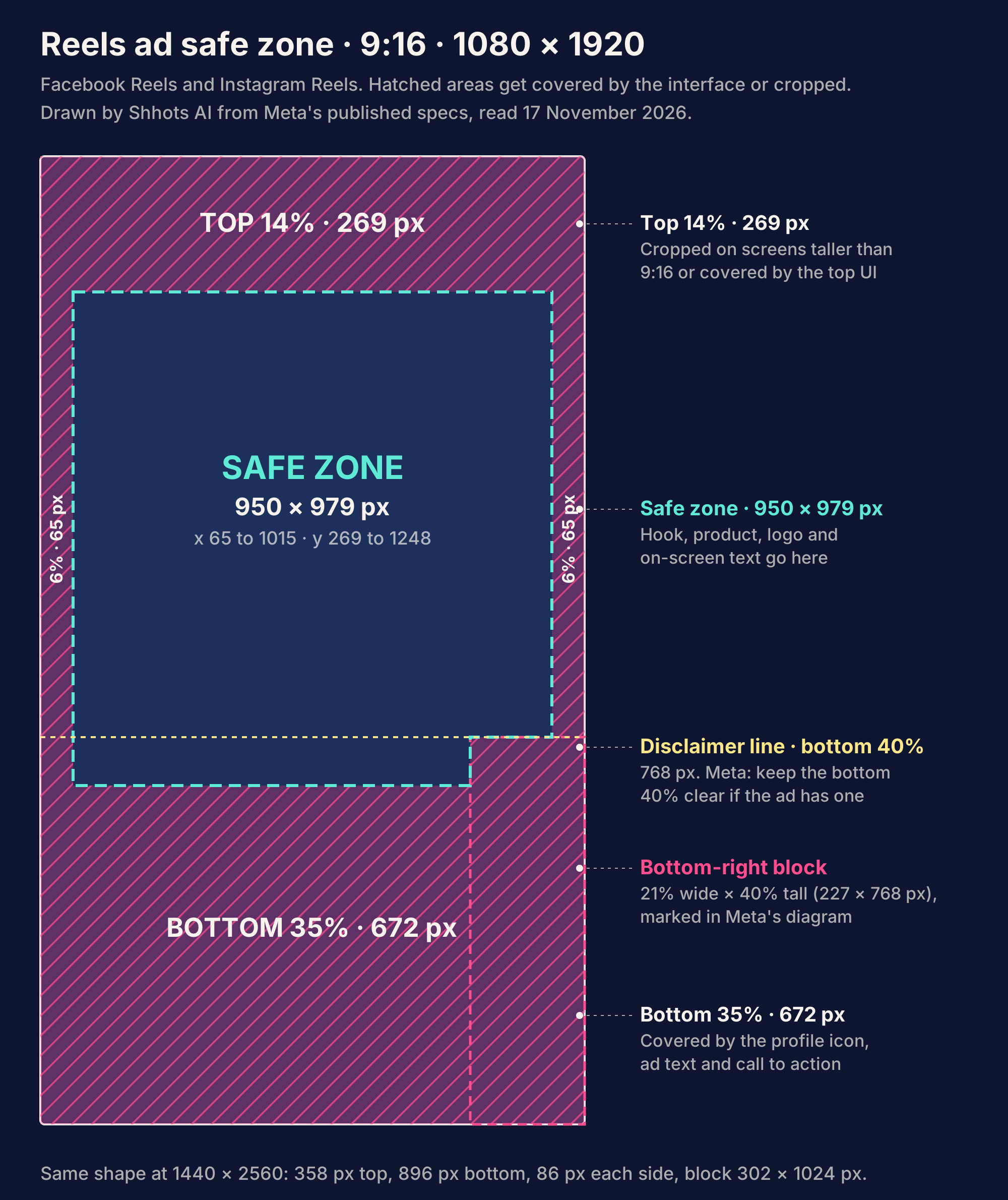
The overlay above is drawn by Shhots from Meta’s published numbers. It is pixel-accurate on a 1080 x 1920 frame. Two parts of it are easy to miss in Meta’s text:
- The bottom-right block. Meta’s own diagram on the help page marks a corner area 21% of the width and 40% of the height, without labelling it. On Reels, that is where the action buttons sit. Text in the lower right of the safe area, between y 1152 and 1248, can still be covered.
- The 40% disclaimer rule. Meta says that if a Reels ad includes a disclaimer, the bottom 40% should stay free of text, logos and key elements. On a 1080 x 1920 frame, everything below y 1152 is out.
Screens taller than 9:16 add one more risk. Meta says it may zoom the creative to fill the screen, which “can crop areas outside the safe zone”, or letterbox it on a black background. For both cases, Meta’s advice is to keep critical text and visuals comfortably inside the safe zone.
Are the Stories and Reels safe zones the same?
On Facebook and Instagram, yes. Both Stories pages and the Instagram Reels page carry the same 14%, 35% and 6% figures, and Meta’s help page covers Stories and Reels with a single diagram.
Messenger Stories is the exception. Its image spec asks for 14% (250 px) at the top and 20% (340 px) at the bottom, and its video spec asks for 14% (250 px) at the top and bottom, with no side margin. Those pixel figures are Meta’s; 250 px is closer to 13% of 1920 than 14%.
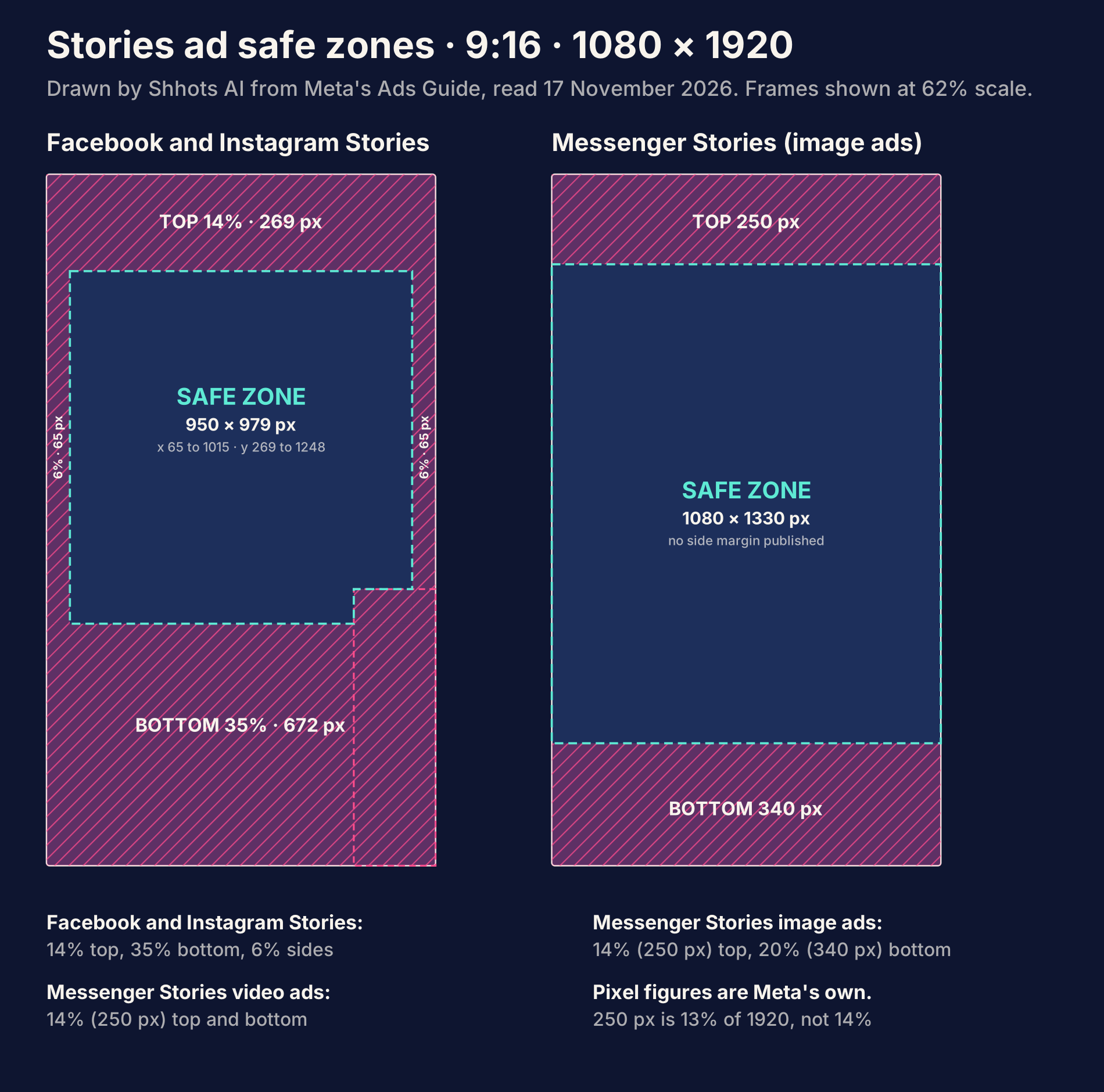
Several third-party guides say Meta “unified” the Stories and Reels safe zone in March 2026. Meta’s own pages, as read on 17 November 2026, give no date for any change. They just state one set of margins for both.
How do you check the safe zone in Ads Manager?
Turn on the Safe zone guardrail when you add media in Meta Ads Manager. Meta draws a yellow overlay on your creative; the safe zone is the area inside it. Meta also notes that ads previously labeled “Sponsored” now show an “Ad” label, so check the preview again rather than relying on an old template.
Is there a safe zone for 4:5 and 1:1 Feed ads?
Meta gives direction but no number. For Instagram Feed ads in 1:1 or 4:5, the help page says to “keep the bottom and side edges free of key creative elements, text and logos.” That is the whole spec. No pixel or percentage figure is published.
In the two overlays below, the purple bands are a Shhots working margin of 65 px, which reuses Meta’s 6% side margin from 9:16. Treat it as a sensible default, not a Meta requirement.
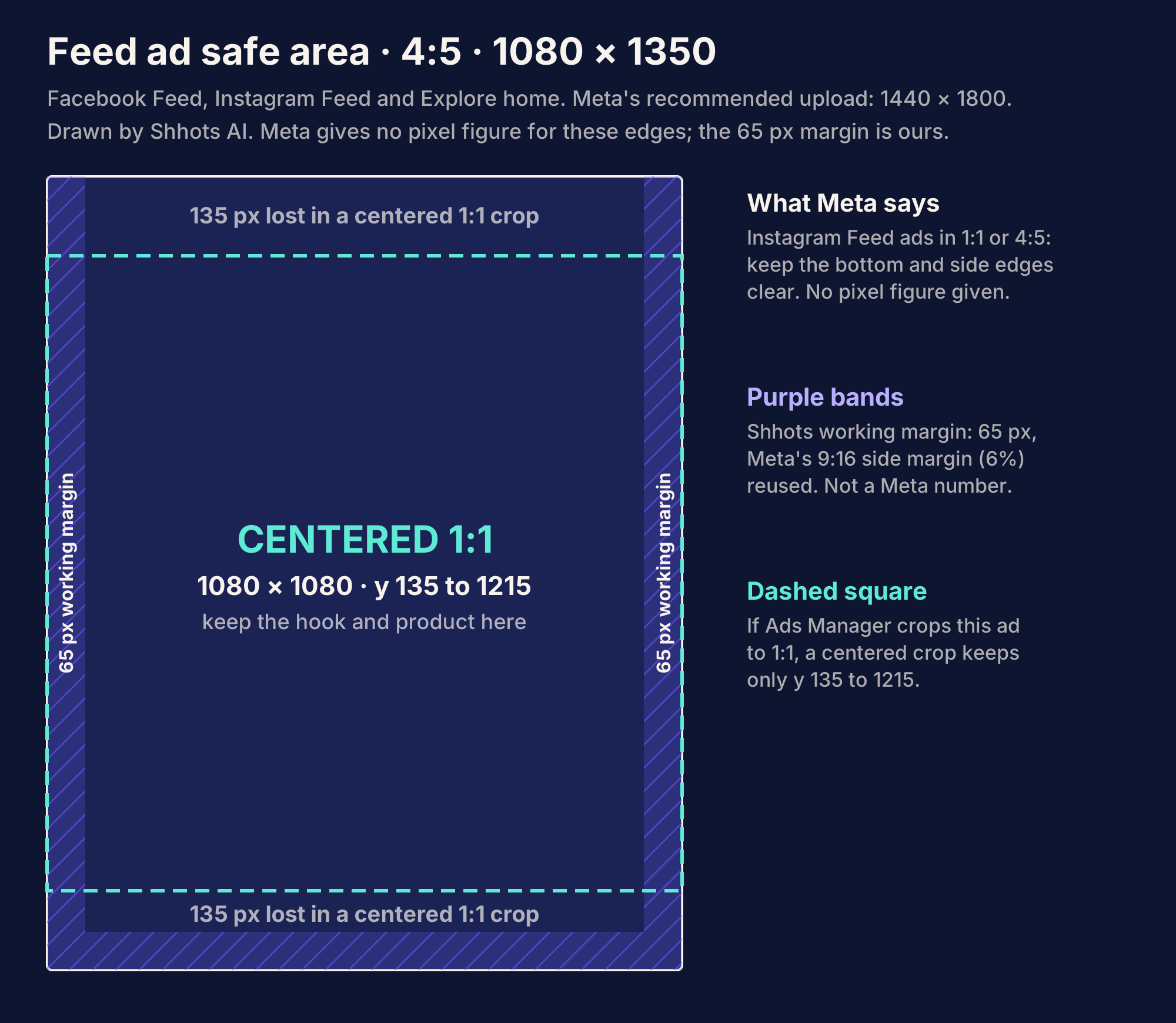
The dashed square matters more than the margin. Meta’s aspect ratio guidance says that if you don’t upload every ratio, Ads Manager fills the gaps with padding, media expansion, cropping or AI features. A 4:5 cropped to 1:1 loses 270 px of height. If the crop is centered, the top 135 px and bottom 135 px go.
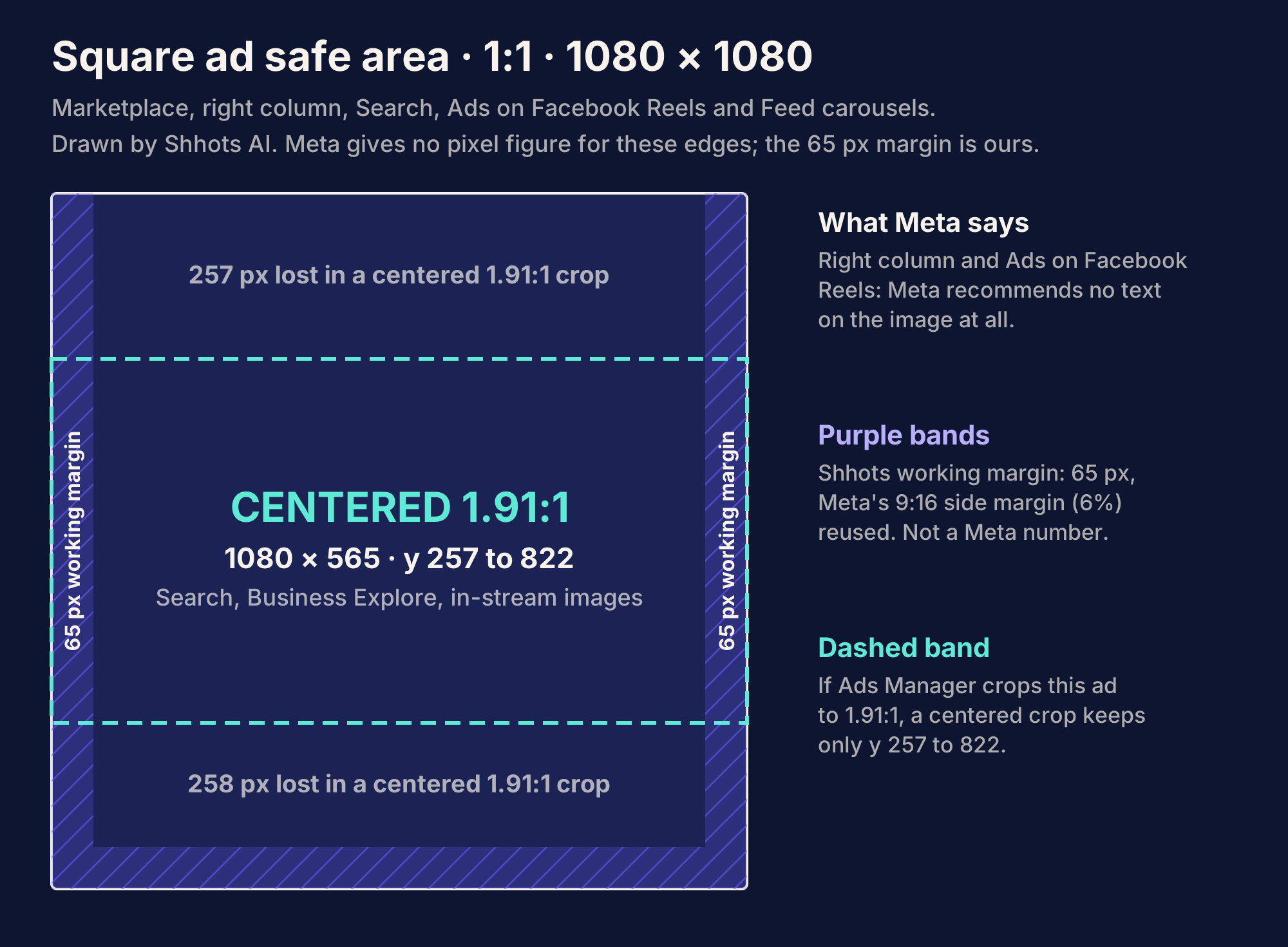
Square ads face the opposite crop. Search, Business Explore and in-stream image placements accept anything from 1.91:1 to 1:1, and a 1.91:1 crop of a 1080 x 1080 image keeps only a 1080 x 565 band. Meta does not say crops are always centered, so review the auto-generated crops before you publish, as its help page advises.
What are the safe zones for 16:9 video?
Meta publishes no safe zone for 16:9 in-stream video. The closest published standard is broadcast’s SMPTE ST 2046-1: a safe title area of 90% of width and height, and a safe action area of 93%. On a 1920 x 1080 frame:
| Area | Share | Size on 1920 x 1080 | Margin each side | Margin top and bottom |
|---|---|---|---|---|
| Safe title (text, logos) | 90% | 1728 x 972 | 96 px | 54 px |
| Safe action (important picture) | 93% | 1786 x 1004 | 67 px | 38 px |
One related note from Meta’s placement ratio page: on the desktop version of Facebook Feed, video shows at 1:1, which can add black bars on either side of a wider video.
Which aspect ratio should you make?
After 8 years of buying Meta ads, the rule I use is to make the fewest ratios that cover where the budget actually goes. Advantage+ placements will try to fill the rest, and Meta’s own advice is to upload a 9:16 asset if Stories matter to the campaign.
| If your campaign… | Make | Export at | It covers |
|---|---|---|---|
| Runs video on Advantage+ placements | 9:16 and 4:5 | 1440 x 2560 and 1440 x 1800 | Reels, Stories, Instagram Feed and Explore video (9:16); Facebook Feed and right column on mobile (4:5) |
| Runs static images mostly in Feed | 4:5 | 1440 x 1800 | Facebook Feed, Instagram Feed, Instagram Explore home, Audience Network rewarded |
| Adds Stories and Reels to a static campaign | 9:16 as a second asset | 1440 x 2560 | Facebook and Instagram Stories and Reels |
| Targets Marketplace, right column or Search | 1:1 | 1080 x 1080, or 1200 x 1200 for right column and Marketplace | Marketplace, right column, Facebook Search, Ads on Facebook Reels |
| Buys Facebook in-stream video | 16:9 or 1:1 | 1920 x 1080 or 1080 x 1080 | Facebook in-stream video |
| Runs a carousel | 1:1, or 4:5 for image-only Instagram carousels | 1080 x 1080 or larger | Facebook Feed carousel (1:1); video carousels on Instagram are 1:1 only, and Meta’s pages disagree on 4:5 |
| Can only make one asset | 9:16 with the message between y 420 and 1248 | 1440 x 2560 | All 9:16 placements, and a centered 4:5 or 1:1 crop keeps the message |
The last row needs one sum. On a 1080 x 1920 frame, a centered 1:1 crop keeps y 420 to 1500, and a centered 4:5 crop keeps y 285 to 1635. Meta’s safe zone runs from y 269 to 1248. The overlap, y 420 to 1248, is the band that survives the Reels interface and both crops. Put the hook and the product there.
What size are Meta carousel ads?
Carousels allow 2 to 10 cards, with images up to 30 MB and videos up to 4 GB per card.
| Placement | Ratio | Size | Video length per card | Text |
|---|---|---|---|---|
| Facebook Feed | 1:1 | 1080 x 1080 or larger | 1 second to 240 minutes | Primary 80, headline 20, description 18 |
| Instagram Feed | 4:5 for image-only carousels; 1:1 if any card is video | 1080 x 1080 or larger | 1 second to 2 minutes | Primary 125, up to 30 hashtags |
| Instagram Stories | 9:16, with the 14/35/6% safe zone | 1080 x 1920 or larger | 1 to 15 seconds | Primary 125, headline 40 |
| Instagram Reels | 9:16 | 1080 x 1080 or larger | Not listed | Not listed |
Meta’s aspect ratio help page is stricter than the Ads Guide here. It says 4:5 carousels are only available for Advantage+ catalog ads built from catalog product images, and recommends keeping every card at the same ratio to prevent automated adjustments. Outside catalog ads, 1:1 cards are the safe choice.
Where do Meta’s own pages disagree?
The Ads Guide and the Business Help Center don’t always match. When they conflict, build to the stricter number.
- Facebook Stories video length. The Ads Guide allows 1 second to 3 minutes. The Help Center’s video length page says 1 to 120 seconds. Keep Stories videos under 2 minutes.
- Facebook in-stream on desktop. The Ads Guide says 5 to 15 seconds on desktop. The Help Center says 5 seconds to 10 minutes. If desktop matters, stay at 15 seconds.
- Instagram Feed single images. The Ads Guide recommends 4:5 at 1440 x 1800. The aspect ratio help page says 1:1 is recommended for single-image ads in Instagram Feed. Both are accepted; 4:5 takes more of the screen.
- Minimum image size. The Ads Guide accepts 500 or 600 px widths. The Help Center recommends at least 1080 x 1080 for most placements.
- 4:5 carousels. The Ads Guide lists 4:5 for image-only Instagram Feed carousels. The aspect ratio help page says 4:5 carousels are limited to Advantage+ catalog ads.
- 9:16 ratio, non-9:16 pixels. Messenger Stories (image) and Audience Network native list a 9:16 ratio next to “at least 1080 x 1080” and “at least 398 x 208”. Upload a true 9:16 at 1080 x 1920.
Pre-upload checklist for Meta ads
Run this before every upload. Each line maps to a spec above.
- The ratio matches the placement within tolerance: 1% on Instagram and Stories, 3% on Facebook Feed, 0% on Ads on Facebook Reels.
- Images are JPG or PNG under 30 MB. Videos are MP4 or MOV under 4 GB.
- Exports are at the recommended size: 1440 x 1800 for 4:5, 1440 x 2560 for 9:16, 1080 x 1080 or larger for 1:1.
- Video is H.264 with a fixed frame rate, progressive scan and stereo AAC audio at 128 kbps or more, with no edit lists.
- On 9:16, every word and logo sits inside x 65 to 1015 and y 269 to 1248 (on 1080 x 1920), and clear of the bottom-right 227 x 768 px block.
- If the ad has a disclaimer, nothing sits below y 1152.
- If you upload only 9:16, the hook and product sit between y 420 and 1248.
- Captions are burned in for Facebook Reels, which has no auto captioning. A video caption generator burns them in.
- Reels ads use no licensed music, product tags, face effects or GIFs.
- The message lands in the first 40 characters of primary text, and the headline is 27 characters or fewer for Facebook Feed.
- The Safe zone guardrail is on, and every auto-generated crop has been reviewed in the preview.
FAQ
What size should a Meta ad be in 2026?
A Meta ad should be 4:5 at 1440 x 1800 pixels for Facebook and Instagram Feed, and 9:16 at 1440 x 2560 pixels for Stories and Reels, according to Meta’s Ads Guide as read on 17 November 2026. Marketplace, right column and Search use 1:1 at 1080 x 1080 or larger.
What are the safe zones for Meta Reels ads?
Meta’s Reels safe zone leaves 14% of the top, 35% of the bottom and 6% of each side free of text and logos. On a 1080 x 1920 frame that is 269 px, 672 px and 65 px, leaving a 950 x 979 px safe area. Reels ads with a disclaimer should keep the bottom 40% clear.
Are Instagram Stories and Reels safe zones the same?
Yes. Meta’s Ads Guide lists the same 14% top, 35% bottom and 6% side margins for Instagram Stories, Instagram Reels and Facebook Stories. Messenger Stories differs: 250 px at the top and 340 px at the bottom for image ads.
What is the maximum file size for Meta video ads?
The maximum file size for Meta video ads is 4 GB on every placement. Image ads are limited to 30 MB. Video length limits vary, from 4 to 15 seconds for Ads on Facebook Reels up to 241 minutes for Facebook Feed.
What is the headline character limit for Facebook ads?
Facebook Feed ads have a recommended headline length of 27 characters, and most other placements recommend 40. Meta’s general guidance is 125 characters for primary text, 40 for the headline and 25 for the description. These are recommendations, and Meta says longer text may be truncated.
Should I export 9:16 ads at 1080 x 1920 or 1440 x 2560?
Export Stories and Reels ads at 1440 x 2560, which is what Meta’s Ads Guide recommends for those placements. Instagram Feed video, Instagram Explore and Messenger Stories list 1080 x 1920. Both are 9:16, so the safe-zone percentages apply to either.
Does Meta have a safe zone template?
Meta’s template is the Safe zone guardrail in Ads Manager, which draws a yellow overlay on your creative when you add media. Meta’s aspect ratio help page also links PDF design templates. The four overlays on this page are drawn by Shhots AI from Meta’s published margins.
How long can a Meta video ad be?
It depends on the placement. Facebook Feed allows up to 241 minutes, Instagram Feed and Stories up to 60 minutes, Instagram Reels up to 15 minutes, and Facebook Reels lists no maximum. Ads on Facebook Reels must run 4 to 15 seconds, and Audience Network rewarded video 3 to 61 seconds.
Build the ratios before you need them
Take your next ad and export it twice: 1440 x 2560 with the message between y 420 and 1248, and 1440 x 1800 for Feed. Then upload both and check the Safe zone guardrail. If you would rather start from a product photo, the AI Facebook ad generator renders 9:16, 4:5 and 1:1 versions of the same ad, from $19 a month on the Starter plan. Related reading: Amazon product image requirements, the same kind of spec sheet for Amazon listings, and Meta ad creative fatigue for when those ads stop working.
More on AI Ads
All AI Ads posts- How to Use the Meta Ad Library to Research Competitor Ads The Meta Ad Library shows every active Facebook and Instagram ad, free. How to search it, read run dates and variants, use the API, and what 6 spy tools cost.
- ChatGPT Ads: How They Work, What They Cost and How to Run Them ChatGPT ads show below answers for Free and Go users in 89 countries. Self-serve from $25 a day with CPM, CPC or conversion bidding. Specs, costs and setup.
- Canva Alternatives for Ads 2026: 7 Tools, Verified Prices Canva alternatives for making ads in 2026: what Canva does for ads, where it stops, and 7 tools with prices read from each vendor page in October 2026, including free options.