
Disclosure: Shhots AI is our product. Ad Library fields, filters and sort options were checked in the live library and on Meta help pages on 17 November 2026. Tool prices were read on each vendor's own pricing page the same day.
The Meta Ad Library is Meta’s free, public database of every ad currently running on Facebook, Instagram, Messenger, Threads, WhatsApp and the Audience Network. You can search it at facebook.com/ads/library without logging in. For an ordinary commercial ad it shows the creative, the copy, the start date, the platforms and how many ads share that creative. It does not show spend, impressions or results, except for political and issue ads anywhere, and for ads delivered in the EU or UK, which also show targeting and estimated reach.
This guide covers what the library shows and hides, how to search and filter it, how to read the signals in a competitor’s ads, how to turn what you find into a brief for your own original ads, the Ad Library API, and six paid ad spy tools with prices read on 17 November 2026. Every field and filter below was checked in the live library and on Meta’s help page that day.
What is the Meta Ad Library?
It is Meta’s ad transparency tool, still widely called the Facebook Ad Library. Meta’s help page says it contains all active ads shown across Meta technologies, plus active branded content with a paid partnership label on Facebook and Instagram.
Three facts from Meta matter most for research:
- Anyone can use it. Meta’s library FAQ says you can explore it with or without a Facebook account. Reporting ads and viewing adult content, such as alcohol or gambling ads, need a logged-in account.
- New ads show up fast. The library page says an ad appears within 24 hours of its first impression, and edits show within 24 hours too.
- It covers six platforms. The Platform filter lists Facebook, Instagram, Audience Network, Messenger, WhatsApp and Threads.
Marketers use it for one job: seeing what competitors run right now. In 8 years of running Meta ads across 70+ brands, I have found it the best free source for what competitors run and a weak one for judging what works. The rest of this guide is about the gap between those two.
What does the Meta Ad Library show, and what does it hide?
What you see depends on two things: the ad type and the country you search from. A US search shows far less about the same brand than a French one, because Meta archives ads delivered in the EU, with targeting and reach data, to meet the EU’s Digital Services Act. Meta has extended the same archive to the UK.
| Ad type | What you see | How long it stays | Spend shown? |
|---|---|---|---|
| Commercial ad, outside the EU and UK | Creative, copy, CTA, start date, platforms, version count, advertiser | Only while active | No |
| Commercial ad delivered in the EU | All of the above plus run dates, targeting (location, age, gender), estimated reach by location, age and gender, advertiser and payer | 1 year after the last impression | No |
| Commercial ad delivered in the UK | Same as the EU, without advertiser and payer | 1 year after the last impression, for ads that ran after 1 July 2025 | No |
| Ad about social issues, elections or politics | Creative plus spend range, impression range, reach by age, gender and location, who paid | 7 years, active or inactive | Yes, as a range (e.g. $1,000 to $5,000) |
| Branded content (paid partnership label) | Creation date, creator, brand partner, post type, link | Content created on or after 17 August 2023 | No |
Sources: About the Meta Ad Library and the Ad Library landing page, read 17 November 2026.
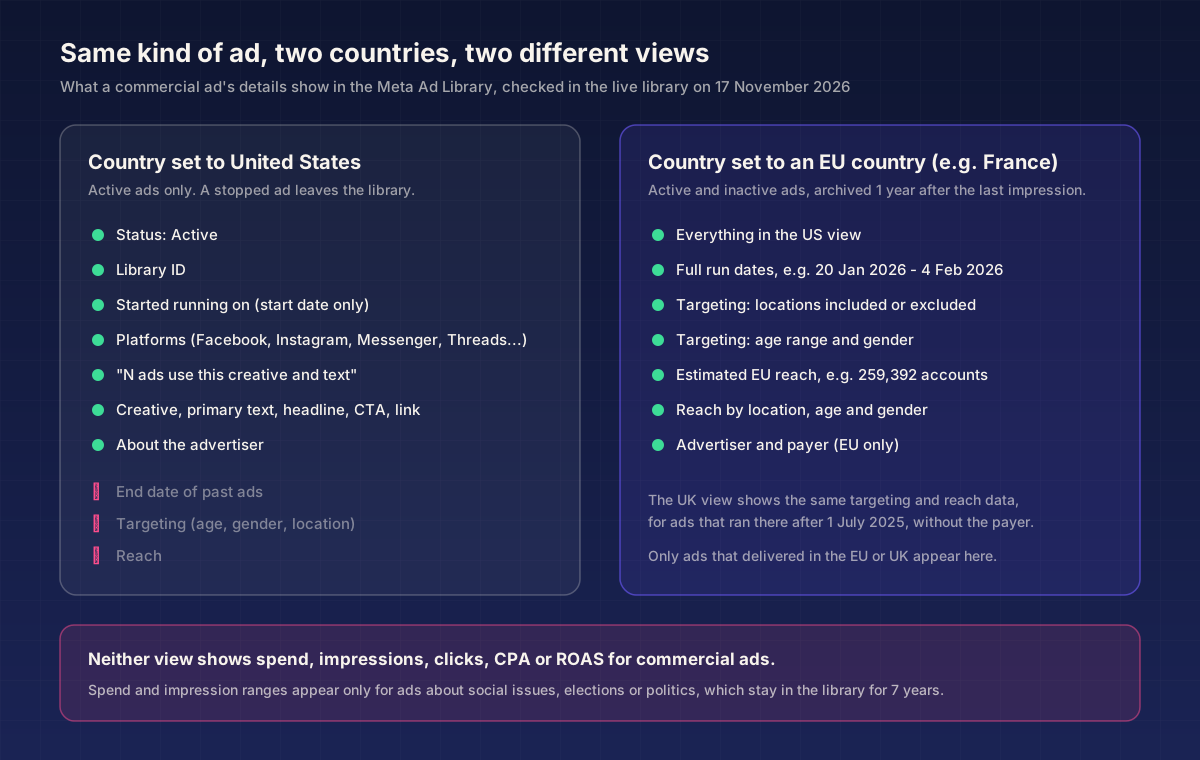
The practical upshot: if a competitor also sells in Europe, search them from an EU country. You get their stopped ads, exact run windows and reach numbers, none of which the US view shows.
What no view shows for commercial ads: spend, impressions, CTR, CPA, ROAS or conversions. Any article that claims the library tells you which ads are “profitable” is guessing from proxies. The proxies are useful. They are still proxies.
How do you search the Meta Ad Library step by step?
Six steps, all checked in the live library on 17 November 2026.
1. Open the library and set the country
Go to facebook.com/ads/library. The search bar starts with a country selector, which defaults to where you are. Set it to the market your competitor sells in. For brands that also run in Europe, run a second search from France, Germany or another EU market to get the archive.
2. Choose the ad category
Pick All ads for commercial research. The other options are Issues, elections or politics, and, in the US, Properties, Employment, and Financial products and services.
3. Search for the advertiser, not just a keyword
Type the brand name and wait for the dropdown. It shows two kinds of results:
- A quoted phrase, such as “Gymshark”, labelled “Search this exact phrase”.
- Advertisers, the brand’s Pages with follower counts and their linked Instagram accounts.
Pick the Page. A plain keyword search returns any ad that includes the word, or any ad from a Page whose name includes it, so a search for a brand name also pulls in resellers, gyms and other shops that mention it. On the advertiser view you get a result count, a keyword box to search within that brand’s ads, and a Similar regional ads row that links the brand’s other country Pages. Big brands split ads across regional Pages, so check that row before you conclude a brand runs few ads.
4. Apply filters
The Filters panel has six controls:
| Filter | Options | Use it to |
|---|---|---|
| Language | Any language the ads run in | Isolate one market’s copy |
| Advertiser | Pages matching your search | Remove other brands from a keyword search |
| Platform | Facebook, Instagram, Audience Network, Messenger, WhatsApp, Threads | See if a brand writes different ads for Instagram |
| Media type | Images, Memes (images with text), Images and memes, Videos, No image or video | See how much of a brand’s ad mix is video |
| Active status | Active and inactive, Active ads, Inactive ads | See stopped ads (only those archived for EU, UK or political reasons) |
| Impressions by date | A from and to date | Find ads that were serving during a sale or launch window |
5. Sort the results
Sort by has two options: Impressions: high to low, which is the default, and Most recent. The library never shows the impression number for a commercial ad, but the default order means the first rows are the ads Meta delivered most. Switch to Most recent to see what a brand launched this week.
6. Open the ad details
Each card shows the status, Library ID, start date, platform icons and, when it applies, “This ad has multiple versions” and a line such as “5 ads use this creative and text”. Two buttons open more:
- See summary details opens every ad that shares one creative and text. The panel explains that advertisers reuse one image or video and text across campaigns with different start dates, locations or budgets.
- See ad details opens one ad: its versions (a carousel, for example, pages “1 of 2”), About the advertiser and, for EU or UK ads, Transparency by location and Advertiser and payer.
Meta’s help page says you can also download Ad Library searches, but only while logged in and after agreeing to the Terms of Service.
How do you read the signals in a competitor’s ads?
Every signal in the library is indirect. Read them together and none of them alone.
| Signal | Where you see it | What it suggests | What it cannot tell you |
|---|---|---|---|
| Days running | ”Started running on” date, or the date range on EU ads | An ad live for 60+ days is probably not losing money, or someone would have paused it | Brand ads, retargeting and evergreen ads can run long at low spend |
| Variant count | ”N ads use this creative and text” | The advertiser put that creative into several ad sets, often a sign they are scaling it | Whether those ad sets are spending |
| Impression order | Default sort, Impressions: high to low | Rows near the top got the most delivery | Whether delivery turned into sales |
| Launch clusters | Many ads with the same start date | A sale, a launch or a structured creative test | Which of the batch survives; check back in two weeks |
| Platforms | Icons on each card | Whether the brand builds for Reels and Stories or runs one asset everywhere | Spend split by placement |
| Format mix | Media type filter | How much the brand leans on video versus static | Which format converts better for them |
| Creator partnerships | Advertiser shown as “Brand with Creator” | The brand runs partnership ads through creators’ handles | The creator’s fee or usage terms |
| Landing page | Link domain under the creative | Which offer or collection the ad sells | Conversion rate of the page |
| EU reach and targeting | Transparency by location (EU and UK only) | Who Meta actually delivered the ad to | Spend or cost per result |
Two rules I use. First, never judge a brand from one ad. Pull 20 to 30 of its ads and look for what repeats. Second, re-check after 14 days. An ad still live two weeks after a launch cluster is the one the brand kept; the rest of the batch is what it learned from.
The Jev and Meta Ads MCP post goes further into why copying a competitor’s pattern without its numbers often means paying to run its test, not its winner.
What does a real Ad Library search look like?
Here is one brand, searched on 17 November 2026. Gymshark is used as an example of public library data only; it has no connection to this post.
From the United States. Gymshark’s main Page showed about 640 active ads. Sorted by impressions, most of the top rows had started on 15 November 2026 and carried a Black Friday “up to 50% off” offer. The ads split the sale by product, one category per ad (pants, shorts, leggings, hoodies, tops), each with its own “from” price in the headline. One creative carried “5 ads use this creative and text”, and its summary panel listed 13 ad versions. The US view gave no end dates and no reach.
From France. The same Page showed about 15,000 results with inactive ads included. The highest-impression rows were short videos, several run as creator partnership ads shown as “Gymshark with” a fitness creator, that ran from 2 or 3 July 2026 to 8 or 9 November 2026, roughly four months, with a 10% welcome code. One January carousel ran from 20 January to 4 February 2026, targeted France, ages 18 to 65+ and all genders, and reached an estimated 259,392 accounts. The largest single reach bucket was women aged 45 to 54, at 37,000 accounts. All 18 to 24 year olds combined came to 5,663.
What that tells a researcher: the brand’s long-running ads in Europe were videos, many run through creators, with a small code, while its US activity that week was a short, price-led sale. And broad 18 to 65+ targeting delivered mostly to people over 35, which you would never learn from the US view.
How do you turn Ad Library research into a creative brief?
A swipe file is a list of other people’s ads. A brief is a decision about yours. The step between them is tagging.
Log every ad the same way
For each competitor, log 20 to 30 ads in a sheet with these columns:
| Column | What to write |
|---|---|
| Advertiser and Library ID | So you can find the ad again |
| Start date and days running | From the card; for EU ads, the full range |
| Variant count | The “N ads use this creative” number |
| Format | Static, carousel, video, UGC-style video, creator partnership |
| Hook | What happens in the first line or the first 3 seconds, described in your own words |
| Angle | The reason to buy it argues: price, problem and fix, social proof, comparison, founder story, routine |
| Offer | Discount, bundle, free shipping threshold, trial, none |
| CTA and landing page | Button text and the page it sends to |
Describe hooks in your own words (“customer shows the before photo, then the jar”) rather than pasting the script. That keeps the file about patterns, and it stops copied lines creeping into your ads later.
Count the patterns
Sort the sheet by days running and look at the top third. Count angles, formats and offers. You are looking for three things:
- The table stakes. If every long-running ad in the category is a vertical video with captions, you need one too. That is format, not creative.
- The crowded angle. If eight of ten competitors lead with a discount, a discount ad from you will look like theirs.
- The gap. An angle your customers mention in reviews that no competitor runs.
Write the brief
A one-page brief has five parts: the audience, the one angle you will test, three to five hooks written from your own customer reviews and support tickets, the formats to make (taken from the table stakes), and the offer. Our guide to AI ad copy generators covers tools that help draft hook variants once the angle is fixed.
How do you make original ads from a competitor brief?
Use competitor research to choose what to test. Build every asset from your own product, your own claims and your own footage or generated scenes.
- Make the formats the market rewards. If long-running competitor ads are UGC-style videos, an AI UGC ad generator lets you test your own angle in that format before you pay a creator. On Shhots AI’s $19/month Starter plan, the 2,000 monthly credits cover up to 3 AI UGC ads; the $49 Pro plan covers up to 10.
- Start from your product page. The URL to ad generator reads your own product URL and builds a video ad from your images, title and description, which keeps the claims tied to what you actually sell.
- Make more versions than one. The variant counts in the library are a reminder that serious advertisers run several cuts of each concept. Plan 3 to 5 hooks per angle.
- Size for every placement. If competitors run on Reels and Stories, build 9:16 and 4:5 versions. See Meta ad sizes and safe zones.
- Plan the refresh. A competitor’s four-month ad is the exception. Most creative wears out sooner; Meta ad creative fatigue covers the signs and the refresh cadence.
Is it legal to copy ads from the Meta Ad Library?
Looking is fine. Copying is not. The library makes ads public for transparency; it does not license them. The images, video, music, scripts and any creator’s likeness in a competitor’s ad belong to that brand or its licensors, and Meta’s API page says the ad creative it returns is subject to Meta’s Terms of Service.
Meta’s own Advertising Standards on copyright and trademarks bar ads that infringe a third party’s copyright or trademark, and say ads can be rejected after a rights holder reports them. So a copied ad can be pulled by Meta on top of any legal claim from the brand.
Safe practice: take patterns (format, length, angle, offer type), never assets or lines. Do not reuse a competitor’s footage, photos, music, voiceover, script or a creator’s face. Do not use another brand’s name in your ad in a way that implies a connection. This is general information, not legal advice; ask a lawyer about a specific ad.
How does the Meta Ad Library API work?
The Ad Library API lets developers query the library in code. Its scope is narrower than the website, and that catches most people out.
What it covers. Meta’s API page lists two sets of ads: ads about social issues, elections or politics delivered anywhere in the past 7 years, and ads of any type delivered to the UK or EU in the past year. For all ads currently running elsewhere, the same page sends you back to the Ad Library website. So a US-only brand’s commercial ads do not come back from the API.
Who can get access. Anyone with a Facebook account who completes three steps on Meta’s API page:
- Confirm your identity and location at Facebook.com/ID, the same check required to run political ads. Meta says it can take a few days.
- Create a Meta for Developers account and agree to the Platform Policy.
- Create an app from the API page (My apps, then Create app), then generate an access token.
Meta’s Radlibrary guide on GitHub notes that tokens from the Graph API Explorer work only for a limited time, and that an App ID and secret can produce a token that lasts 60 days. It also notes that queries fail for country codes you are not verified for.
What each ad returns:
| Ad set | Fields |
|---|---|
| All ads in the API | Library ID, creative content, Page name and ID, delivery dates, platforms |
| Social issue, election or political ads | Plus spend range, impression range, reach by age, gender and location (%) |
| Ads delivered to the UK and EU | Plus estimated UK and EU impressions, targeting and reach demographics, advertiser and payer (EU only) |
How a call looks. Requests go to the Graph API ads_archive endpoint with ad_reached_countries, ad_type and either search_terms (100 characters at most) or search_page_ids (up to 10 Pages), per the ads_archive reference. The reference lists error 613 for exceeding the rate limit without publishing the limit itself. Meta also keeps an Ad Library API script repository on GitHub with example code.
If your competitors only advertise in the US, the API will not help you. That gap is the reason third-party tools exist.
Which third-party ad spy tools work with the Meta Ad Library?
Paid tools add what the library lacks: saved copies of ads after they stop running, automatic competitor tracking and search across brands by format or hook. Meta does not publish spend for commercial ads, so treat any “estimated budget” in these tools as a model, not a figure.
Prices below were read on each vendor’s pricing page on 17 November 2026.
| Tool | Entry price (monthly billing) | Longer billing | Competitor tracking | Trial or free option | Built for |
|---|---|---|---|---|---|
| Foreplay | $59/mo Basic | $49/mo | From Workflow ($175/mo, $149/mo annual): 15 brands, unlimited on annual | 7-day free trial | Swipe files, briefs and competitor tracking for creative teams |
| Atria | $19/mo Maker Starter | $19/mo | Maker plans follow 3 brands; team plans from $129/mo (annual) follow 50 to 200 | Not stated | Ad inspiration library plus AI ad making |
| Swipekit | $26/mo Basic | Saves $156 a year | Brand Tracker: 5 brands (Basic), 10 (Plus, $46), 15 (Agency, $66) | 14-day free trial, no card | Saving ads from Meta, TikTok and LinkedIn libraries |
| Minea | $49/mo Starter | $39/mo paid quarterly | Brand tracker on every plan | Not stated | Dropshipping product and ad research |
| BigSpy | $69/mo Starter | Yearly toggle on page, not checked | Followed pages from Growth ($159/mo) | Free plan: Facebook only, 10 searches a day | Multi-network ad search, 11 networks on Ultimate ($499/mo) |
| PowerAdSpy | $69/mo Basic (Facebook and Instagram) | $27/mo billed yearly ($331) | Ad Tracker from Standard ($99/mo) | $1 for 3 days on Basic | Multi-network search with an “estimated ad budget” on Platinum ($279/mo) |
Notes on the table:
- Atria showed a Black Friday offer of up to 41% off on 17 November 2026, so its team-plan price may change after the sale.
- BigSpy advertised 20% off monthly and 10% off yearly plans for new subscribers until 29 November 2026; the page did not say whether listed prices included it.
- MagicBrief is left out: its pricing page returned a 404 error on 17 November 2026.
How to choose: if you want a free start, use the library itself plus BigSpy’s free plan. If your work is building briefs for a creative team, Foreplay and Swipekit are built around saved boards. If you sell via dropshipping, Minea is built for product research. If you need Google, TikTok and Pinterest ads in the same search, BigSpy’s Growth plan and PowerAdSpy’s upper tiers cover them.
FAQ
Is the Meta Ad Library free?
Yes. The Meta Ad Library is free and you can search it without a Facebook account. Logging in is needed only to report ads, view age-restricted ads such as alcohol or gambling, and download searches.
Can you see how much competitors spend in the Meta Ad Library?
No, not for commercial ads. The Meta Ad Library shows spend only for ads about social issues, elections or politics, and then only as a range such as $1,000 to $5,000. Ads delivered in the EU or UK show estimated reach and targeting, but still no spend.
Does the Meta Ad Library show inactive ads?
Only some. Commercial ads disappear when they stop running, unless they were delivered in the EU or UK, where they stay for one year after their last impression. Political and issue ads stay for seven years whether active or not.
How long has an ad been running in the Meta Ad Library?
Each card shows a “Started running on” date, so subtract it from today’s date. Ads delivered in the EU or UK show the full date range, including the end date for stopped ads. Meta says new ads appear within 24 hours of their first impression.
What does “multiple versions” mean in the Meta Ad Library?
It means the ad rotates more than one version of its creative or text. Open See ad details to page through the versions. A separate line, “N ads use this creative and text”, counts how many ads share one creative, which you can open with See summary details.
Who can use the Meta Ad Library API?
Anyone with a Facebook account who confirms their identity and location at Facebook.com/ID, creates a Meta for Developers account and creates an app. The API returns political and issue ads from the past 7 years and ads of any type delivered to the UK or EU in the past year. It does not return currently running commercial ads outside those regions.
Can I download ads from the Meta Ad Library?
Meta lets logged-in users download Ad Library searches after agreeing to its Terms of Service. Saving an ad for research is different from reusing it. The creative belongs to the advertiser, and Meta’s ad policies bar ads that infringe copyright or trademarks.
What is the best Meta Ad Library alternative?
It depends on the job. Foreplay ($59/mo, or $49/mo annual) and Swipekit ($26/mo) suit creative teams saving ads and tracking competitors. BigSpy ($69/mo, with a Facebook-only free plan) and PowerAdSpy ($69/mo) cover more ad networks. Prices verified 17 November 2026.
Run your first competitor scan this week
Pick three competitors. Log 20 of each brand’s ads in the sheet above, sorted by days running, and check the EU view for any brand that sells in Europe. Write one brief around the gap you find, then make five hooks for it as short videos with the AI UGC ad generator and test them against your current best ad.
More on AI Ads
All AI Ads posts- ChatGPT Ads: How They Work, What They Cost and How to Run Them ChatGPT ads show below answers for Free and Go users in 89 countries. Self-serve from $25 a day with CPM, CPC or conversion bidding. Specs, costs and setup.
- Canva Alternatives for Ads 2026: 7 Tools, Verified Prices Canva alternatives for making ads in 2026: what Canva does for ads, where it stops, and 7 tools with prices read from each vendor page in October 2026, including free options.
- Topview AI Alternatives 2026: 8 Tools, Verified Prices Topview AI alternatives compared for 2026 with prices read from each vendor page in October 2026, plus what Topview itself costs and what reviewers say.